
Solution-IV Fixed Assets is designed to help you manage your assets and calculate depreciation. You may have as many depreciation calculations on an asset as required for your business. Different calculations might be used for book, federal tax, and state tax purposes.A variety of reports are available showing you the value of each asset for book, tax, and insurance purposes. Acquisitions and retirements are handled with appropriate postings to General Ledger, if desired. Other reports compare depreciation methods, project depreciation over the life of the asset, and show depreciation taken in prior years.
Features
Parameterized
The parameters give you the ability to customize the system to fit your needs without making costly program changes. These parameters include whether or not to post to General Ledger, the maximum tax credit per year, how to handle comments in inquiry and how to handle declining balance depreciation when the amount drops below the straight line calculation.
Standard Methods
The standard depreciation methods included with Solution-IV Fixed Assets are straight line, double declining balance, 150% declining balance, sum of the years digits, ACRS, MACRS, MACRS with part year conventions, all at purchase, and all at sale. The tables for the standard methods may be modified if necessary to comply with new government regulations.
Custom Methods
Depreciation tables may be created for methods not already included with the package.
Multiple Methods
An unlimited number of depreciation methods may be maintained and calculated for each asset. These may be used for federal tax, state tax, book, or any other requirement.
Asset Information
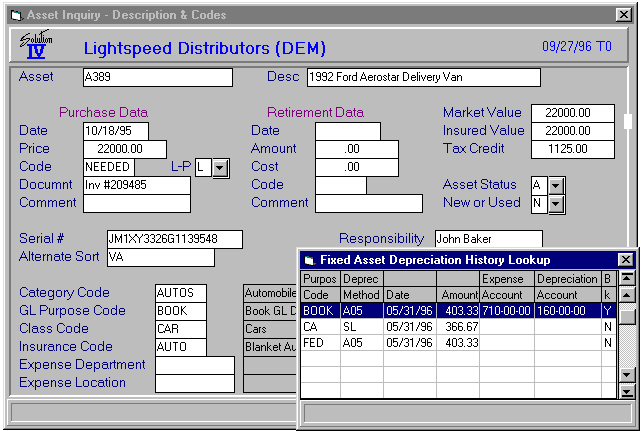
Standard information about each asset is maintained in the asset masterfile such as description, acquisition and retirement information, serial number, location, responsible party, depreciation methods, depreciated value, insured value, warranties and service contracts, capital lease information, comments and depreciation history.
Asset Inquiry
The asset inquiry function allows quick access to information about an asset. All of the information regarding the asset may be viewed but not modified, with the exception of the comments where access is controlled by the parameters.
Depreciation Inquiry
This inquiry function allows you to enter an asset and depreciation method. It then computes a deprecation schedule for the asset. This may be useful for determining the desired method of depreciation to assign to an asset.
Depreciation Calculation
Depreciation can be calculated for any or all of the depreciation methods you have assigned to an asset. You have the option of selecting ranges of categories, assets and purpose codes for which to calculate depreciation. The calculated depreciation may be overridden if desired.
Acquisitions
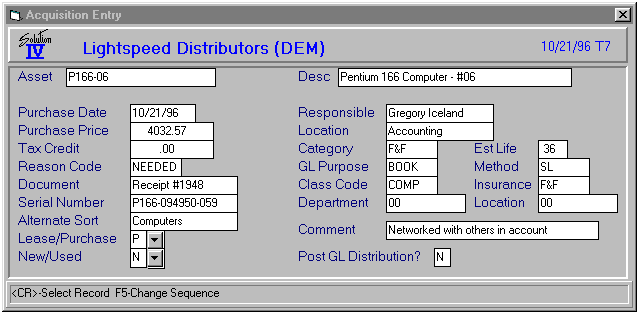
By entering assets into the system through Acquisition Entry, you have the option of having the acquisition post to General Ledger, as well as print history reports showing the detail of assets purchased between a range of dates.
Retirements
Similar to acquisitions, retirements may be entered and then shown on a history report at a later date.
Amortization Sub-system
The amortization sub-system allows you to enter a loan amount, interest rate, and number of payments. It then calculates the payment amount, total of all payments and amortization schedule.
Budgeting Sub-system
The budgeting sub-system allows you to calculate annual depreciation for a range of assets and post it to the budget fields in General Ledger Account Maintenance.
Reports
Audit Journals
Journals for asset depreciation, acquisitions and retirements provide required audit trails for data entry. The information may be verified before being updated to the permanent files.
Retirement Audit Journal
This report shows all of the assets that are fully depreciated, but not yet retired. You may use this option to see which assets need to be retired using Retirement Entry.
Asset Masterfile Listing
The Asset Masterfile Listing details the information on each asset. A variety of sort and detail options are available.
Asset Labels
Labels may be printed as needed for labeling assets or for recordkeeping purposes.
Asset Valuation Report
The Asset Valuation Report shows the value of your assets based on the depreciation method used for posting to General Ledger.
Insurance Value Report
The Insurance Value Report shows the insurance value of your assets along with the location and responsible party.
<
Historical Acquisition Report
The Historical Acquisition Report shows all asset purchases for a given range of dates.
Historical Retirement Report
The Historical Retirement Report shows all assets retired for a given range of dates.
Tax Credit Report
The Tax Credit Report shows the tax credits taken for each asset by year. The maximum tax credit amount is maintained in the parameters.
Depreciation Comparison Report
The Depreciation Comparison Report shows the difference between two different depreciation purposes for a given range of assets.
Depreciation Projection Report
The Depreciation Projection Report gives a schedule of what the depreciation will be for a given range of assets and depreciation purposes.
Depreciation History Report
The Depreciation History Report gives the detail on deprecation taken for a given range of assets and purposes.
Amortization Schedule
This is the actual schedule of payments and loan balances for a range of loans entered into the amortization sub-system.