
Solution-IV Purchase Order is the key to integrating your purchasing and inventory control functions, giving you control over inventory costs and outgoing cash flow. Purchase orders are automatically created based on order parameters defined on the inventory item. Orders may be tracked from the creation of the order, to order receipt, to invoice receipt, with unit and price discrepancies reported and corrected. If you are using Solution-IV Order Processing, a report may be printed showing sales orders that may be filled as a result of recent receipts. A wide variety of other reports including open purchase orders, expected deliveries, items received but not yet invoiced, and vendor price and delivery performance reports are available, as well as purchase analysis reports.
Features
Parameterized
The Purchase Order system parameters allow you to customize the Purchase Order package to your particular needs without having to make program changes. The parameters include such things as the format of your purchase order number and control such functions as posting to General Ledger, assigning receipt and return numbers, and whether or not to use pre-printed purchase order forms.
Purchase Order Numbers
The purchase order number may be up to 15 characters in length divided into up to 4 segments. Each segment may have a predefined value (ie: 96) or may contain the date.
Automatic Purchase Order Creation
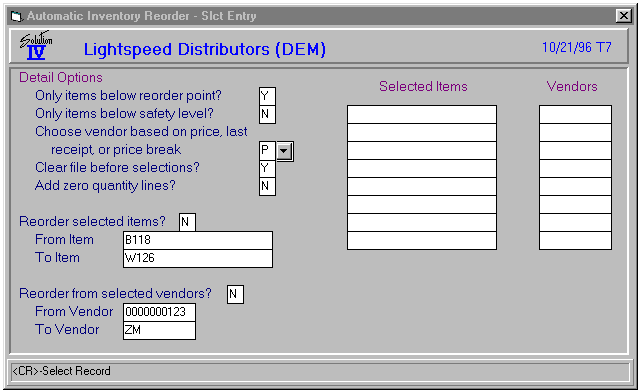
The system allows you to automatically create purchase orders based on the reorder parameters defined for each inventory item. Selection options allow you to control which items will be ordered and from which vendor. Once purchase orders have been created, you may edit them like any other purchase order.
Drop Shipments
You may “drop ship” an order direct to a customer site by overriding the ship to address on the purchase order. When the drop-shipped items are received, the inventory records are not affected.
Multiple Warehouses
Purchase order receipts may be received into any of an unlimited number of warehouses which have been created in the Solution-IV Inventory Control module.
Blanket Orders
Blanket orders, also called master orders, may be maintained and released as necessary. This allows you to take advantage of predefined pricing offered by the vendor. Selection cycles may be used to release groups of blanket orders automatically.
Vendor Part Numbers and Price Breaks
Within Solution-IV Inventory Control, you may define multiple vendors along with their prices for each item. The automatic reorder function can then use this information to secure the best cost for each item.
Cost Inquiry
The cost inquiry function uses the vendor price file from inventory to allow you to view the cost of each item based on the vendor and quantity purchased.
Purchase vs Stocking Units of Measure
In Solution-IV Inventory Control, you have the ability to define different units of measure for purchasing, valuation (stocking) and sales. When entering a purchase order, the unit of measure will default to the purchase unit of measure, and will automatically compute the conversion to valuation unit of measure when doing item receipts.
Special Orders
You may enter purchase orders for items not normally stocked in inventory. This feature may also be used to create purchase orders for items such as office supplies.
Confirm-Only Purchase Orders
You can designate that the purchase order being sent to the vendor is a confirmation of a verbal order previously made, and a message will print on the purchase order so the vendor does not duplicate the order. This message is maintainable by the user.
Buyer Verification
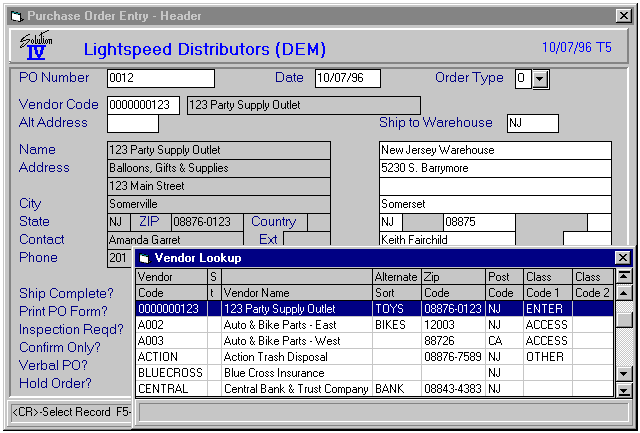
If desired, buyers may be defined in the purchase order system with or without purchase limits. If you use buyers, purchase orders must be verified (authorized) before they may be processed.
Receipt Variances
You have the option of setting upper and lower price and quantity limits. If a receipt is outside of the limits, a three-character password must be entered to process the receipt. Both price and quantity variances are shown on reports.
Partial Receipts
Partial or full receipts may be processed for each order. You may do as many partial receipts as required to fully receive the purchase order.
Lots and Serial Numbers
Lot and serial numbers for lot/serial type items may be entered as you receive the items into inventory. The appropriate number of lines are automatically created for serial-type items.
Automatic Invoice Generation
If desired, Accounts Payable invoices may be automatically generated as a result of entering invoices through Purchase Order. Actual invoice entry is done in the Purchase Order module so that the correct cost for each item may be recorded.
Reports
Purchase Analysis Sub-system
All purchase detail information is retained by Purchase Order. Purchase analysis reports are provided which show purchases sorted by buyer, class code, item, product code, and vendor, in a summarized or detailed manner.
Purchase Orders
Purchase Orders may be printed using plain paper, “logo” paper, or pre-printed forms.
Transaction Register
The Transaction Register is your permanent record of all receipts, returns, and invoices in the current batch. It is an important part of your audit trail and must be printed before updating the transactions to the permanent files.
Open Order Report
This report shows all purchase orders not yet filled. Purchase orders that have partial receipts posted against them are also shown on this report.
Cash Requirements Report
This report shows anticipated cash requirements based on current open payables plus expected purchase order receipts.
Returns by Reason Report
This report details all returns sorted by reason code. Reason codes are maintained in the Purchase Order system and a reason code is required on every return.
Expected Delivery Report
This report shows all expected deliveries and may be valuable when allocating warehouse space.
Backorder Fill Report
If you are using Solution-IV Order Processing, this report is used to indicate which customer orders may be filled as a result of recent purchase order receipts.
Vendor Price Performance Report\
This report details any variances between the purchase order or receipt cost and the vendor invoice cost. You may restrict the report to show only variances outside of the variance limits established in the Purchase Order Parameters.
Vendor Delivery Performance Report
This report shows those purchase orders received late. You may specify whether to base the variance on the vendor promised date or your required date.
Uninvoiced Receipts Report
This report shows all purchase orders that have been received, but for which the vendor invoice has not been entered. The information on this report can be useful for estimating future payables.
Transactions not Ordered Report
This report shows transactions for which no purchase order was issued. You may report on receipts, returns, invoices, or all transaction types.
Purchase Analysis Reports
The Purchase Analysis reports show purchase amounts and quantities for each inventory period by various categories. These categories include buyer code, item code, product code, and vendor code, as well as combinations of these groups.
Summary Purchase Analysis Reports
The Summary Purchase Analysis reports summarize orders, receipts, returns, invoices, and performance variances by vendor code, item code, and combinations of vendor plus item and item plus vendor. The summary includes the last transaction, as well as month- to-date and year-to-date totals.