
Standard
- List Price: This price is entered into the Sales Unit of Measure List Price field in the Item Master File. The list price is for the item when the item is sold in the corresponding unit of measure. Up to five sales unit of measures may be entered as well as five list prices one corresponding to each sales unit of measure.
- Discount: Customer discounts are entered into the Discount Code field in the Customer Master file
Price Break
Price breaks can be created using the following types: actual price, a discount percent, a discount amount, a markup percent, or a markup amount. They can also be based on either unit quantity or total dollar amount.
- Item Price Class: Up to 6 characters for the item price class. You may also leave the item price class blank if you wish to set up a single price break code for each customer price class or if you want a single price break code for the entire inventory. You may set up price breaks based on number of units sold or dollar volume sold. Also, the price may be based on a cost markup, price discount, or a flat price.
- Customer Price Class: The customer price class to which this price break code applies. You may also leave the customer price class blank if you wish to set up a single price break code regardless of the customer price class or if you want a single price break code for the entire inventory. You may set up price breaks based on number of units sold or dollar volume sold. Also, the price may be based on a cost markup, price discount, or a flat price.
- Price Break Description: Up to 35 characters for the description of this particular price break code.
- Price Break Method: The method used to work out the price for this price break code:
- A - Discount amount
- C - Cost markup percentage
- D - Discount percentage
- M - Cost markup amount
- P - Actual price
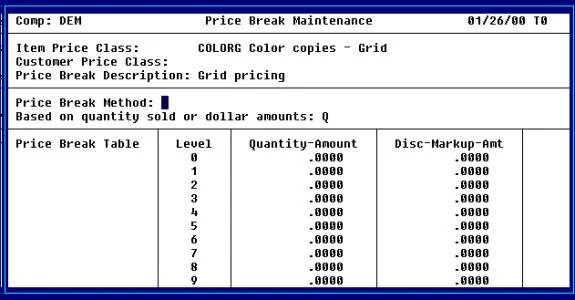
- G - Grid
- L - Layer
- Based on quantity sold or dollar amounts: The type of quantity price break for this price break code:
- A - Based on dollar amount ordered
- Q - Based on quantity ordered
- S - Based on set quantity
- C - Copy quantity
Pricing methods
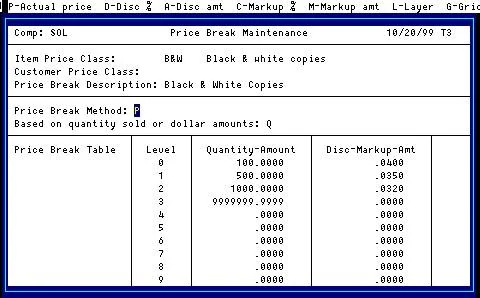
Tier
For each customer/item price break combination, there are ten price break levels. A customer may be assigned to always use a given level, or the level may be based on quantity or dollar volume.
| Ordered | Price per copy |
|---|---|
| 1 | List price |
| 100 | .040 |
| 1050 | .032 |
Layered
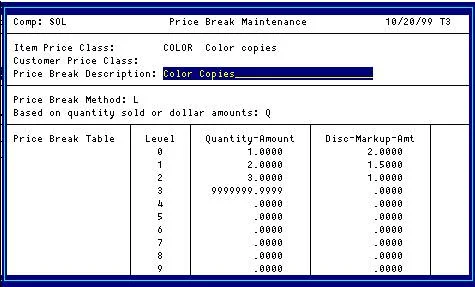
There is usually a price for one copy, a lower price for copy two of the same original, and a lower price for subsequent copies. Order Processing allows up to ten pricing layers for an item. When entering a layered pricing item, the system prompts for the number of originals to calculate the correct price.
| Originals | Sets | Price |
|---|---|---|
| 1 | 2 | 1 @ 2.00 + 1 @ 1.50 = 3.50 |
| 1 | 3 | 1 @ 2.00 + 1 @ 1.50 + 1 @ 1.00 = 4.50 |
| 2 | 2 | 2 @ 2.00 + 2 @ 1.50 = 7.00 |
Sets
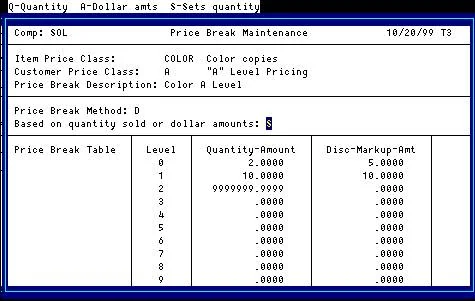
Enter the number of originals and the number of sets in Order Entry; price breaks use the standard tier pricing method.
| Originals | Sets | Price |
|---|---|---|
| 1 | 1 | List price |
| 2 | 1 | List price × .95 |
| 1 | 2 | List price × .95 |
| 2 | 50 | List price × .90 |
Copies
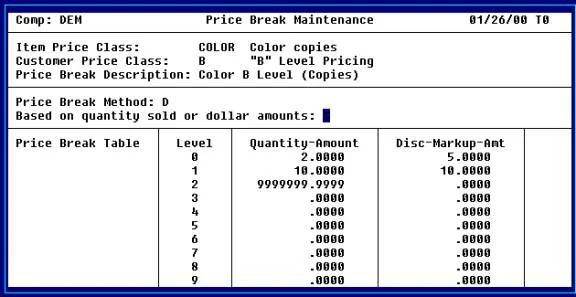
Like Sets pricing, except the price is based on the number of sets only, where Sets (“S”) uses the number of originals times the number of sets.
| Originals | Sets | Price |
|---|---|---|
| 1 | 1 | List price |
| 2 | 1 | List price |
| 1 | 2 | List price × .95 |
| 2 | 50 | List price × .90 |
Grid
Enter the number of originals and the number of sets in Order Entry, and the price comes from a grid. The grid is laid out like a spreadsheet: the number of originals across the top, the number of sets down the side, and the price in the middle. In the screenshot, row 0 holds the number of originals and the first column the number of sets.
| Originals | Sets | Price per each |
|---|---|---|
| 1 | 1 | 1 @ 1.50 = 1.50 |
| 2 | 2 | 2 @ 1.50 = 3.00 |
| 5 | 6 | 35 @ 1.10 = 38.50 |
Megachrome
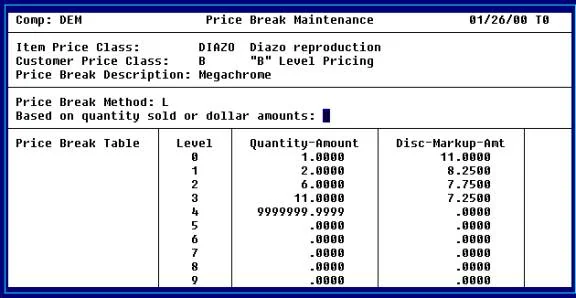
The price is based on a rate per square foot, and the rate per square foot depends on the number of sets (copies) of each original. The first copy is always priced at level 0; the remaining copies are priced by the total number of copies of one original.
| Originals | Sets | Length | Width | Sq. feet | Price |
|---|---|---|---|---|---|
| 1 | 1 | 24 | 36 | 6 | 6 @ 11.00 = 66.00 |
| 1 | 4 | 24 | 36 | 6 | 6 @ 11.00 + 18 @ 8.25 = 159.50 |
| 4 | 1 | 24 | 36 | 24 | 24 @ 11.00 = 264.00 |
Contracts
Contracts are used to define a special pricing arrangement with a certain customer for a certain item or items. A contract runs for a specified period of time. There are various types of contracts as follows:
- Actual price
- Override normal price break code
- Cost markup
- Price discount
Customer
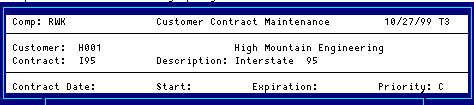
The customer code will be used throughout the system when referring to a particular customer.
Contract
The customer contract code is a file verified code used to define a contract price for an item or a group of items which is valid for a particular customer or a particular customer price level.
Description
Describes the customer contract.
Contract Date
The contract date or the date on which this contract was made with this customer. This field is for reference only and is different than the contract start date.
Start
The date on which this contract takes effect. This contract will not apply to orders prior to this date.
Expiration
The date on which this contract expires. This contract will not apply to orders after this date.
Priority
If both a special sales promotion and a customer contract price are in effect for a particular item, the pricing priority indicates which price takes priority. Enter the priority of this customer contract as it relates to special sales promotions from the following list:
- C - Customer contract price takes priority.
- L - The lessor of the contract price and special promotion takes priority.
- S - Special sales promotion price takes priority.
Line
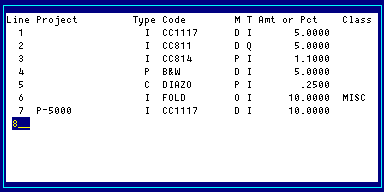
Sequence number.
Project
The project code is a file-verified code that may be used in order entry.
Type
The type of code that this line of the contract will be compared to. When pricing an order line, this code type will be used with the next field to determine whether or not there is a match between the order line and the contract line.
- I - Item code
- P - Product code
- C - Item Price Class
- N - No code compare
Code
The item code, product code or item price class depending on the code type that you have selected. If this field is left blank, all codes of the selected type will be considered a match.
Method
The method of calculating the price for this contract from the following list:
- A - Discount amount off regular price
- C - Markup percentage over cost
- D - Discount percentage off regular price
- M - Markup amount over cost
- O - Override item price class
- P - Actual price
Type
The type of contract from the following list:
- I - Price is off item list price
- Q - Price is off quantity price break
Amount or percent
Based on the contract method for this contract, enter either the actual price, the discount amount, cost markup amount, discount percentage, or cost markup percentage.
Class
The item price class which applies to this contract if the contract method is ‘O’.