

Installation
Check the License Assignment Card
Section titled “Check the License Assignment Card”Serial number information on the License Assignment Card in the Order Confirmation email includes:
- The Basic serial number
- Additional serial number for T-RemoteControl
If any of this information is missing or incorrect, please contact your Thoroughbred dealer.
Select an Installation Directory
Section titled “Select an Installation Directory”T-RemoteControl needs the terminal configuration file TCONFIGW to display data correctly on your terminal. You may install T-RemoteControl in a directory where TCONFIGW resides or you may copy or link TCONFIGW to the installation directory. A TERM.MAP file is needed either in the installation directory or in /usr/lib/basic to select a terminal table using your TERM environment variable. Use the cd command to make the installation directory your current directory for the remaining steps.
Begin the Installation or Upgrade
Section titled “Begin the Installation or Upgrade”cd to the TSREMOTE path in your Basic home directory.
Use the install utility:
./installThe following screen displays.
*********************************************************************** ** T-RemoteControl Installation Setup ** ***********************************************************************Enter the software serial number (provided on the media label): ( - )Type the T-RemoteControl serial number and press Enter. Do not use the Basic serial number.
If you receive the message:
Invalid ssn for this product. Retry? (Y/N)Y You can correct a typing mistake.
N The install utility will return you to the operating system prompt. T-RemoteControl will not be installed. Contact your Thoroughbred dealer to obtain a valid software serial number.
If you typed an invalid value, the system will generate a message:
Invalid ssn. Retry? (Y/N)Y You can enter a valid value. If the install utility does not accept the T-Remote Control serial number, please contact your Thoroughbred dealer.
N The install utility will return you to the operating system prompt. T-RemoteControl will not be installed.
The install utility will display the following messages:
Installing T-RemoteControl, Please Wait...
T-RemoteControl Installation completed successfully.
Activating T-RemoteControl
Section titled “Activating T-RemoteControl”The first time tsremote is executed, a message similar to the following will be displayed:
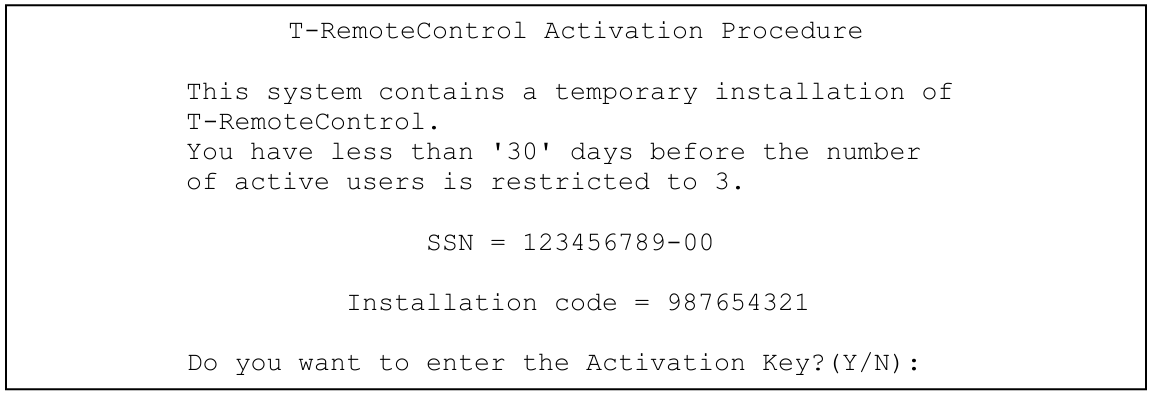
Use the displayed serial number and installation code to obtain an Activation Key as described above. You can enter N to use T-RemoteControl during the temporary period. When you have an Activation Key, enter Y and you will be prompted to enter it.
From the T-RemoteControl Installation, version 8.9.1. Open this page in the PDF