

*IPSD - Hexadecimal File Dump
Purpose
This utility produces a hexadecimal dump of a file to either the terminal or a printer. Records are dumped in both hex and ASCII. This utility also allows the user to look at all data in the file and/or program and at the Key Index Area (KIA) of SORT and DIRECT files.
Procedure
To run this utility from Thoroughbred Basic Console Mode, type:
RUN “*IPSD” and press Enter.
To select this utility from the Thoroughbred Basic Utilities Menu, type one of the following:
I and press Enter.
*I and press Enter.
*IPSD and press Enter.
Menu option # and press Enter.
The following message is displayed:
HARD COPY (Y/N):
Type Y and press Enter to send the dump to a printer. Type N and press Enter to display the dump on the terminal. The system prompts:
SELECT PRINTER: xx xx (where xx is a configured printer)
Make your selection from the list of available printers displayed in the prompt. Printers displayed in background mode are currently being used by another task and, therefore, are unavailable. If the printer requested cannot be opened, the user is prompted to make another selection. If only one printer is configured this question is not asked.
DISK NAME OR NUMBER:
FILE NAME:
Type the name of the file to be dumped and press Enter or press Enter to exit the utility. If the specified file cannot be opened, the user is asked to enter another file name.
The system generates different prompts according to whether the dump is to be displayed on the terminal or sent to a printer. The following section outlines the prompts generated and the information that should be entered:
Output to Terminal
Section titled “Output to Terminal”RECORD NUMBER
Type the number of the record to be dumped and press Enter. Press Enter to dump the next record in sequence. Record numbers start with zero.
RECORD NUMBER/‘KEY’/‘KIA’/
For DIRECT files, enter KIA to dump the Key Index Area. Enter KEY if records are to be chosen by their Key values. Record numbers may be entered just as in the previous RECORD NUMBER prompt.
OFFSET (*256 BYTES)
If the record size is greater than 256 bytes, it cannot be displayed in one piece on the terminal. Enter the offset of the 256-byte block to be dumped. Press Enter to dump the next block in sequence. The first 256- byte block is block zero.
KEY:
Press the Key of the record that is to be dumped, F2 for the next Key, or $nn to specify the hexadecimal Key value.
SECTOR
Type the Index of the sector (or block) within the Key Index Area that is to be dumped. Press Enter to dump the next sector in sequence. The first sector is zero.
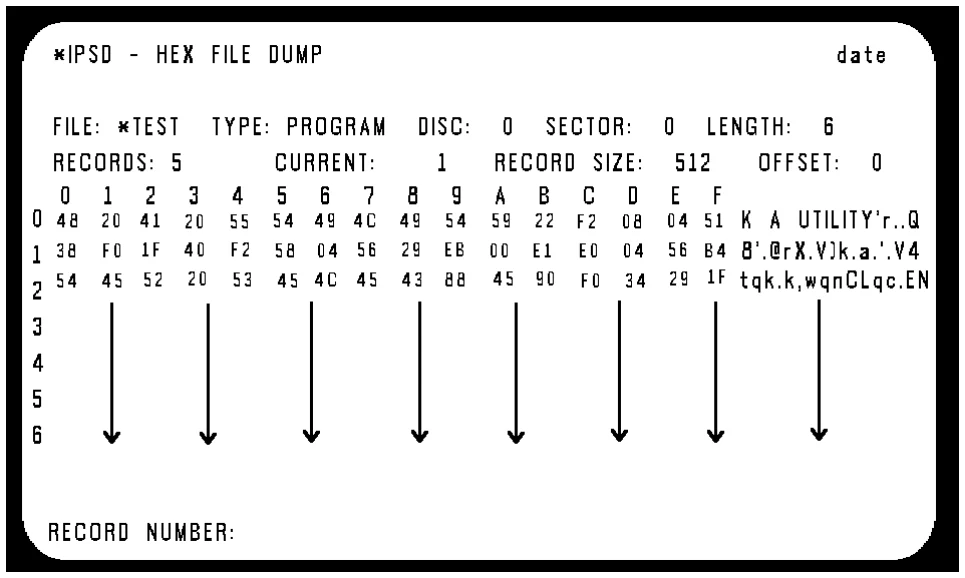
A screen similar to the following is displayed:
Output to Printer
Section titled “Output to Printer”RECORD (R),KIA (K)
For DIRECT files, type R and press Enter to dump the data area. Type K and press Enter to dump the Key Index Area.
FROM RECORD
Type the number of the first record to be dumped to the printer. Press Enter to set this prompt to zero.
TO RECORD
Type the number of the last record to be dumped to the printer. Press Enter to set this prompt to the last record in the file.
FROM SECTOR
Type the Index of the first sector of the KIA to be dumped to the printer. Press Enter to set this prompt to zero.
TO SECTOR
Type the Index of the last sector to be dumped. Press Enter to set this prompt to the highest numbered sector in the KIA.
Notes
Each record or sector is dumped in blocks of up to 256 bytes in a matrix of up to 16x16 hexadecimal characters. To the right of this matrix are the equivalent ASCII character strings. Non-printing characters are shown as periods.
Error Messages
- ERROR xx HAS OCCURRED, CR TO RETRY
- An unexpected error has occurred, probably I/O related.
- KEY NOT FOUND IN FILE: xxxxxxxx
- The specified Key is not in the file, enter another Key.
- PRINTER IN USE
- The requested printer is being used by another task. Select another.
- PRINTER NOT READY
- The requested printer is off-line (i.e., not turned on, out of paper, out of toner, etc.). You can correct the problem and try again, select another printer, or F4 to exit the utility.
From the Thoroughbred Basic Utilities, version 8.9.1. Open this page in the PDF