

CONNECT VIEW
CONNECT VIEW allows you to view many records at one time. With the appropriate flags set in the view definition header, you may perform maintenance using this view. If there is no data file, the system prompts for creation of the data file.
For more information on view maintenance and views see the Database Maintenance section earlier in this manual. For more information on editing, copying, deleting, and renaming view definitions see Object Views in the Dictionary-IV Developer Guide.
Below you will see a view description:
View Description
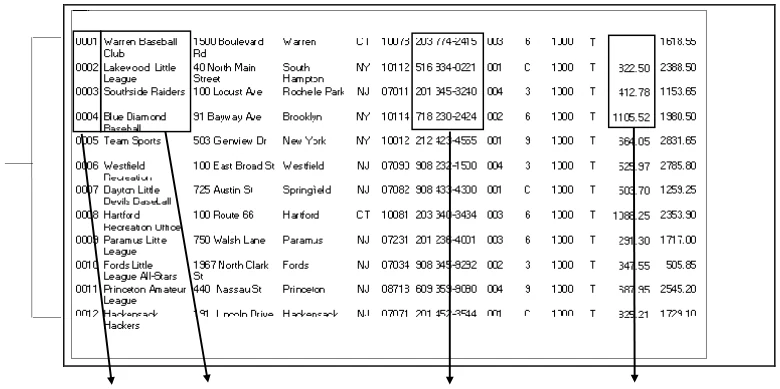
Data in file.
| Cust | Cust | Cust | Open AR |
|---|---|---|---|
| Code | Name | Telephone | Balance |
| 0001 | Warren Baseball Club | 203 555-2415 |
| Data in view | 0002 | Lakewood Little League | 516 555-0221 | 822.50 |
| 0003 | Southside Raiders | 201 555-3240 | 412.78 | |
| 0004 | Blue Diamond Baseball | 718 555-2424 | 1105.52 |
You may select any of the data names defined in the Format Definition to create a view, and there may be many Views for a specific database.
This section describes how to:
- Move through the view while in cursor mode
- Change data in the edit mode
- Modify the view in cursor mode
- Use the F8 Commands
- CONNECT VIEW Quick Reference
UTCUST in CONNECT VIEW
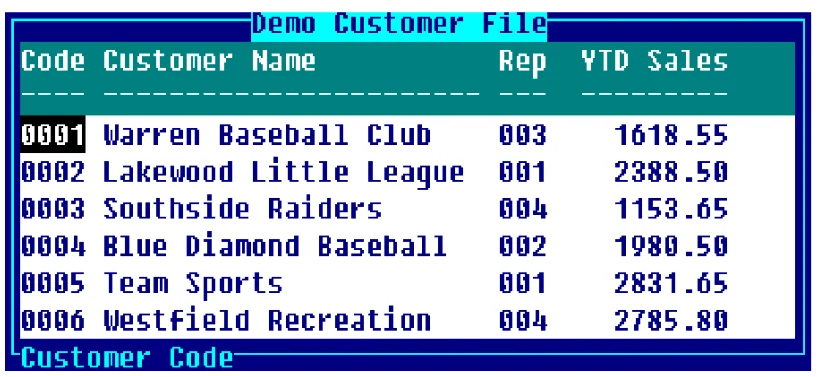
Below you will find a list of functions to assist in using CONNECT VIEW.
CONNECT VIEW
Character-Insert
Character-Delete
F1- Resize/move view
**F2-**Reverse Sort
F3-Column Width
F5-(Controlled by flag in View Edit.)
F6-Select Data element help.
F7-Carriage Return
**F8-**Commands
New in CONNECT VIEW
The following are new to CONNECT VIEW:
- F2-Reverse Sort reverses the sort order of any data element within a view.
- Right/Left Arrow keys wrap at the border. Use the Tab and Back Tab keys to scroll the window horizontally.
- Delete heading lines by pressing Line Delete.
- Press F16 for a hard copy.
- Column widths can be made larger than the length defined in Format Definition. This allows headings for small fields to be more readable.
- Recover columns to the left or right of the current cursor position.
- F8-PRINT command outputs to the printer you define.
- F8-SUM command totals numeric columns you define.
- Create columns in a view using a different link.
In this chapter
Section titled “In this chapter”From the Dictionary-IV User Guide, version 8.9.1. Open this page in the PDF