

Multi-Tasking Information
This utility has a number of functions:
- Create and Initialize a Conflict Table A conflict table must be created in this utility before it can be used for conflict processing. (For more information see the Conflict Processing Section in the Menu section of the Dictionary-IV Developer Guide.) When the table is created, default values can be specified for the numeric and alphanumeric flags in the table.
- Change, List, or Delete an Existing Conflict Table These functions allow debugging of a conflict table. The Change mode allows you to change the values for any flag in the table. This can be useful to initialize flags to starting values or to reset the flags if a user manages to exit a selection without updating the necessary conflict flags. The List function displays the table of 120 numeric and 120 alphanumeric flags, and the Delete function removes the entire table from the system.
This is a protected utility. If security is active, access to this utility is restricted to those individuals with knowledge of the system password.
Select Multi-tasking Information from the Dictionary-IV Utilities Menu. The system displays the following screen:
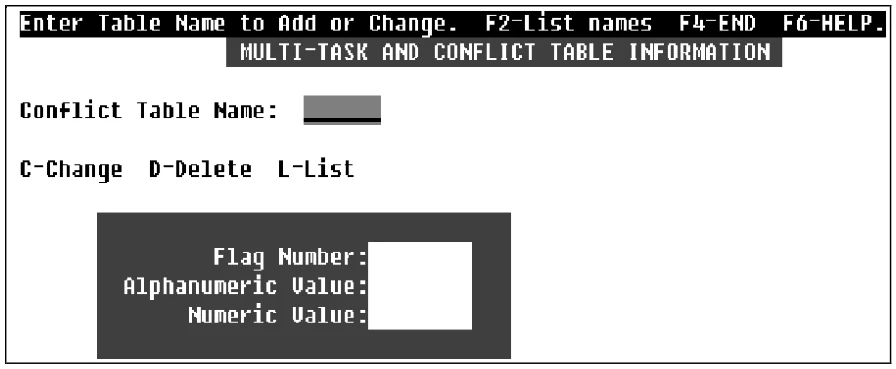
Conflict Table Name Type from 1 to 6 alphanumeric characters for the Table Name (library conventions do not apply). Press Enter. To display existing conflict table names, press F2.
If you enter a new table name, you must verify the action. The system prompts:
Conflict Table does not exist. Create new table?
When you create a new table, you must specify an alphanumeric and a numeric value that are used to initialize all the flags in the table.
The system prompts:
All Flags will be initialized to value entered.
(<RETURN>=$00$ or 0)
Select one of the following:
Y To create a new table.
N The system positions the cursor at the next field.
If you enter an existing table name, you must then select the type of maintenance to perform:
- C-Change
- Type an alphanumeric or numeric value for a given flag number and press Enter. The values must meet the requirements described above.
To exit Change mode, press F4 or the Up Arrow key at the Flag Number field. If any changes were made to the table, the system prompts:
Save Changes to Conflict Table?
- D-Delete
- The Delete option requires that you verify the delete before the table is removed. The system prompts:
Delete Entire Conflict Table?
- L-List
- The List option displays on the screen a list of values in the table.
Flag Number
Enter the flag number from 1 to 120 for either flag type.
Alphanumeric Value The alphanumeric value can be a single character (e.g., A), in which case it is taken as an ASCII character; otherwise, if two characters are entered, it is taken as a hexadecimal value (e.g., 41); the default is $00$.
Numeric Value
The numeric value must be between 0 and 255; the default is 0.
From the Dictionary-IV Administrator Guide, version 8.9.1. Open this page in the PDF