

*TPSD - File Transfer and Expand
Purpose
This utility copies any program or file and allows you to make changes to any of the following at that time:
- Disk
- Sector
- Key size
- Record size
- Number of records
- File name
Procedure
To run this utility from Thoroughbred Basic Console Mode, type:
RUN “*TPSD” and press Enter.
To select this utility from the Thoroughbred Basic Utilities Menu, type one of the following:
T and press Enter.
*T and press Enter.
*TPSD and press Enter.
Menu option # and press Enter.
The system prompts:
FILE NAME: (<CR> TO END)
Type the name of the file or program to be modified and press Enter or press Enter to exit the utility. When a name is entered, the system calls up a screen listing the file or program information. The following is a sample file and screen:
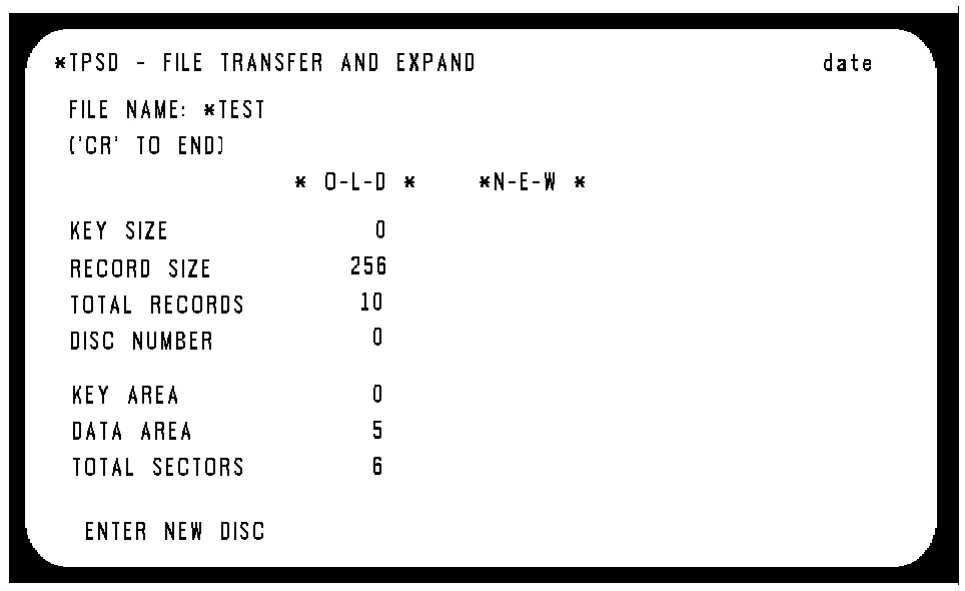
The following list outlines the prompts generated by the system for this utility:
ENTER NEW DISC
Type the number of the disk to copy the file to and press Enter or press Enter to keep the file on the same disk.
ENTER NEW KEY LENGTH
For SORT and DIRECT files, type the new key length in bytes and press Enter or press Enter to use the same key size. The valid range is 2 to 144 bytes.
ENTER NEW RECORD SIZE
Type a new record size and press Enter or press Enter to use the same record size.
ENTER TOTAL RECORDS REQUIRED
Type the number of records desired, and press Enter or press Enter to use the same number. For programs enter the number of 256-byte pages needed; for SORT files, enter the number of keys.
To convert the file to an auto-expanding file, enter the value 0. To convert an auto-expanding SORT or DIRECT file to a static file, enter a value greater than 0.
NEW NAME OR (CR) TO REPLACE
Type a new file name and press Enter or press Enter to use the same name.
After all the information has been entered, press Enter. The system begins the file transfer. After the system has completed the transfer, one of the following messages is displayed:
xxxxxxxx HAS BEEN REPLACED (HIT CR) (where: xxxxxxxx is a filename)
or
xxxxxxxx HAS BEEN CREATED (HIT CR) (where: xxxxxxxx is a filename)
Press Enter and the system redisplays the FILE NAME prompt. Enter another file name or press Enter to exit the utility.
Error Messages
- ERROR xx HAS OCCURRED. <CR> TO CONTINUE OR CTL-IV TO END
- An unexpected error has occurred, probably I/O related.
- FILE BEING USED BY ANOTHER TASK, CR TO CONTINUE OR CTL4 TO END
- Another task has opened the specified file.
- NO ROOM ON DISK OR SPECIFIED SECTOR UNAVAILABLE
- The utility cannot create the file and the execution is aborted. Enter another sector or make room on the disk by deleting unnecessary files.
- WARNING: FILE MAY BE TRUNCATED
- For index files, this is displayed if the number of records desired is less than the current file size. For SORT and DIRECT files, it is displayed if the number of records requested is less than the number of keys in use. Press Enter to continue or press F3 to enter a new number of records.
- WARNING: KEYS WILL BE TRUNCATED
- If the new key size is smaller than the old key size, this message is displayed. Press Enter to continue or press F3 to enter a new key size.
- WARNING: PROGRAMS MAY BE SHORTENED
- The number of pages requested is not large enough to contain the program. Type a larger number.
- xxxxxxxx ALREADY EXISTS ON DISK xx
- The utility cannot create the file using this name, enter another name.
- xxxxxxxx, TRUNCATION RESULTED IN DUPLICATE KEY CONTINUE (Y/N)?
- Shortening a key to the new length resulted in it becoming the same as another key. Type Y and press Enter to proceed to the next record or type N and press Enter to stop copying the file.
- CONFIRM: CONVERT FROM AN AUTOEXPANDING FILE (Y/N)?
- A selected file is in autoexpanding format. To convert the file to a fixed-size file, type Y and press the Enter key.
- CONFIRM: CONVERT TO AN AUTOEXPANDING FILE (Y/N)?
- The selected file will be converted to autoexpanding format. To make the conversion, type Y and press the Enter key.
From the Thoroughbred Basic Utilities, version 8.9.1. Open this page in the PDF