

Client Environment
To set up TS Network DataServer software you must configure network communications and server access for the client.
The following files must be created or modified:
- SERVER.MAP
- IPLINPUT
- TERM.MAP
SERVER.MAP
Section titled “SERVER.MAP”The SERVER.MAP text file establishes a relationship between a 2-character Server ID used by Thoroughbred and the server system. This file is a simple text file. The system searches the Basic directory first. If the file does not exist there, the system defaults to the /usr/lib/basic directory.

Thoroughbred uses the Server ID to reference the server system. Enter a line in the file for each server.
The syntax for an entry is:
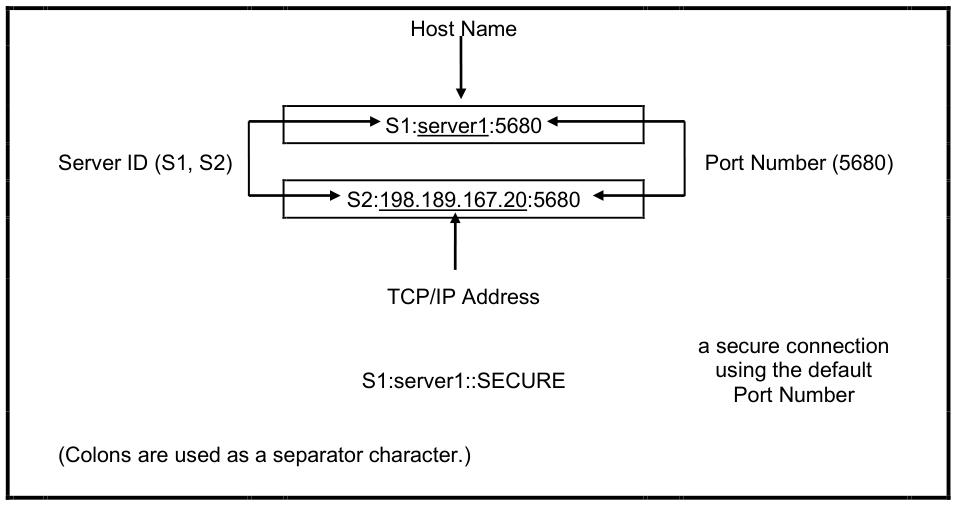
server-id:[host-name|TCP/IP address]:TCP/IP port[:PARENT][:SECURE]server-id
is a 2-character alphanumeric string used within Basic to reference a particular server system.
host-name
is the host name for the server system. You can use the host-name or the TCP/IP address.
TCP/IP address is either the TCP/IP address or the host name for the server system. You can use the TCP/IP address or the host name.
TCP/IP port
(optional) is the TCP/IP port number used to override the default port number (5680). In the event of a conflict with another process using TCP/IP, the transport protocol layer of the TCP/IP process uses the port number to deliver the packet data to the appropriate application.
PARENT
(optional) is a keyword for designating a server as the host for TS Network Basic.
SECURE
(optional) is a keyword specifying that secure communications with the TS Network DataServer are required.
The fields in a SERVER.MAP entry are separated by a colon ( : ). Fields are positional and consecutive colons must be used when necessary to indicate defaulted fields. The SECURE and PARENT keywords may be combined in any other order. The following are examples of valid SERVER.MAP entries:
Server ID or TCP/IP Address
IPLINPUT
Section titled “IPLINPUT”Once you establish the server ID you can make the required entries for the IPLINPUT file.
Each DEV line corresponds to a directory on the server. The syntax for a DEV line is:
DEV device-name,1,,server-flag,,,,server-id:pathdevice-name is device ID used to reference logical disk directories. Valid values range from D0 through D9, DA through DZ, and Da through Dz.
server-flag informs Basic that the disk directory is located on a server and defines the type of server. The value for the Thoroughbred server is 2.
server-id is the two-character alphanumeric code assigned to this server. The server ID on the DEV line must match an entry in the SERVER.MAP file.
path is the directory (on the server) where the data resides. The path may or may not be a fully qualified path. If it is not a fully qualified path, it is interpreted as relative to the directory where the server executable resides.
Examples
The following are examples of valid DEV lines (using the SERVER.MAP entries defined previously):
Fully Qualified Path
DEV D1,1,,2,,,,S1:/home/data/userIn this example a fully qualified path has been specified. Therefore, files on device D1 are placed in the directory/home/data/user.
Relative Path
DEV D2,1,,2,,,,S2:data/userIn this example a relative path has been specified. If the server executable is located in the directory /usr/lib/basic, data files on device D2 will be placed in the directory /usr/lib/basic/data/user on the server S2 (IP Address = 198.189.167.20).
Hierarchical Disk on the Server
DEV D2,1,,2,,1,,S2:The device-name and server-id are the same as previously defined.
Prior to the availability of TS Network DataServer, only one hierarchical disk could be specified in an IPLINPUT file. The Client Basic supports one hierarchical disk per server as well as one for the local client disk.
TERM.MAP
Section titled “TERM.MAP”The TS Environment and the Server Process (tsserv) uses terminal Ids to enforce data integrity (record and file locking). Terminal Ids must be unique not only with other client Basics but also with each server connection. The client and server(s) negotiate at startup to establish a terminal ID that is unique for the client Basic and all servers connected. Therefore, it is not recommended that client Basics be initiated as follows:
./b T5Terminal table assignment is accomplished using TERM.MAP. See the Thoroughbred Basic Customization and Tuning Guide for information on creating and maintaining the TERM.MAP file.
From the TS Network DataServer Reference, version 8.9.1. Open this page in the PDF