

FILE-SECTION
The Link(s) specified in the FILE-SECTION bring together, and define in a central location, the definitions and specifications that are needed to control access to specified data files in a report definition. The Link(s) point to a Format that specifies where each data item is physically located in a record. It also shows which Data Names are associated with the data in the file. The Link(s) also contain the Sort patterns defined for the file.
Primary Function of a Link
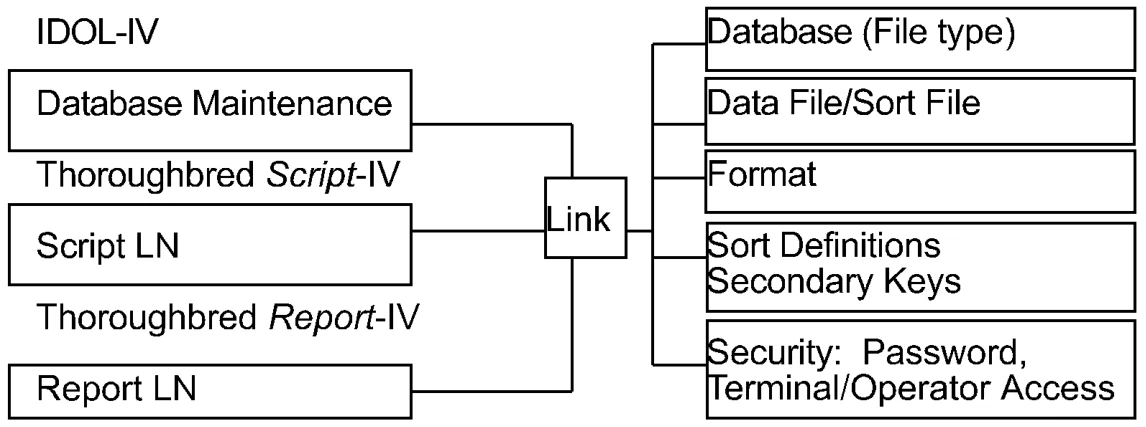
Line types
Section titled “Line types”The following line types are used in the FILE-SECTION:
- LN
- Link Name
- LNC
- Continue Processing
- LNU/LNu
- Reuse Data File Channel
- LNX
- SELECT WHEN Criteria
- LNS
- ORT BY Criteria
Conventions
Section titled “Conventions”This section provides information on specifications that can be entered in the FILE-SECTION of a report definition. The commands and variables are arranged alphabetically, and the information for each entry is organized in the following way:
FUNCTION
A brief description of the action or purpose of each command or variable.
SYNTAX
An outline of command or variable structure, including syntax and readability options. Parameter choices are detailed directly following the command.
NOTES
Remarks and important information on command or variable syntax and the function of a command or variable in the FILE-SECTION.
EXAMPLES
Typical examples of command and variable usage.
Where there is more than one Format for a command, the beginning of each command is shown in boldface letters and the choices are separated by a blank line. In some cases, different command formats are handled in separate sections, e.g., the various options for the LN line.
As long as the elements within a command are separated by spaces and fall within the command area of a report, no indentation is required. For readability, the syntax is represented with standard indentation to highlight clauses and options under each command.
Note: For more examples of Report-IV commands, declarations, and variables, see the Sample Reports appendix.
Link Definition Name
Section titled “Link Definition Name”FUNCTION
The LN line specifies which Link(s) the report will access, and includes the definitions and specifications that are needed to control access to a specified data file in a report definition.
The primary specifications in the Link are the data file, Format, database type, Sort definitions, and Sort file. The LN command makes these specifications available to the report.
When using the LN line type for two or more links, the system must find a selected record in subsequent links before printing can take place. If a subsequent record is not found, and a one-to-one relationship exists, the primary record is skipped.
The Link definition:
- Controls how the data file is accessed
- Maintains Sort definitions for the file
- Indicates which Format definition data is to be read into
- Provides security for the data
SYNTAX
LN LLDDDDDDLL is the library name where the Link definition is located.
DDDDDD is the Link name.
NOTES
- Press the F1 key for a syntax check after specifying the Link name. This is required to update data names available for use in report definition.
- At least one Link must be specified.
- Multiple links can be specified but each Link must be specified on a separate line.
- When more than one Link is specified, the report generated is a joined report. A relationship is established between the two files by a common Data Name or key.
- Data names must not start closer to the left than the “L” in the ruler line.
- If the Link definition cannot be found, make sure that the name is specified and spelled correctly.
EXAMPLES
LN UTCUSTContinue Processing
Section titled “Continue Processing”FUNCTION
The LNC line is used with a secondary Link that continues to read and process multiple links when missing records exist for common Data Names. (Each LNC opens one to two logical data file channels and has no impact on key pointers for previous LN or LNC lines that refer to the same data file.)
SYNTAX
LN    LLDDDDDD
LNC LLDDDDDD- LLDDDDDD
- is the name of a Link that has the same Data Name as other specified links.
NOTES
- Press the F1 key for a syntax check after specifying the Link name. This updates the report workspace.
- LNC is used when multiple data file channels are open for a single data file.
EXAMPLES
LN UTCUSTLNC UTTERMLNC UTSREPLNC UTSHIPThis example will open the appropriate four data files on four separate data file channels. If secondary Sort files existed for the data files, they would also be opened resulting in up to eight open data file channels. If UTCUST, UTTERM, UTSREP, and UTSHIP all pointed to the same physical data file, the data file read for UTTERM would not affect key positioning or processing sequence of the main Link, UTCUST. Likewise, if the UTSREP read fails to find a proper match, processing will continue with UTSHIP. Data will be presented to the REPORT-SECTION for every UTCUST record read, regardless of success or failure to find any matching LNC records.
LNU/LNu
Section titled “LNU/LNu”Reuse Data File Channel
Section titled “Reuse Data File Channel”FUNCTION
The LNU and LNu lines are secondary links that conserve data file channels by opening a single channel when multiple links that share the same data file are specified. The sequence of key pointers is not relevant. This is allowed only if the file is a Multi-Format file, such as a lookup or code file.
SYNTAX
LNU   LLDDDDDD
LNu LLDDDDDD- LLDDDDDD
- is the name of a Link that has the same data file as a previously specified Link Name.
How LNU Processes Data
- LNU continues to read and process multiple links when missing records exist.
- The LNU line corresponds to the LNC line in its ability to read and process data from multiple links when missing records exist.
How LNu Processes Data
- LNu returns to the top file and continues reading when missing records exist and it suppresses printing of data.
- The LNu line corresponds to the LN line in its ability to read and process data from multiple links when missing records exist.
NOTES
- Press the F1 key for a syntax check after specifying the Link name. This updates the report workspace.
- Data names must not start closer to the left than the “L” in the ruler line.
EXAMPLES
LN UTCUSTLN UTTERMLNU UTSREPLNU UTSHIPThe links UTTERM, UTSREP, and UTSHIP share the same physical data-file. The Link UTCUST contains these Data Names that are foreign keys (or lookups) to the other files: TERM-CODE, SREP-CODE, SHIP-CODE. Using LNU or LNu, a single data file channel will be opened.
If LNU is used, the system continues to read and process the next specified Link when missing records exist. LNu returns to the top file and continues reading when missing records exist. The read function caused by the LNU lines will change the physical record pointer of the shared data file. Thus, the next record read for LN UTTERM will be determined by the previous record read for LNU UTSHIP.
SELECT WHEN Criteria
Section titled “SELECT WHEN Criteria”FUNCTION
The LNX line allows you to specify multiple selection criteria from different links.
Use a : (colon character as a line type designator for the next line if the commands and/or syntax must continue on the next line.
SYNTAX
LNX SELECT WHEN Data Name [rel-oper value]: conditional-operator value- Data Name
- is a valid Data Name.
- rel-oper
- enables you to specify a portion of the value in a Data Name and describes how one Data Name relates to another.
- conditional operator
- defines the conditions under which records are accessed using operators.
- value
- is a value, which determines whether or not to access data records.
NOTES
- Use LNX for SELECT WHEN statements when using multiple links. It is not necessary to use LNX for SELECT WHEN statements when Data Names are from the primary data file.
- LNX must be the last entry in the FILE-SECTION unless you use an LNS line type.
- The conditional logic can use relational, Boolean and/or logical expressions to establish a true or false condition.
- Data names must not start closer to the left than the “L” in the ruler line.
EXAMPLES
LN UTCUSTLN UTSALCDLNX SELECT WHEN CUST-CODE = "009" AND SALES-CODE: ="12345"CUST-CODE is defined in both UTCUST and UTSALCD, and SALES-CODE is defined in the file UTSALCD. When SELECT WHEN is used in an LN, only Data Names specified in that Link can be used.
For more information, see the SELECT WHEN section later in this document.
SORT BY Criteria
Section titled “SORT BY Criteria”FUNCTION
The LNS line allows you to specify a SORT expression using Data Names from multiple links.
Use the : (colon character ) as a line type designator for the next line if the command and/or syntax must continue on the next line.
SYNTAX
LNS SORT BY Data Name|expression: [(substring)|(sort order)|(substring,sort order)] [Data Name...]- Data Name
- is a valid Data Name.
- expression
- includes any valid Data Names.
- substring
- specifies part of a Data Name by which to sort.
- sort order
- specifies ascending or descending order:
A specifies ascending order. This is the default. D specifies descending order.
Data Name are additional Data Name(s) to be included sequentially in the Sort.
NOTES
- LNS must be the last entry in the FILE-SECTION.
- Use LNS to sort based on data names from multiple links or secondary links. It is not necessary to use LNS to sort when all Data Names are present in the primary data file.
For more information, see the SORT BY section later in this document.
EXAMPLES
LN UTCUSTLN UTSALCDLNS SORT BY SALES-CODESALES-CODE is a Data Name located in the secondary file, UTSALCD.
LN UTCUSTLN UTSALCDLNS SORT BY (BASE-PRICE - ACCTG-COST) / BASE PRICE * 100This Sort is based on the result of a numeric expression using Data Names.
KEY RANGE FROM/TO
Section titled “KEY RANGE FROM/TO”FUNCTION
The KEY RANGE option specifies a range of key values to access the records in a keyed file.
SYNTAX
LN LINK NAME KEY RANGE FROM from-key [TO to-key]- from-key
- specifies the primary key or secondary key in the range to be processed. The default is the first key in the file, or the secondary key if a Sort is selected.
- to-key
- specifies the last key or secondary key in the range to be processed. The default is the last key in the file, or the last secondary key if a Sort is selected.
NOTES
- The key range option is used on the first LN line in the FILE-SECTION.
- Key values can be literal strings or Data Names.
- The actual range of keys processed is from “GREATER THAN OR EQUAL TO” the from-key value through “LESS THAN OR EQUAL TO” the to-key value.
- When the first Link definition in the report contains a preset key, a key range is automatically generated as the preset key range. In this case, be sure not to put the key prefix in the range.
- When the key range is applied to a SORT BY from a predefined sort pattern, the key range is applied to the Sort and must conform in case (uppercase or lowercase) and Sort order (ascending or descending) to the Sort definition.
- When multiple links are specified in the FILE-SECTION, the key preset value, which is specified in the Dictionary-IV Format, determines the selection and the key range of data to be specified.
- This option can only be specified for the first Link when you have multiple file definitions.
EXAMPLES
LN UTSALCD KEY RANGE FROM "R1C000"This shows the use of a literal string for the starting key value.
LN UTSALCD KEY RANGE FROM CODE-A TO CODE-CThe Data Name CODE-A contains the value of the starting key and CODE-C contains the value of the optional ending Key. Assignment of a value to Data Names can be done in the ENTRY-SECTION.
SELECT WHEN
Section titled “SELECT WHEN”FUNCTION
The SELECT WHEN option determines whether a record is accessed, depending on defined conditions.
SYNTAX
LN LINK NAME SELECT WHEN Data Name [(substring)]: [conditional-operator value] [rel-oper value]- Data Name
- is a valid Data Name.
- substring
- specifies part of a Data Name by which to select.
- conditional operator
- defines the conditions under which records are accessed using operators.
- rel-oper
- enables you to specify a portion of the value in a Data Name and describes how one Data Name relates to another.
- value
- is a value, which determines whether or not to access data records.
NOTES
- The SELECT WHEN command follows the same syntax rules of a Thoroughbred Basic IF directive, except that the THEN and ELSE clauses are not allowed. For more information, see the Thoroughbred Basic Reference Manual.
- Substrings can be included as part of the conditional logic expression.
- The Thoroughbred Basic POS function can be used to scan a reference string for the occurrence of a specified substring and return a numeric value indicating its position.
- If the first Link definition in the report contains key presets, a SELECT WHEN for these values will be generated automatically.
- The conditional logic can use relational, Boolean and/or logical expressions to establish a true or false condition.
- The SOUNDEX function, SDX, and the LIKE relational operator are valid syntax.
- Use a : (colon character) as a line type designator for the next line if the commands and/or syntax must continue on the next line.
EXAMPLES
LN UTCUST SELECT WHEN STATE = "TX"The report will select only customers from Texas, assuming that TX is the code for Texas for the Data Name STATE.
LN UTCUST SELECT WHEN CUST-CODE LIKE "F*"The report will select customers if the first character of the Data Name CUST-CODE is F. The LIKE wildcard character * selects all data that begins with F followed by zero or more characters.
LN UTCUST SELECT WHEN (CUST-CODE = "001" AND: OPEN-AR-BALANCE >1000/.45) OR CREDIT LIMIT = 8000This SELECT WHEN condition involves different possibilities using conditional operators. The AND and OR are processed left to right. Parentheses can be used to force conditional checks.
SORT BY
Section titled “SORT BY”FUNCTION
The SORT BY option allows you to control the order in which records are accessed.
Use a : (colon character) as a line type designator for the next line if the commands and/or syntax must continue on the next line.
SYNTAX
LN LINK NAME SORT BY Data Name|expression: [(substring)|(sort order)|(substring,sort order)] [Data Name...]- Data Name
- is a valid Data Name.
- substring
- specifies part of a Data Name by which to sort.
- sort order
- specifies ascending or descending order:
A specifies ascending order. This is the default. D specifies descending order.
- Data Name
- are additional Data Name(s) to be included sequentially in the Sort.
Instead of creating a user-defined Sort, you can specify a predefined Sort from the Link definition. The syntax is as follows:
LN LINK NAME SORT BY [SORTn]n is the Sort number defined in the Link.
NOTES
- Single Data Names, constructions, and substrings can be specified.
- The Sort rule constructs the sequence of data items that determine the sorted order.
- The Sort order sequence is based on standard ASCII character values.
- When a SORT BY expression is used, KEY RANGE and SELECT WHEN are applied while sorting so that only selected records are read from the sorted file.
- Numeric expressions can be used in a SORT BY clause. The + (plus sign) implies addition rather than concatenation. Therefore, a , (comma) must be used to separate Data Names.
- Sorting can be done in ascending or descending order. The default is ascending when the Sort order is not specified in the SORT definition.
- When using predefined sorts, use the key word SORT plus the Sort number with no spaces in between.
EXAMPLES
LN UTCUSTNo Sort is specified, file is accessed sequentially; by KEY value for DIRECT files and by INDEX value for INDEXED files. In this case, the KEY to the Customer File is CUST-CODE, so it is accessed in that order.
LN UTCUST SORT BY CUST-NAMEThe file is sorted by the customer’s name, as indicated by the Data Name, CUST-NAME.
LN UTCUST SORT BY SORT1The file is sorted by SORT1 as defined in the Link definition. This sorts in the order that was previously specified in the Link and was referred to as SORT1. For additional information on Link Sorts, refer to volume II of the Dictionary-IV Reference Manual..
LN UTSALCD SORT BY (BASE-PRICE - ACCTG-COST) / BASE-PRICE: * 100)The file is sorted by the result of this numeric expression.
LN UTCUST SORT BY STATE, CITY, REP-CODEThis is an example of a Sort using more than one data name. The sequence will be sorted by STATE first, by CITY within STATE second, and finally, by REP-CODE within CITY.
LN UTCUST SORT BY CUST-CODE(2,1,D), YTD-SALESThis illustrates a Sort using a substring, a Sort order (descending) and more than one Data Name. CUST-CODE is sorted in descending order based on the second character while YTD-SALES is sorted in ascending order.
SORT BY USING
Section titled “SORT BY USING”FUNCTION
The SORT BY USING option allows you to save the SORT File that is generated when a file is sorted. It can then be used in another report or when the same report is produced again, saving time normally used for sorting.
SYNTAX
SORT BY expression [USING file-name [(NEW|OLD,DELETE|KEEP)]]- expression
- includes any valid Data Names.
- file-name
- is the name of the SORT file to be saved.
- NEW
- erases the specified Sort file and rebuilds the Sort.
- OLD
- opens the specified Sort file without rebuilding the sorts.
- DELETE
- erases the specified Sort file when the report completes.
- KEEP
- does not erase the Sort file when the report completes.
NOTES
- When you have multiple links, this option can be specified for both primary and secondary links.
- Be careful when using existing SORT files since records may have been added to or deleted from the file since it was last sorted and the changes will not be included.
EXAMPLES
LN UTSALCD SORT BY SALES-CODE(2,1,D), COST-MTD-YTD: USING UTCUSFLS(NEW,KEEP)The SORT file generated using the SORT BY rule is saved in the UTCUSFLS file. The specification NEW specifies that when the SORT file is generated any previous file with the same name is deleted. KEEP specifies that the file is not erased after the report is completed.
LN UTSALCD SORT BY SALES-CODE(2,1,D), COST-MTD-YTD: USING UTCUSFLS(OLD,DELETE)This shows how another report uses the existing SORT file (OLD) and deletes (DELETE) the file after it has been used.
KEY PRESET VALUES
Section titled “KEY PRESET VALUES”FUNCTION
When multiple links are specified in the FILE-SECTION, the key preset values that are assigned in the Format will determine the selection and the key range of data to be specified.
NOTES
- Sorting using KEY PRESET VALUES is done automatically in Report-IV. Specifications for sorting with key preset values are made in the Format not in a Report-IV definition.
JOIN BY
Section titled “JOIN BY”FUNCTION
The JOIN BY option controls the Data Name(s) used to establish the relationship between data in two links. By default, this relationship is based on the first common Data Name in both links. JOIN BY allows a different, common Data Name to control this relationship.
SYNTAX
LN LLDDDDDD JOIN BY Data Name [,Data Name...]- Data Name
- is any Data Name common to both links.
NOTES
- The Data Name(s) specified on the JOIN BY option must exist in both links being joined.
- Data names must not start closer to the left than the “L” in the ruler line.
EXAMPLES
LN    UTCUST
LN    UTREP
LN    UTSALHSH JOIN BY CUST-CODE
By default UTSALHSH would be accessed using the first common Data Name, REP-CODE. This example overrides this default, using CUST-CODE to access UTSALHSH.
DATA-FILE IS/SORT-FILE IS/TEXT-FILE IS
Section titled “DATA-FILE IS/SORT-FILE IS/TEXT-FILE IS”FUNCTION
The DATA-FILE IS, SORT-FILE IS, and TEXT-FILE IS options override the file names contained in the Link. These options can be used when two or more data files have the same Format. You can open a single Link and override the standard data file by reopening the Link with the DATA-FILE IS option.
Use a : (colon character) as a line type designator for the next line if the commands and/or syntax must continue on the next line.
SYNTAX
LN LLDDDDDD [DATA-FILE IS file name]: [SORT-FILE IS file name]: [TEXT-FILE IS file name]- file name
- is any string expression, which can include quoted string constants, string variables, or data names.
NOTES
- If you override a data file that has a SORT file, then you must specify the SORT file in the SORT-FILE IS option.
EXAMPLES
LN UTSALCD DATA-FILE IS STATE+"SALCD"A single Link, UTSALCD, is opened. Instead of accessing the data file specified in that Link, this LN causes the data file whose name is comprised of the contents of Data Name STATE followed by “SALCD” to be accessed. The original Sort file specified in the Link will not be accessed. The original Format in the Link will be used to reference the newly specified data file.
Multi-File Processing
Section titled “Multi-File Processing”FUNCTION
Multiple links can be specified in the FILE-SECTION of the Report Definition. The data files are accessed according to the sequence of the Link names, their Keys, and any sorting or selecting specified. The first file is read sequentially by Primary or Secondary Key order. If specified Subsequent files are then accessed by either a single read or multiple reads, depending upon the relationship to the previous file.
Every file, except the first, must be related to a previous file. If the previous file is not related, the relationship is established to the closest file listed above it.
The key used to access the file is Secondary key if specified, otherwise it is the Primary key.
Single-Read Access
A Single-Read file operates as a lookup file and can be considered a direct extension of the previous file. The file is accessed once when the previous file is accessed once. This is a one-to-one relationship to the previous file. For example, if the invoice file is followed by the customer file, an invoice record is read and then the customer code is used to read the customer file.
A Single-Read file is established when the entire key is contained in data from the previous files. If the key is CUST-CODE, then a previous file must contain the Data Name CUST-CODE. If the key is CUST-CODE + SALES-CODE, then the previous files must supply both Data Names.
Since Single-Read files are treated as a direct extension of the preceding file, these files should be grouped together under the source file.
EXAMPLE
LN UTCUST SORT BY REP-CODE, CUST-CODELN UTREPLN UTSALHSH SORT BY CUST-CODEThe customer invoice file is read sequentially by the Secondary key, REP-CODE + CUST-CODE. The sales history file is a Multiple-Read file that does a CUST-CODE lookup for the invoice file. The representative file is a Single-Read file that does a REP-CODE lookup for the customer file.
- Multiple-Read Access
- A Multiple-Read file is accessed more than once when the previous file is accessed once. For example, if the customer file is followed by the invoice file, a customer record is read and then the customer code is used to read all the invoices for that customer in the invoice file.
In this case, the invoice file is sorted by customer code. Note that fewer reads are performed as compared to the Single-Read relationship described above. This can reduce disk access.
A Multiple-Read file is established when only part of the key is contained in data from the previous files. If the key is SALES-NUM + CUST-CODE, then the previous file must contain either CUST-CODE or SALES-NUM (but not both) in order to be a multiple-read file.
EXAMPLE
LN UTCUSTLN UTSALCD SORT BY SALES-CODE, CUST-CODELN UTSALHSD SORT BY SALES-CODE, CUST-CODE,: INVOICE-NUMThe UTSALCD Link is read sequentially by the Primary key, SALES-CODE. The UTCUST Link is a Multiple-Read file in relation to the UTSALCD Link because each record in this Link may have more than one record in the UTCUST Link. The invoice Link is a Multiple-Read file in relation to the UTCUST Link; it may have several records for an individual customer record.
- Automatic File Linkage
- For both Single-Read and Multiple-Read access, the key or part of the key must always be related to a field in one of the previous files.
In cases where the key of the file is not related to the previous file, the system will attempt to build a key that does relate to the previous file. The system will create a Sort file automatically (without specifying the SORT BY option), that operates as a Link or bridge between the two files.
The Bridge file is created when the key of the file is not related to a previous file and there are Data Names in the file that are a part of the previous file’s key.
EXAMPLE
LN UTSALCDLN UTCUSTThe UTSALCD Link is read sequentially by the Primary key (SALES-CODE). The system automatically sorts the UTCUST Link into sales code order, thus creating a Bridge between the two files (SALES-CODE). The same result could be obtained by explicitly specifying SORT BY SALES-CODE for the UTCUST Link. There must be at least one common Data Name shared by the links specified and the defined length of both fields must be identical.
Missing Records
When using the LN line type for two or more links, the system must find a selected record in subsequent links before printing can take place. If a subsequent record is not found, and a one-to-one relationship exists, the primary record is skipped.
Use LNC instead of LN on subsequent links to continue processing if a record in a subsequent Link is missing.
From the Report-IV Reference, version 8.9.1. Open this page in the PDF