

TESTTERM - Test Terminal Tables
Purpose
The TESTTERM utility enables you to test the settings specified for your terminal. You will be able to determine whether you need to modify the terminal table specified for your terminal. If terminal settings are invalid you can use the *NPSD or 8NPSD utility to change your terminal table.
Procedure
To run this utility from Thoroughbred Basic Console Mode type:
RUN “TESTTERM” and press Enter.
To run this utility from the Thoroughbred Basic Utilities Menu type:
TESTTERM and press Enter.
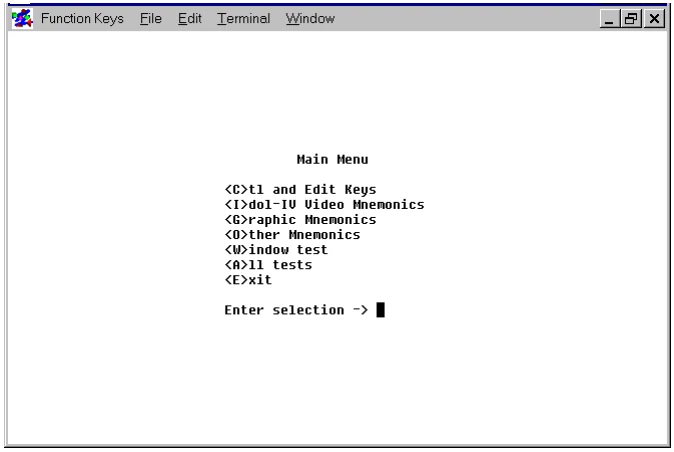
The TESTTERM utility begins with the TESTTERM Main Menu:
- C
- is short for control and edit keys. Use this value to test specifications for function keys, arrow keys, delete keys, insert keys, and so on.
- I
- is short for Dictionary-IV video mnemonics. Use this value to test specifications for text and cursor attributes.
- G
- is short for other mnemonics. Use this value to test specifications for the graphics characters that enable you to create boxes, tables, and other visual displays. For more information on mnemonics please refer to the Thoroughbred Basic Customization and Tuning Guide.
- O
- is short for other mnemonics. Use this value to test specifications for a wide variety of terminal mnemonics. For more information on mnemonics please refer to the Thoroughbred Basic Customization and Tuning Guide.
- W
- is short for Thoroughbred Basic Windows tests. Use this value to test specifications for Thoroughbred Basic Windows.
- A
- is short for all tests. Use this value to test all of the terminal specifications. This value comprises all the values listed above. After the tests are done, you can print a summary report, which lists all terminal specifications.
- E is short for exit. Use this value to leave from the
- TESTTERM utility and return to the Thoroughbred Basic Utilities Menu.
Type one of the values above and press Enter. If you find any invalid specifications, please refer to the description of the *NPSD or 8NPSD utility for information on how to modify your terminal table.
From the Thoroughbred Basic Utilities, version 8.9.1. Open this page in the PDF