

DUMP
Dump Data and Environment Information
This directive is a debugging aid that prints on the selected channel the specified information about this task.
Syntax
Section titled “Syntax”DUMP keyword (channel [,ERR=line-ref|,ERC=error-code]) dump-options
DUMP keyword (str-array[ALL] [,ERR=line-ref|,ERC=error-code])dump-optionskeyword- specifies what portion(s) of the programming and/or Thoroughbred Basic environment should be dumped.
channel- is an integer in the range of 0 to 32764 specifying the channel number of an OPEN file or device.
str-array- is the name of an existing string array that will receive the DUMP output.
line-ref- is the program line number or label to branch to if an error is produced by this function.
error-code- is a programmer-defined error code. Valid values are positive or negative whole numbers.
dump-options- is one or more optional specifiers that limit or control the portion of the environment to DUMP.
Remarks
Section titled “Remarks”Starting with release level 8.2, this directive has been enhanced to recognize the Escape key as a means of stopping a DUMP.
Starting with release level 8.2, you can only DUMP into three types of files: INDEXED, SERIAL, and TEXT. If you try to DUMP into any other type of file, an ERR=17 results.
Starting with release 8.3.0, the output from a DUMP can be loaded into a string array. The string array will then be re-DIMensioned to a one-dimension array and loaded if the array is more than one dimension or contains less than three elements. The DUMP output will be appended to the string array if there are three or more elements. The string array receiving the DUMP output will not be DUMPed out.
Starting with release level 8.9.0, the device width will be used to compute the number of characters per line to output when DUMPing string values.
Starting with release level 8.9.0, the DUMPing of string values will display foreign characters using #IDSV.LANGUAGE-SUFFIX to determine the language code. If the language code cannot be determined, DUMP will default to English. The foreign characters processed are the extended ASCII codes based on the Windows-1252 character set. For more information on the extended ASCII codes, please refer to the Thoroughbred Basic Technical Appendices.
Valid values and meanings for keyword are:
ACTIVE PROGRAMS- Prints the names and sizes of programs currently loaded in memory and in use by the current Thoroughbred Basic task.
ADDR PROGRAMS- Prints the names of all ADDRed public programs.
ALL- Prints out all levels of the current programming environment and the Thoroughbred Basic environment.
ARRAYS- Prints the names and values of all arrays in the environment including the total number of elements, the dimension sizes, and the value of each element in the array.
CALLSTACK- Prints out the CALL stack indicating which program was CALLed by which program and from which statement number.
CHANNELS- Prints out the names of all OPEN files, printers, and terminals.
DEFERRED_WRITE- Specifies that information generated by the DUMP directive is not printed immediately.
ENCRYPTION- Prints out the record encryption level and whether or not it is enabled.
ENVIRONMENT- Prints out all information about a single level of the current programming environment. If a level is not specified using dump options, the current level is displayed.
ESCAPE WHEN- Prints the active breakpoints set by the GLOBAL ESCAPE WHEN directive.
FILES- Prints out the name of each OPEN file and its channel number.
FORLOOPS- Prints active FOR/NEXT loops including the statement number of the FOR, the loop variable, increment value, and ceiling value.
FORMATS- Prints the names of all INCLUDEd formats and the values of their data names.
GLOBAL VARS- Prints out all common global variables. Displays the name and the value of each variable. The length of the string is displayed along with an ASCII and a hexadecimal representation of the value.
GOSUBS- Prints active GOSUBs showing the statement number of the GOSUB and the statement number referenced by the GOSUB.
HELP- Displays all valid DUMP options. To narrow the range of displayed values, you can specify a string. For example, DUMP HELP "VAR" displays all options that contain VAR.
INT ARRAYS- Prints the names and values of all integer arrays.
INT VARS- Prints out the names and values of all integer variables.
IPLCONFIG- Prints out IPLINPUT configuration information contained in the CNF and PTN lines from the IPLINPUT file, which was used when this Thoroughbred Basic task was initiated.
IPLDEVS- Prints out all information specified in the DEV lines of the IPLINPUT file which was used when this Thoroughbred Basic task was initiated.
IPLFILE- Prints out the name of the IPLINPUT file, which was used when this Thoroughbred Basic task was initiated.
IPLINFO- Prints out all information from the IPLINPUT file, which was used when this Thoroughbred Basic task was initiated.
IPLPRMS- Prints out the names and values of all allowable PRM lines from the IPLINPUT file, which was used when this Thoroughbred Basic task was initiated. For more information see the SET PRM directive and the PRM section of the Basic Customization and Tuning Guide (System Files).
NUM ARRAYS- Prints the names and values of all numeric arrays.
NUM USER FNS- Prints the names and values of all numeric user defined functions.
NUM VARS- Prints out the names and values of all numeric variables.
PRINTERS- Prints out the name of each OPEN printer and its channel number.
RETRY- Prints the Thoroughbred Basic statement that produced the last error condition. LEVEL=allows you to display the last RETRY statement in each level of the call stack.
STACKINFO- Prints out all active program control information.
STR ARRAYS- Prints the names and values of all string arrays including the length of each element and hexadecimal and ASCII representations of the value.
STR USER FNS- Prints the names and values of all string user defined functions.
STR VARS- Prints out the names and values of all string variables, including the length of each string and a hexadecimal as well as ASCII representation of the value.
SYSCOMMON- Prints out a subset of "SYSTEM" which contains the most commonly needed system variables: CTL, DIR, ERR, PGN, PRC, PREFIX, PSZ, SYS, and TRACEMODE.
SYSTEM- Prints out the names and values of all system variables.
TCB- Prints out all the Task Control Block values.
TERMINALS- Prints out the name of each OPEN Terminal ID and its channel number.
TYPEAHEAD_SIZE- Prints out the size of the keyboard buffer. For more information on type-ahead control and the keyboard buffer, please refer to descriptions of the BT and ET terminal mnemonics in the Thoroughbred Basic Customization and Tuning Guide.
USER FNS- Prints the name, statement number of definition, and contents of all user-defined functions.
VARS- Prints out the names and values of all program variables.
VERSION- Prints Thoroughbred Basic version information.
WHILELOOPS- Prints active WHILE/WEND loops indicating the statement number of the WHILE.
WINDOWS- Prints out all information about the current status of the Thoroughbred Basic Window Manager including the total number of defined windows, the current window, terminal information, and information about each defined window.
The format for dump options is:
"COLUMNS="- Allows the user to specify the device width to be used in computing the number of characters per line to output when DUMPing string values.
"LEVEL="- Allows the user to specify a particular environment level to DUMP. When used along with "NAME=" this provides the ability to DUMP a specific variable in a different level of the programming environment. When using public programs and CALL/ENTER linkage, Level 0 refers to the main program that was RUN, Level 1 is the first level of CALL, Level 2 the next nested CALL, and so on. Starting with release 8.3.0, the current environment level may be specified as "LEVEL=TOP".
"NAME="- Allows the user to specify a particular variable name, Thoroughbred Basic Window, or format to DUMP. When specifying arrays, the name of the array must be followed by brackets, e.g., "NAME=ARRAY[]". A Thoroughbred Basic Window name can be up to 8 characters long. The main screen may be specified as "NAME=MAIN".
Multiple dump-options may be chained together into a single string using the vertical bar as a separation character (|). The option to specify and use a different separation character is also available with the “SEP=” option. Examples of both follow:
"NAME=STRING_ARRAY$[ ] | LEVEL=0" "SEP=\NAME=STRING_ARRAY$[ ]\LEVEL=0"Examples
Section titled “Examples”The following sample program contains most of the programming environment elements the DUMP directive can display:
00010 REM "DUMPPROGRAM - PROGRAM TO DEMONSTRATE ''DUMP"00050 DEF FNSQUARE$ (N)=STR(N*N)+" IS THE SQUARE OF "+STR(N)00100 DIM NUM_ARRAY[5],STR_ARRAY$[2,2],INT_ARRAY%[-1:1,-1:1,-1:1]00150 NUMBER=10.5, STRING$= "STRING ELEMENT ", ELEMENT=100200 INTEGER%=INT(NUMBER)00300 CGVAR$=CGV("!GLOVAL_VAR1","THIS VARIABLE IS PROTECTED"); CGVAR$=CGV("GLOVAL_VAR2","THIS VARIABLE IS NOT PROTECTED")00400 FORMAT INCLUDE #DNFFMT ,OPT="DEFAULT"01000 FOR SUB1=1 TO 6; NUM_ARRAY[SUB1-1]=SUB1; NEXT SUB101100 FOR SUB1=0 TO 2; FOR SUB2=0 TO 2; STR_ARRAY$[SUB1,SUB2]=STRING$+STR(ELEMENT); ELEMENT=ELEMENT+1; NEXT SUB2; NEXT SUB101200 ELEMENT=1, COUNT=0, SUB1= -1; WHILE COUNT<3; FOR SUB2=0 TO 2; FOR SUB3=0 TO 2; INT_ARRAY%[SUB1,SUB2-1,SUB3-1]=INTEGER%+ELEMENT; ELEMENT=ELEMENT+1; IF ELEMENT=28 THEN GOSUB 08000 FI; NEXT SUB3; NEXT SUB2; SUB1=SUB1+1; COUNT=COUNT+1; WEND06900 GOTO 0900008000 OPEN (8) "P8"; DUMP ALL (8); CLOSE(8); RETURN09000 ENDOutput resulting from the DUMP directive at line 08000 will look like the following:
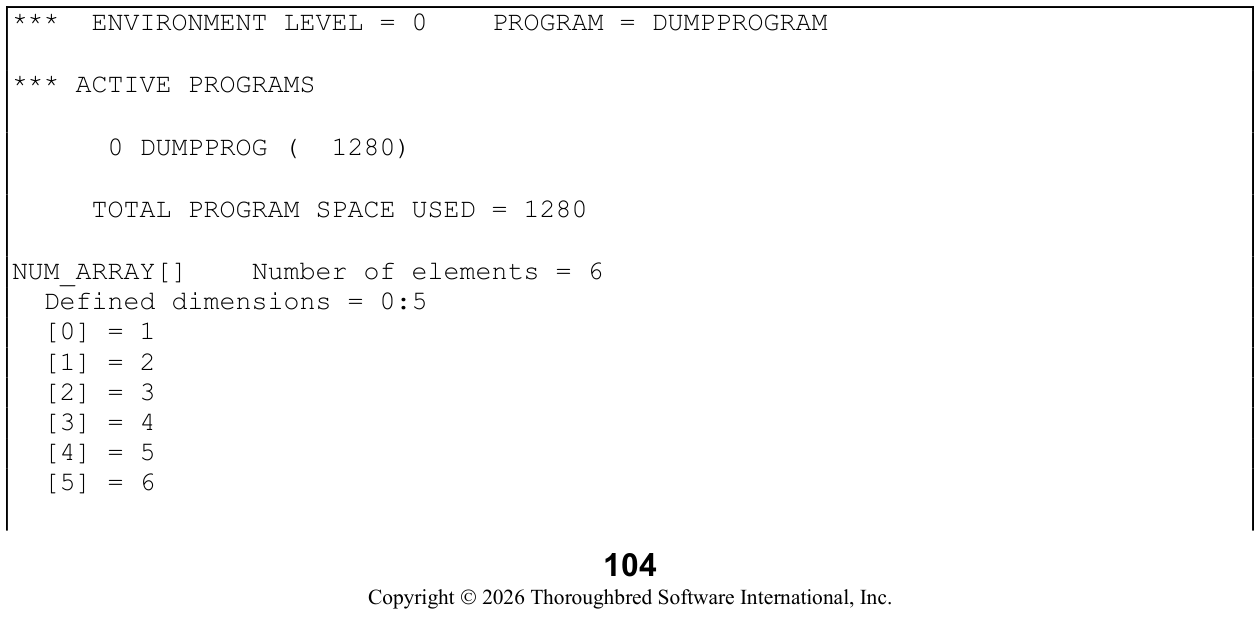

…and the remainder of elements in STR_ARRAY$…
INT_ARRAY%[ ] Number of elements = 27  Defined dimensions = -1:1, -1:1, -1:1  [-1,-1,-1] = 11
  [-1,-1,0] = 12
  [-1,-1,1] = 13
…and the remainder of elements in INT_ARRAY%…
NUMBER = 10.5STRING$           Length = 15   1: "STRING ELEMENT " $53545249 4E472045 4C454D45 4E5420$INTEGER% = 10SUB1 = 1SUB2 = 2ELEMENT = 28SUB3 = 2COUNT = 2
GOSUB on line 1200 going to line 8000FOR/NEXT loop starting at line 1200   Variable = SUB3   Step value = 1 Limit = 2FOR/NEXT loop starting at line 1200   Variable = SUB2   Step value = 1 Limit = 2
WHILE/WEND loop starting at line 1200
RETRY not active
*** GLOBAL ESCAPE WHEN INFORMATION       No breakpoints currently active
*** COMMON GLOBAL VARIABLES
!GLOBAL_VAR1         Length=26    1: "THIS VARIABLE IS PRO" $54484953 20564152 4941424C                              45204953 2050524F$   21: "TECTED"         $54454354 4544$
…all other common global variables and their contents…
***FORMATS/DATA NAMES
#DNFFMT           Number of data elements = 4   .DNAME-1       Length = 10    1: "STRING-1 "   $53545249 4E472D31 2020$   .DNAME-2 = -99999.99
…all other formats/data names and their contents…
*** SYSTEM VARIABLES
CDN = 726690.6
…all other system variables and their contents…
*** TASK CONTROL BLOCK
TCB(0) = 0
…all other task control block values…
*** ADDRed PROGRAMS…lists all public programs that had been ADDRed…
*** WINDOW INFORMATIONnumber of windows = 1Current window = Main window
Terminal Information:Model code = W50ANSI = No   Auto-wrap = Yes
…and all information about this terminal pertinent to Thoroughbred Basic Windows…
*** CHANNEL INFORMATIONFiles   No channels openPrinters   Channel Printer I.D.    8     P8Terminals   Channel Task I.D.    0   T4
*** IPL ENVIRONMENT INFORMATIONIPL input file = IPLINPUTDevice definitions = 18Number of FDT's = 20Partition size = 60000
Parameter (PRM)   StatusALLOC       Off   << Default >>CORE        Off   << Default >>IF47        On
…and all other PRM values…
Devices (DEV)Disk Enabled Sub-dirs PathD0 Yes No /work/8.1/qa/UTILSD3 Yes Yes /work/8.1/qa/SUB…and the remaining logical disk directories…
Terminal   Driver    PortT4          Window   tty
Printer Type            Width Lock Timeout CommandP1       2=Slave        80    Yes   15        ttyP8       1=Spool, pipe 80     Yes   1        cat>dump.out
Ghost Tasks   None defined
…and the Record Encryption information…
*** ENCRYPTION INFORMATION
    Record Encryption 1.1 is enabled
*** END OF DUMP
The second example shows how to load DUMP output into a string array:
DIM SA$[1];DUMP STR VARS (SA$[ALL]);DUMP STR ARRAYS (SA$[ALL])first loads into SA$[] the names and values of all string variables and then the names and values of all string arrays except for SA$[].
From the Thoroughbred Basic Language Reference, Volume I: A–E, version 8.9.1. Open this page in the PDF