

Introduction
Thoroughbred Report-IV is the report generator in the Dictionary-IV family of 4GL products.
It allows you to build reports using non-procedural constructs.
Reports can be directed to a printer, screen, or disk. You can produce report layouts using horizontal and vertical scrolling and screen painting.
Thoroughbred Report-IV can retrieve any data defined in Dictionary-IV. It can select records, sort, and calculate subtotals. The appearance can be controlled using page breaks, headers, footers, boldface, and underscore.
Thoroughbred Dictionary-IV defines the type and location of data items. Report-IV combines data from multiple files, file structures, file systems, and operating systems.
What is Thoroughbred Report-IV
Section titled “What is Thoroughbred Report-IV”Thoroughbred Report-IV is a comprehensive report writer that produces both simple and complex reports. It is designed to handle all application reporting requirements, reducing the need for the developer to create report programs.
Report-IV generates a printout of data from one or more files defined in Thoroughbred Dictionary-IV. It selects any specific group of records, sorts these records according to the user’s specifications, processes each record as needed, calculates subtotals and totals, and prints the end results. Special features for printing include page breaks, headers, footers, special character styles, boldfacing and underscoring.
Report-IV can work with almost any printer’s features due to its integration with Dictionary-IVs configurable printer interface tables.
If you prefer to deal strictly with functional and technical information, this manual also serves as a reference. You may wish to read the section in this Introduction on How this Manual is Organized.
The other major components are Thoroughbred Dictionary-IV, Thoroughbred Script-IV, Thoroughbred Query-IV, and Thoroughbred Source-IV. These components have separate manuals to describe their functions fully.
Report-IV provides full screen, free-form screen editing for producing high quality report layouts, and it supports horizontal scrolling for complete on-line viewing of the report layout.
The report definition is composed of several components. First, the report definition header specifies parameters such as the name of the definition and the library where it exists. The first two characters of the definition name designate the library. Other specified parameters include creation date and last change date as generated by the system. Next, the report layout is specified. It is divided into four sections: ENTRY-SECTION, FILE-SECTION, CONTROL-SECTION, and REPORT-SECTION.
ENTRY/FILE/CONTROL/REPORT SECTIONS
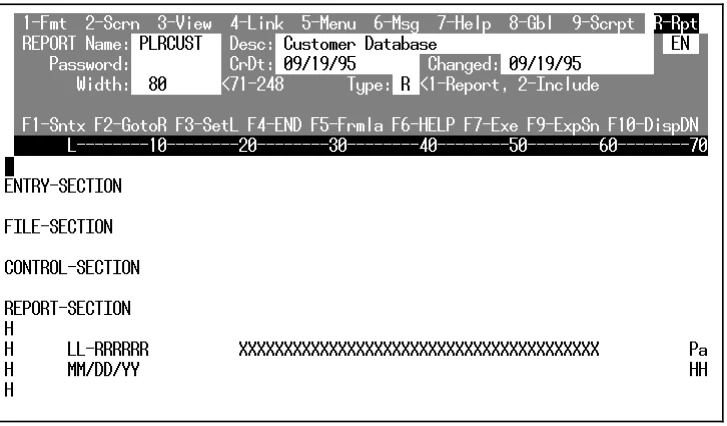
Each section plays a role in the specification of the report definition:
- ENTRY-SECTION
- Specifies the definition of any local Data Names to be included in the report, and Initialization and Termination routines.
- FILE-SECTION
- Indicates which Links (Files) are to be used in the report and how they are accessed.
- CONTROL-SECTION
- Controls the printing of special lines or report components, specifies controls of totals and subtotals, and conditional page breaks, etc.
- REPORT-SECTION
- Lays out the positions of data fields to be printed, specifies formulas, literal text, etc.
Report-IV Benefits
Section titled “Report-IV Benefits”- Thoroughbred Report-IV easily produces reports that would normally require extensive programming, saving you time, energy, and expenses.
- Reports can range from simple lists to complex cross-references of multiple files.
- It is easy to modify and save reports.
- You can create reports for any software application you have, including your accounting system.
- You can create reports that bring together data from different systems.
Report-IV Features
Section titled “Report-IV Features”Specific features and capabilities enable Report-IV to:
- Edit and display reports in 132-column mode.
- Create reports from any data file that Dictionary-IV can access.
- Access multiple related data files.
- Access files from a 3GL or 4GL application system.
- Provide special sorting and selection of records.
- Compute data in formulas specified by users.
- Compute totals and/or subtotals.
- Allow specification of controls for indicating conditional or intermittent activities such as special report lines, page breaks, processing, etc.
- Contain extensive formatting features, which include:
- headers and footers
- ability to incorporate literal text into a report
- adjustment of special character attributes including boldface, underscore and point size
- table driven interface to take full advantage of special printer functions and features
- masking numeric data
- Provides a full screen, free form editor for creating/editing report definitions.
- Contains a complete maintenance system for creating, changing, deleting, copying, renaming, and listing libraries and definitions.
- Offers security to restrict access to the system, to reports and to report components (libraries and/or definitions).
- Provides complete system maintenance utilities including Backup/Restore, Library Maintenance, Printer Table Maintenance, etc.
Report-IV Applications
Section titled “Report-IV Applications”Report-IV can create many types of reports, from simple listings to more complex reports, which might include multiple links, sort specifications, multiple subtotals, and control breaks. Below are suggested applications for reports:
Lists
Reports from databases that are maintained such as client/customer accounts receivable, and inventory. Other listings that can be produced include mailing labels and phone lists.
Forms
Reports in the format of standard or commonly used forms such as payroll checks, invoices, order forms, and billing statements.
Special Reports
More complex reports, including employee payroll registers, sales analysis, balance sheet, and profit and loss.
Cross Reference
Reports, which sort information such as a client listing, sorted by regional account representative, or a client outstanding invoice listing.
Report-IV Components
Section titled “Report-IV Components”Data Files
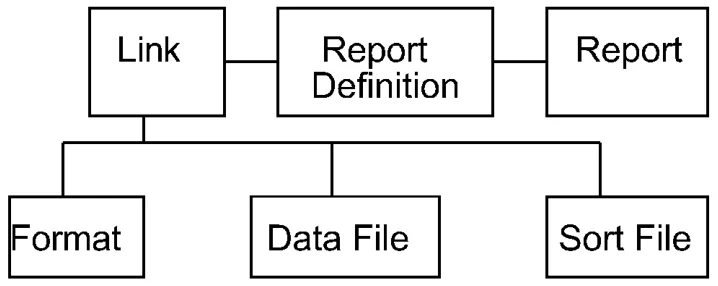
The base of the reporting system is the file(s) containing the data that will be presented in a report.
Links
To retrieve this data and move it into a report, a map of the data file, a Format is required. Report-IV interfaces with Dictionary-IV Definition Maintenance and uses a Link which points to the Format, the actual data files and secondary sort files to be used with the designated format.
Report Definition
The Report Definition outlines the layout of the finished report. It indicates where data is to be printed, when and where processing will occur, and it specifies headers, footers and other presentation information.
Reports
Finally, the report itself is produced. It may be output to a screen, printer, or file.
The Link(s) specified in the report definition contains file information such as format name, data file, and sort file.
Report-IV Components
For more information
Section titled “For more information”… about creating applications, refer to the Thoroughbred Dictionary-IV User Guide.
… about software conventions and databases, refer to the Dictionary-IV User Guide.
… about using each Dictionary-IV product, refer to the individual product reference manual (Query-IV, Script-IV, and Source-IV Reference manuals).
… about Thoroughbred Basic Utilities refer to the Thoroughbred Basic Utilities Reference Manual.
… about Thoroughbred Basic, refer to the Thoroughbred Basic Reference Manual.
From the Report-IV Reference, version 8.9.1. Open this page in the PDF