

Introduction
TS DataServer for Oracle is an integral part of the Thoroughbred Software network solution. With TS Environment, server data can be made available across platforms for use in Dictionary-IV, Report-IV, Query-IV, Script-IV, and Thoroughbred Basic applications.
Operating System Support: UNIX, Linux, and Windows
For specific information, please contact your Thoroughbred Sales Representative.
This guide first describes the Client side of TS DataServer for Oracle, which is provided with every TS Environment installation. It then provides specific information for accessing Oracle servers.
Your applications may require special privileges to access the database. You should consider the following issues:
- Setting privileges to access the database.
- Designing or modifying site procedures.
- Setting procedures for server transaction processing.
Requirements
Section titled “Requirements”To run TS DataServer for Oracle 10, tsoracle10, your system must meet the following requirements:
- Network communications implemented with TCP/IP protocol
- TS Environment 8.5.2+
- Oracle version 10 or higher
To run TS DataServer for Oracle 11, tsoracle11, your system must meet the following requirements:
- Network communications implemented with TCP/IP protocol
- TS Environment 8.5.2+
- Oracle version 11 or higher
To run TS DataServer for Oracle 19, tsoracle19, your system must meet the following requirements:
- Network communications implemented with TCP/IP protocol
- TS Environment 8.8.3+
- Oracle version 19 or higher
Once the installation is complete. Server access is enabled by the addition of a number of configuration items. For more information see SERVER.MAP and IPLINPUT.
TS DataServer for Oracle Components
Section titled “TS DataServer for Oracle Components”The TS DataServer for Oracle consists of three components:
- A Client enabled TS Environment,
- A Startup Program, and
- A Server Process (tsoracle##) for each connection.
Client Enabled TS Environment
Section titled “Client Enabled TS Environment”The client side is enabled in the standard TS Environment. When configured for data server access, it detects requests for data that reside on the server. When this event occurs, it sends the I/O request to the server for processing. The server responds with the result set and processing continues.
Startup Program
Section titled “Startup Program”The Startup Program (tsoracle##) creates Server Processes for clients as needed. When the Startup Program detects a client attempting to connect, it tries to create a Server Process for the client. If a Server Process is created successfully, the client and server can perform client/server communications.

Server Process
Section titled “Server Process”The Server Process (a child tsoracle##) is triggered by requests from the client. Once a request is received, it is processed and the results returned to the client.
System Architecture
Section titled “System Architecture”The following diagrams outline the core options for configuring the components of the Thoroughbred client.
- Client and server on one system
- Client on one system - server on another
Client and Server Co-exist on One System
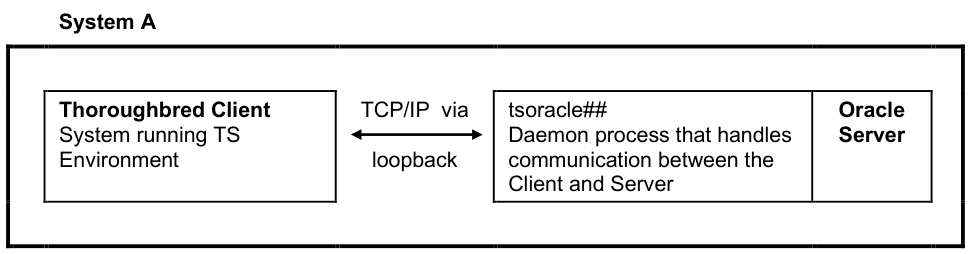
In the layout described by the above figure, the information is sent to the Server Process through the loopback TCP/IP address.
System Architecture
Client on System A and Server on System B
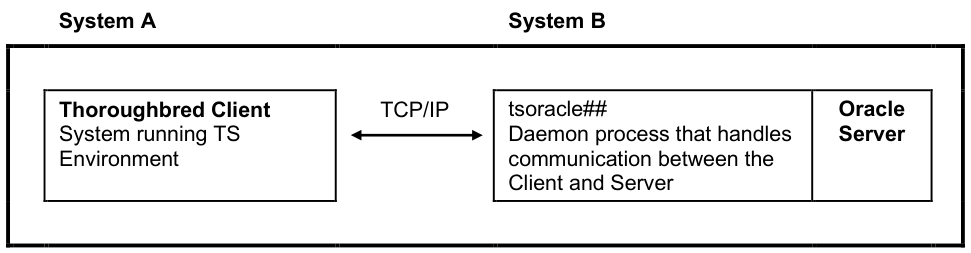
In the above figure the information is sent over the network to the server system. Once the requests reach the Server Process it creates SQL statements that are interpreted by the server system. The results are then passed back to the client through the Server Process.
From the TS DataServer for Oracle Reference, version 8.9.1. Open this page in the PDF