

Dictionary-IV Formats and Links
You must have a Format and Link defined to access an Oracle Server table.
Format Definition
Section titled “Format Definition”Although no changes are required to existing formats in order to use the client capabilities of the environment, you should be aware of the following information.
File Type
Section titled “File Type”When the Oracle tale is created, the field types are translated as follows:
Alphanumeric: VARCHAR2 or CHARNumeric: NUMBERDATE: DATEThe VARCHAR2 data types and CHAR allow only the characters above hex 20 to be included in the data. Any character below hex 20 is converted to a space.
The CHAR type will be used when the Basic PRM CREATWDBATTR is configured and the data element is set as a fixed length field either mandatory or optional (Entry Type 1 or 3).
When records are written to this table, any field of the CHAR type will be assigned a value of at least one space. This will ensure that the column is not null. For more information see PRM CREATWDBATTR in the IPLINPUT topic.
Entry Type
Section titled “Entry Type”All mandatory fields (Entry Type 2 and 3) will be set as NOT NULL fields in the Oracle tables when the Basic PRM CREATWDBATTR is set.
Data Elements – Naming
Section titled “Data Elements – Naming”Oracle only allows alphanumeric characters, the currency symbol ($), an underscore ( _ ), and a pound sign (#) in column names. The first character of the column must start with a letter. Any deviation from this convention results in table creation failure.
tsoracle## program translates the hyphen ( - ) that is acceptable in Thoroughbred Dictionary-IV Formats to an underscore ( _ ).
The use of Oracle reserved words (DATE, NUMBER, etc.) also results in table creation failure. For more information see your appropriate Oracle reference material.
Data Elements - Maximum Number
Section titled “Data Elements - Maximum Number”Although Thoroughbred Dictionary-IV supports the definition of 255 data elements, Oracle enforces a maximum number of 254 columns (one column corresponds to one data element).
Oracle does not support multiple occurrences for a single data element. For more information Multiple Occurrences in the Dictionary-IV Developer Guide.
The system creates separate columns in the Oracle table from a multiple occurrence field. The following is the naming convention for multiple occurrences.
data-element-name_seq#- seq#
- is the range from one to the number of defined occurrences. The total number of data element names plus each occurrence must not exceed 254. This is important to remember when moving an existing file into the server environment.
Binary Numeric Fields
Section titled “Binary Numeric Fields”Fields defined as binary in the Format are converted to decimal values and stored in ORACLE NUMBER fields. The type of binary field determines the length of the field.
The following table displays the formulas for calculating the field width in the Oracle table.
Formulas for Calculating Field Widths
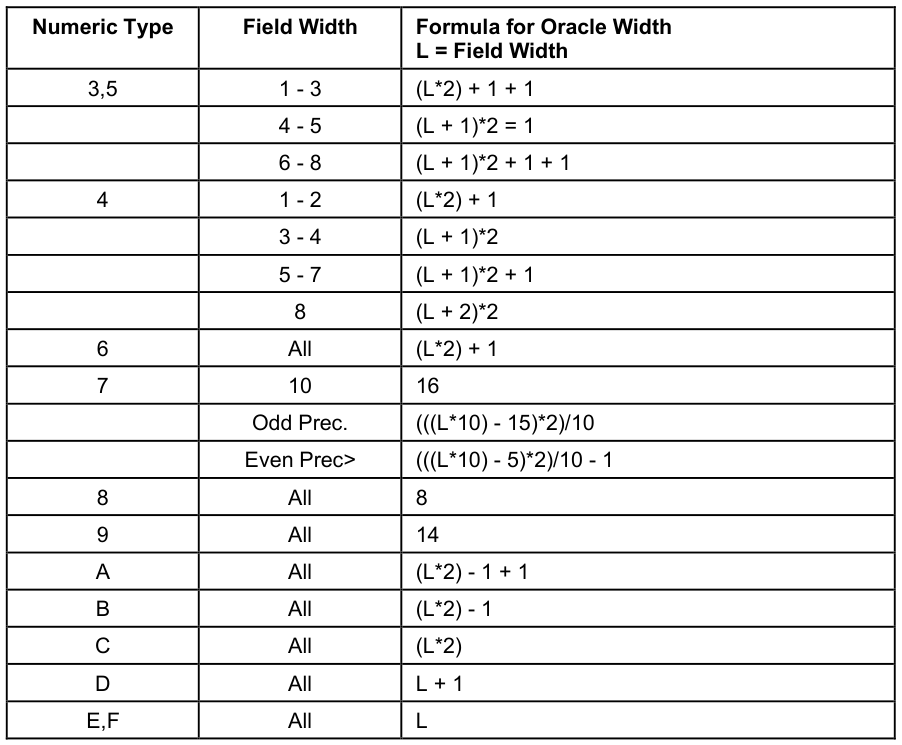
In all cases: if the value contains a decimal, add one to the field width.
SQL Dates
Section titled “SQL Dates”The system automatically translates dates stored in either of the SQL formats into the standard Oracle date storage format as you update records.
Link Definition
Section titled “Link Definition”The Link definition contains the configuration parameters necessary to describe a server table to Dictionary-IV. To access the Oracle Server you must enter the following information in the Link definition:
- File Type: M
- Server ID
- Table Name
Below is a sample Link definition screen:
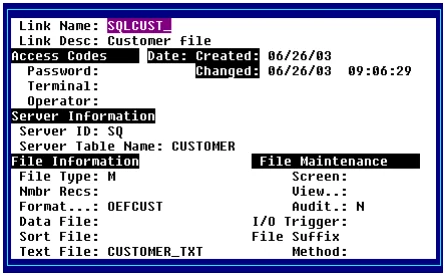
Server ID The server ID is a unique identifier that references the host via the definition in the SERVER.MAP file. It will be validated against the list of server devices configured in the IPLINPUT file. Although no ID will be disallowed, a warning will be displayed.
Table Name
The Table Name is the name used to create a table on the server.
Text File Name The Text File Name in this example appears as CSSERFL1.TXT. In Oracle it is converted to CSSERFL1_TXT.
Both the table and text file names must conform to Oracle table naming conventions. For more information see the appropriate Oracle document to review the restrictions.
Links must be defined as a file type M (MSORT). While the physical file is not stored as an MSORT file, it will be processed as one in Dictionary-IV for sorts and text field storage. For more information see Using Sorts and Text Fields for Oracle Data.
For Dictionary-IV to detect that a Link references a server-based table, File Type, Server ID, and Table Name must all contain valid information. If they do not a local file will be used, referenced by the name entered in the Data File field.
The system supports file suffixes. The file suffix character ( @ ) must be placed in the Table Name field for server files, rather than the Data File field. Where text fields are configured and a file suffix is used, the text file name must include the suffix character. For more information refer to the Dictionary-IV User Guide.
Since the @ is a Dictionary-IV convention, access to tables on other Oracle servers via SQL*NET (TABLE@OTHER_SERVER) can only be accomplished by configuring a synonym on the Oracle server referenced by the Server ID.
Sort definition occurs in the same way for server Links as for local Links and should be saved and updated with F8 processing. Even though no physical rebuild takes place, this will properly update the Link header. For more information see the Dictionary-IV Developer Guide.
If sort definitions exist in the Link and the table is recreated, the indexes will be defined automatically on the server as part of the create process.
Under the current Dictionary-IV methodology, first build a Link header and create the table. Modify the Link header to define the sorts. Erase and recreate the table. The indexes for all sorts are now defined on the server.
Once the Link header is configured, multiple and single record maintenance, CONNECTs, reports, queries, and recompiled scripts can access server tables. For more information about modifying Basic programs to support access to server tables see Using Basic.
While the data and sort file names may be populated during the Link header creation, neither is referenced during server access. However, the data file name is used to generate the text file name for text field storage. Therefore, be sure to either enter the data file name for the automatic generation of a text file name or manually enter the field.
From the TS DataServer for Oracle Reference, version 8.9.1. Open this page in the PDF