

Screen Characters
This utility allows you to configure screen display codes to be used as the system default, and three alternate sets, which are primarily used for implementing keyboards in foreign languages. This is valid for non-windowed screens.
Press F12 in Screen Maintenance to select a set of screen display codes from the sets created in this utility.
Select Screen Characters from the Dictionary-IV Utilities Menu. The system displays the following screen:
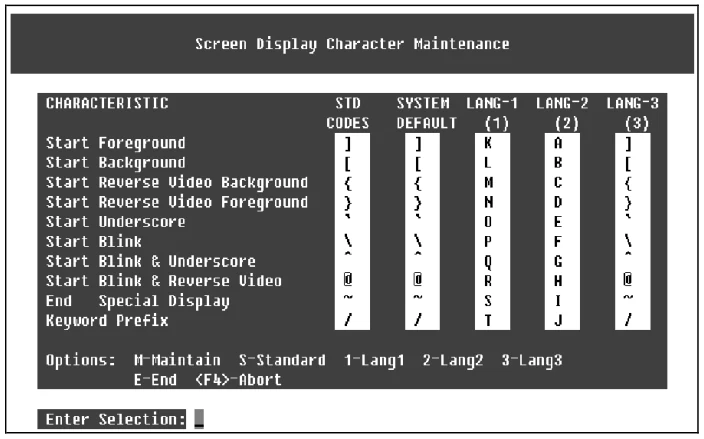
Five columns are displayed:
- Standard Codes
- System Default
- Language 1
- Language 2
- Language 3
Column 1 displays the standard codes (the way the product is shipped). Column 2 lists the system default codes. Columns 3 through 5 provide three alternate sets (languages) of screen display characters.
Use the following selections to maintain the character sets:
M Allows maintenance of the System Default column.
S Copies Standard Codes into the System Default column.
1 Swaps System Default codes with Language 1 codes.
2 Swaps System Default codes with Language 2 codes.
3 Swaps System Default codes with Language 3 codes.
E Ends the utility and saves any changes.
F4 Aborts the utility; does not save changes.
From the Dictionary-IV Administrator Guide, version 8.9.1. Open this page in the PDF