

Report-IV Utilities
This section describes Report-IV utilities.
Introduction
Section titled “Introduction”This section describes the options from the Thoroughbred Dictionary-IV Supplemental Utilities Menu that apply to Report-IV. The Report-IV software is integrated with Dictionary-IV that allows users to access options from Dictionary-IV menus.
The Thoroughbred Dictionary-IV supplemental utilities covered are:
Convert REPORT to Report-IV
- File Definition (to Format)
- Printer Table
- Report Definition
Miscellaneous
- Thoroughbred Report-IV: Compile Reports
- Thoroughbred Report-IV: Compile Errors
For more information about the Dictionary-IV Supplemental Utilities Menu options, see the Dictionary-IV Administrator Guide.
Convert REPORT File Definition (to Format)
Section titled “Convert REPORT File Definition (to Format)”The File Definition to Format Conversion Utility allows you to convert existing Thoroughbred REPORT file definitions into Report-IV definitions maintained in Dictionary-IV. You can convert definitions by library, range, or mask.
Dictionary-IV Supplemental Utilities Menu
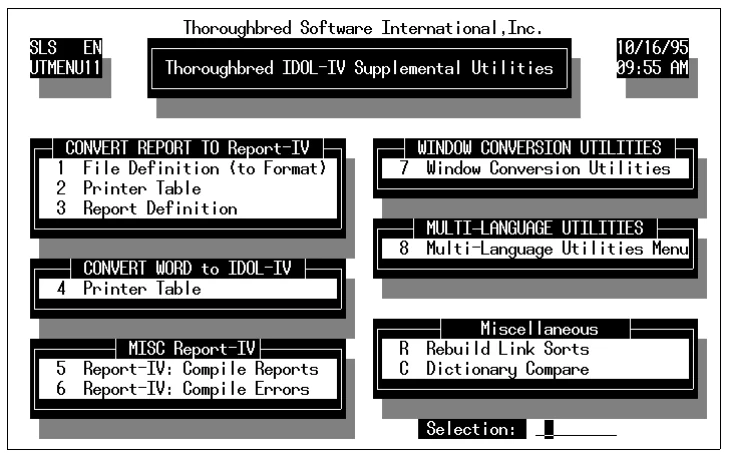
From the Supplemental Utilities Menu, select option 1. File Definition (to Format). The conversion screen is displayed. The system prompts:
Library:Enter the two-character library ID of the Thoroughbred REPORT library to convert.
Select everything:Select one of the following:
Y converts every definition in the library.
N enables you to specify a range of definitions to convert.
If you select N, the cursor goes to the prompt:
from name ....: (RETURN for first)to name ......: (RETURN for same or last)Enter the range of definition names. When selecting a range of names, press the Enter key twice to select the first and last names in the library.
using name mask....: (RETURN for none)A name mask allows you to select definitions without specifying individual names. If you do not wish to use a mask, bypass this prompt by pressing the Enter key.
A mask sets up a matching test. If a definition name matches the mask, then it is selected. If no match is made, it is bypassed. A mask contains match and passing characters. The characters in a Format name must match all of the match characters (same character and position) for it to be selected. The pass character (?) is used to indicate that no match in this position is needed.
| Mask | Action | Definition Names | |
|---|---|---|---|
| A? | selects | AB AC A1 | |
| bypasses | aB cA 11 |
This utility treats everything in the library as a file definition. If the library contains a variety of definitions, you should use the procedure to convert one definition or a range of definitions instead of converting the entire library. Definition types that are categorized as “F” are selected.
Is the displayed information correct?Select one of the following:
N enables you to make changes.
Y proceeds with the conversion. The system converts the specified definitions. If a definition has already been converted, or if a definition already exists by that name, the system asks if it should replace the existing definition.
XXXXXXXX already exists, replace?Select one of the following:
Y The system overwrites the existing definition.
N The existing definition is not overwritten and the next definition is read. If an end of definition is reached, the conversion is stopped and the menu is displayed.
To interrupt the conversion process, press the key sequence that represents the Escape key. The system asks if you want to terminate; enter the appropriate response.
New Definition LocationThoroughbred REPORT File Definitions are converted to Dictionary-IV formats and can be accessed by entering the definition name in Format Maintenance.
When accessing the new Dictionary-IV format, if the library that was converted does not exist in Dictionary-IV, the system prompts:
Creating new Library, enter Title:Enter the library title. The definition is accessible.
Convert REPORT to Report-IV (Printer Table Conversion)
Section titled “Convert REPORT to Report-IV (Printer Table Conversion)”This Printer Table Conversion Utility allows you to convert existing Thoroughbred REPORT printer tables into Report-IV printer tables that are maintained in Dictionary-IV. You can convert printer tables by library, range, or mask.
From the Supplemental Utilities Menu, select option 2. Printer Table. The conversion screen is displayed and the system prompts:
Library:Enter the two-character library ID of the Thoroughbred REPORT library to convert.
Select everything:Y converts every printer table in the library.
N enables you to specify a range of printer tables to convert.
If you select N, the cursor goes to the prompt:
from name ....: (RETURN for first)to name ......: (RETURN for same or last)Enter the range of printer table names. When selecting a range of names, press the Enter key twice to select the first and last names in the library.
using name mask....: (RETURN for none)A name mask allows you to select definitions without specifying individual names. If you do not wish to use a mask, bypass this prompt by pressing the Enter key.
A mask sets up a matching test. If a definition name matches the mask, then it is selected. If no match is made, it is bypassed. A mask contains match and passing characters. The characters in a Format name must match all of the match characters (same character and position) for it to be selected. The pass character (?) is used to indicate that no match in this position is needed.
| Mask | Action | Definition Names | |
|---|---|---|---|
| A? | selects | AB AC A1 | |
| bypasses | aB cA 11 |
Is the displayed information correct?Select one of the following:
Y proceeds with the conversion.
N enables you to make changes.
The system converts the specified printer tables. If a printer table has already been converted, or if a printer table already exists by that name, the system asks if it should replace the existing definition.
XXXXXXXX already exists, replace?Select one of the following:
Y The system overwrites the existing definition.
N The existing definition is not overwritten and the next printer table is read. If an end of file is reached, the conversion is stopped and the Development Utilities Menu is displayed.
To exit while the conversion is in process, press the Escape key. The system asks if you want to terminate. Enter the appropriate response.
New Printer Table LocationThoroughbred REPORT printer tables are converted to Dictionary-IV printer tables and can be accessed by using the Printer Maintenance Utility.
Convert REPORT to Report-IV (Report Definition)
Section titled “Convert REPORT to Report-IV (Report Definition)”The REPORT Definition to Report-IV Conversion Utility allows you to convert existing Thoroughbred REPORT definitions into Report-IV definitions maintained in Dictionary-IV. You can convert definitions by library, range, or mask.
From the Supplemental Utilities Menu, select option 3. Report Definition. The conversion menu displays and the system prompts:
Library:Enter the two-character library ID of the Thoroughbred REPORT library to convert.
Select everything:Select one of the following:
Y converts every report definition in the library.
N enables you to specify a range of report definitions to convert.
If you select N, the cursor goes to the prompt:
from name...: (RETURN for first)to name .......: (RETURN for same or last)Enter the range of report definition names. When selecting a range of names, press the Enter key twice to select the first and last names in the library.
using name mask....: (RETURN for none)A name mask allows you to select definitions without specifying individual names. If you do not wish to use a mask, bypass this prompt by pressing the Enter key.
A mask sets up a matching test. If a definition name matches the mask, then it is selected. If no match is made, it is bypassed. A mask contains match and passing characters. The characters in a Format name must match all of the match characters (same character and position) for it to be selected. The pass character (?) is used to indicate that no match in this position is needed.
| Mask | Action | Definition Names | |
|---|---|---|---|
| A? | selects | AB AC A1 | |
| bypasses | aB cA 11 |
Is the displayed information correct?Select one of the following:
Y proceeds with the conversion.
N enables you to make changes.
The system converts the specified definitions. If a definition has already been converted, or if a definition already exists by that name, the system asks if it should replace the existing definition.
XXXXXXXX already exists, replace?Select one of the following:
Y The system overwrites the existing definition.
N The existing definition is not overwritten and the next definition is read. If an end of file is reached, the conversion is stopped.
To interrupt the conversion process, press the Escape key. The system asks if you want to terminate. Enter the appropriate response.
New Definition LocationThoroughbred REPORT definitions are converted to Report-IV reports and can be accessed by entering the report name in Report-IV.
If you try to access REPORT definitions using the Report-IV Definition Maintenance screen and the library that was converted does not exist in Dictionary-IV, the system prompts:
Creating new Library, enter Title:Enter the library title. The definition is accessible.
Thoroughbred Report-IV (Compile Reports)
Section titled “Thoroughbred Report-IV (Compile Reports)”Compiling a report is sometimes referred to as phasing, because the compilation goes through phases. Options in this utility allow you to compile all reports or specify a library, a range of reports in a library, and a name mask.
From the Supplemental Utilities Menu, select option 5. Report-IV: Compile Reports.
The system prompts:
R-REPORT-IV Q-QUERY B-BothSelect R for Report-IV.
The system prompts:
Do you want to compile everything?Select one of the following:
Y compiles all reports from all libraries.
N enables you to make the following specifications:
If you select N, the Compile screen is displayed.
Library:Enter the two-character library ID for the reports that you want to compile.
Select everything:Select one of the following:
Y compiles every report in the library.
N enables you to specify a range of reports to compile.
If you select N, the cursor goes to the prompt:
from name....: (RETURN for first)to name .....: (RETURN for same or last)Enter the range of report definition names. When selecting a range of names, press the Enter key twice to select the first and last names in the library.
using name mask....: (RETURN for none)A name mask allows you to select definitions without specifying individual names. If you do not wish to use a mask, skip this prompt by pressing the Enter key.
A mask sets up a matching test. If a definition name matches the mask, then it is selected. If no match is made, it is skipped. A mask contains match and passing characters. The characters in a Format name must match all of the match characters (same character and position) for it to be selected. The pass character (?) is used to indicate that no match in this position is needed.
| Mask | Action | Definition Names | |
|---|---|---|---|
| A? | selects | AB AC A1 | |
| bypasses | aB cA 11 |
Is the displayed information correct?Select one of the following:
Y compiles the specified reports.
N enables you to make changes.
The system begins the compilation and displays a screen providing information on the current report being compiled and indicating the compile phase.
To interrupt the compilation process, press the Escape key.
Do you want to discontinue report?Select one of the following:
Y skips the current report and continues with the next report.
N resumes compiling the current report.
F4 aborts the compiling process.
Report-IV Compile Errors
Section titled “Report-IV Compile Errors”This option allows you to view report compile errors. You have the option of printing the compile errors to a selected printer or on the terminal screen.
From the Supplemental Utilities Menu, select option 6. Report-IV: Compile Errors. A View appears, listing reports that contain errors, and descriptions of those errors.
If no errors are encountered the following message appears:
No phase errors encountered, RETURN to continue.If errors are encountered, a View appears with errors and associated information. When you press the F4 key from the View, the system prompts:
Do you want a printed copy?Select one of the following:
- Y You
- are prompted to select a printer if there is more than one configured and a printed copy will be produced.
- N
- Does not print the compile errors to a printer.
If you select printed output, the system prompts:
Select printer (xx xx): xxSelect the printer; xx represents a defined printer name for your system. Press F1 to display a complete list of available printers.
From the Report-IV Reference, version 8.9.1. Open this page in the PDF