

Introduction
You should have received the following:
- An Order Confirmation email containing a License Assignment Card and a link for downloading the products in your order.
Requirements
Section titled “Requirements”OPENworkshop/Report-IV must be installed prior to installing Report-IV to PDF. If you have not already done this do not continue with this installation.
The 3GL wrapper (covered later in this document) requires that the Report-IV to PDF product be installed. The 3GL wrapper is an add-on to the Report-IV to PDF product.
Note: Starting with 8.9.0, Report-IV to PDF is included with Thoroughbred Basic and OPENworkshop. This includes the 3GL wrapper. Install the OPENworkshop/Dictionary environment with the Module Code associated with your order. It will include Report-IV to PDF.
Supported platforms are Windows desktop workstations and Server class machines, Linux, SCO, HP-UX, and AIX.
Overview
Section titled “Overview”Features
Section titled “Features”Report-IV to PDF extends the capabilities of Report-IV allowing you to save your reports as .pdf files.
- Convert Report-IV output to PDF by selecting a printer device from the standard Report-IV printer selection prompt. Convert a plain text file to PDF using the 3GL wrapper.
- Easily configured from the Settings and Options screen.
- Supports background images which are merged with the Report-IV data to create forms.
- Email the .pdf file as an attachment using simple email options or by executing an email Method.
- Fax the .pdf file using simple fax options or by executing a Fax Method.
- Print UPC barcodes.
- Execute a custom Post Save Method when custom processing of the .pdf file is required.
- View archived .pdf files with support for deleting, renaming, emailing and faxing a selected file.
- Supports 3GL printing using the PDF 3GL wrapper.
- Used by T-Connect, Thoroughbred’s browser based terminal emulator for all print options including slave printing.
System Architecture
Section titled “System Architecture”The following diagram outlines the Report-IV to PDF process:
CONNECT REPORT
Report-IV to PDF is selected as the output device from the
standard Report-IV printer selection prompt.
Report-IV writes the report output to temporary text files.
Report-IV to PDF converts temporary text files to .pdf
format and erases all temporary work files.
Report-IV to PDF moves the .pdf file to the predefined
save location and updates .pdf log file.
Report-IV to PDF processes the optional Post Save
Method, email commands, and fax commands.
Report-IV exits or continues with the next chained report.
To ensure proper write permissions, all temporary text files are created in the directory defined by Link UTDATFIL (#IDSV.DISK-NBR-DATAFILES). If this directory is defined in the IPL file with the subdirflg set, the USR directory must exist. All temporary files will be created in the USR directory. Solution-IV installations typically have the subdirflg set for the UTDATFIL directory. For more information on UTDATFIL please refer to the Dictionary-IV Administrator Guide.
When the conversion process is complete, the .pdf file will be moved to the directory defined by the Settings and Options: path to saved .pdf files. Once saved, your applications can perform additional processing on the .pdf file through a custom Post Save Method, email, or fax commands.
The following diagram outlines the 3GL wrapper process:
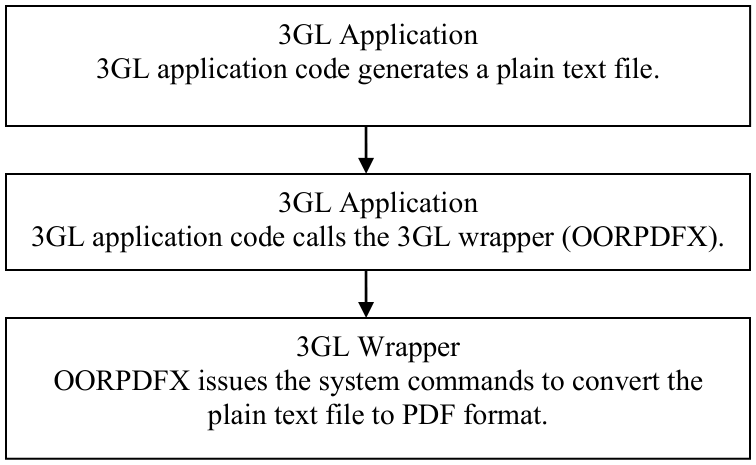
The various options available in Report-IV to PDF are not available with the 3GL wrapper. Please see the 3GL Wrapper section below for details.
For more information on T-Connect, please see the T-Connect Web Terminal Reference Manual.
Fonts and Formatting
Section titled “Fonts and Formatting”By default, all pdf documents are created using the Courier font. The Courier font is strongly recommended, it maintains the integrity of the Report-IV layout. Other supported fonts are:
| Font Face | Font Name |
|---|---|
| Courier Courier-Bold Courier-Italic Courier-Bold-Italic | Courier Courier Bold Courier Italic Courier Bold-Italic |
| Helvetica Helvetica-Bold Helvetica-Italic Helvetica-Bold-Italic | Helvetica (Arial) Helvetica Bold Helvetica Italic Helvetica Bold-Italic |
| Times Times-Bold Times-Italic Times-Bold-Italic | Times Roman Times Roman Bold Times Roman Italic Times Roman Bold-Italic |
| Symbol | Symbol |
| ZapfDingbats | Zapf Dingbats |
| C1 C1B C1I C1BI | STSong-Light (Chinese font) GBK-EUC-H encoding STSong-Light Bold STSong-Light Italic STSong-Light Bold-Italic |
| C2 C2B C2I C2BI | MSung-Light (Chinese font) ETen-B5-H encoding MSung-Light Bold MSung-Light Italic MSung-Light Bold-Italic |
| C3 C3B C3I C3BI | MHei-Medium (Chinese font) ETen-B5-H encoding MHei-Medium Bold MHei-Medium Italic MHei-Medium Bold-Italic |
| J1 J1B J1I J1BI | HeiseiMin-W3 (Japanese font) 90ms-RKSJ-H encoding HeiseiMin-W3 Bold HeiseiMin-W3 Italic HeiseiMin-W3 Bold-Italic |
| J2 J2B J2I J2BI | HeiseiKakuGo-W5 (Japanese font) 90ms RKSJ-H encoding HeiseiKakuGo-W5 Bold HeiseiKakuGo-W5 Italic HeiseiKakuGo-W5 Bold-Italic |
| K1 K1B K1I K1BI | HYGoThic-Medium (Korean font) KSC-EUC-H encoding HYGoThic-Medium Bold HYGoThic-Medium Italic HYGoThic-Medium Bold-Italic |
| K2 K2B K2I K2BI | HYSMyeongJo-Medium (Korean font) KSC-EUC-H encoding HYSMyeongJo-Medium Bold HYSMyeongJo-Medium Italic HYSMyeongJo-Medium Bold-Italic |
Several conversion parameters are based on the Courier font and the Report-IV width defined in the Report-IV header. The default values are: