

CONNECT MENU
The CONNECT MENU command enables you to connect to a pop-up menu. This can be done from a script, menu definition, or Dictionary-IV menu.
Example of a Pop-up Menu from a Dictionary-IV Menu
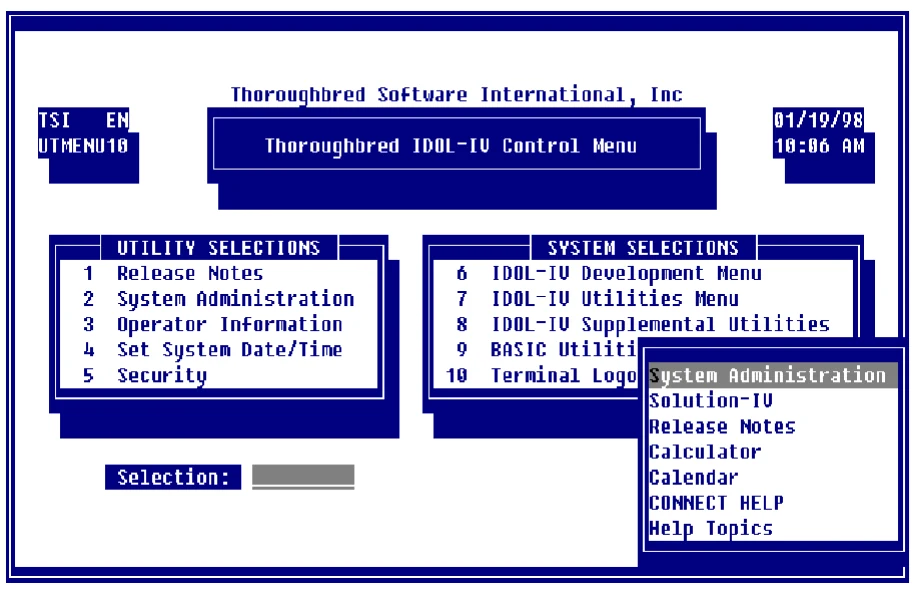
Hot Key (Ctl-P) Pop-Up Menu
For more information about creating a pop-up menu see Help Definition in the Dictionary-IV Developer Guide.
Selecting Options in Pop-up Menus
Section titled “Selecting Options in Pop-up Menus”If a pop-up menu displays you may make your selection in the following ways:
- Type the first letter of the option and press Enter. The system highlights the first match.
- Use the Down Arrow, Up Arrow, Page Up, Page Down, and Home keys to highlight the selection and press Enter.
Quick Key Reference
Section titled “Quick Key Reference”From the Selection field on any Dictionary-IV menu you may type the option number and press Enter to retrieve that option. You may also use the following function keys:
| Key | Description |
|---|---|
| F1 | Edit menu. For more information see F1 Edit Menu. |
| F3 | Screen print. Press this function key to print the screen. The system prompts for the printer. Type the printer name (LP, P1, etc.) and press Enter. |
| F4 | Exit Pop-up menu. |
| F7 | Change the language code in multi-language applications. For more information see Multi-language in the Dictionary-IV Administrator Guide. |
| F8 | Move menu. For more information see F8 Move Menu. |
| F9 | Expand/Compress menu. |
| F10 | Exit. |
| F16 | Print hard copy of the menu. The system prompts for the printer name (LP, P1,…). Type the printer name and press Enter. |
Cursor Movement
Section titled “Cursor Movement”| You may | use the following keys in CONNECT MENU: |
|---|---|
| Key | Description |
| Down Arrow | Moves the lightbar down one row. |
| Up Arrow | Moves the lightbar up one row. |
| Page Down | Moves the lightbar down one page. |
| Page Up | Moves the lightbar up one page. |
| Home | Moves the lightbar to the first option in the window, the first |
| option in the menu, and to the last option in the menu. | |
| Enter/F2 | Selects the highlighted menu option. |
F1 Edit Menu
Section titled “F1 Edit Menu”Displays the menu with all its parameters. You may edit the menu if you are defined as a developer. For more information see Operator Information in the Dictionary-IV Administrator Guide. Also see Help Definition in the Dictionary-IV Developer Guide.
F8 Move Menu
Section titled “F8 Move Menu”Moves the menu left, right, up, or down by pressing the appropriate Arrow key. Use the Tab and Back Tab keys to move the menu left and right.
From the Dictionary-IV User Guide, version 8.9.1. Open this page in the PDF