

EQL Command Language
The EQL Command Language is an SQL-compatible query language. The EQL Command Language option in the Query Control Window displays an interactive window where you can directly enter and edit a query. It provides the full power and capabilities of Thoroughbred Query-IV. For more information about SQL, see the Introduction in this document.
You can generate a query in this window from the selections made using the Query Framer. You can also execute a query directly from this window.
Executing the EQL window
Section titled “Executing the EQL window”When you run Thoroughbred Query-IV the system displays the Query Control window.
Query Control Window – EQL
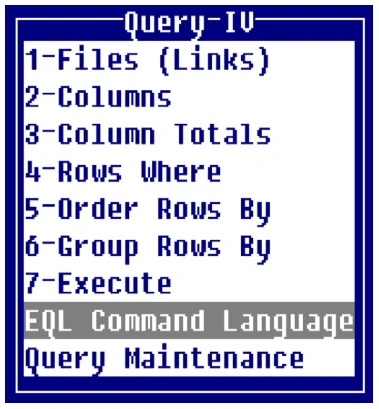
Select EQL Command Language and the system displays the EQL window:
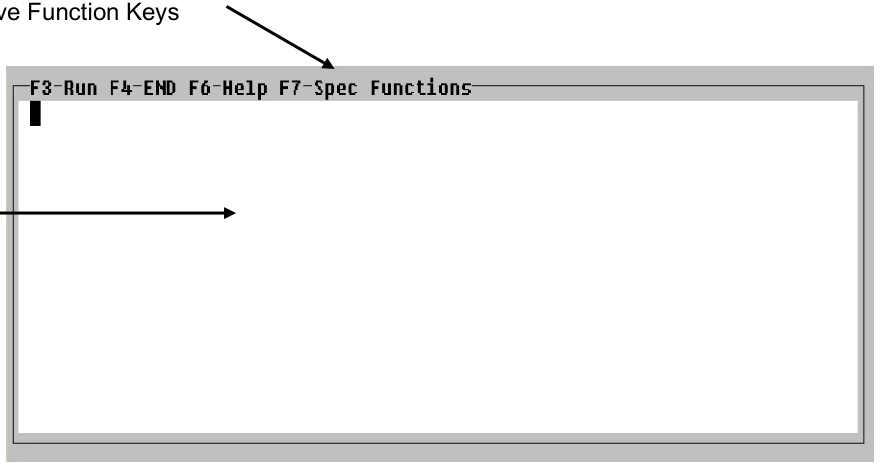
EQL Window
You may begin typing commands.
The following keys are available:
- F3
- To execute the command
- F4
- To end
- F6
- To view Help
- F7
- To view and select from the special functions listing
F7 - Special Functions
Section titled “F7 - Special Functions”The following options are available from Special Functions:
Split Text
Splits the text. For more information, see the Introduction in this document.
Join Text
Joins the text. For more information, see the Introduction in this document.
Execute Command
Executes the command in the window.
End
Exits.
Display Sorts Displays the sorts for the Link or Schema defined in your command. You may make selections from this listing.
Help
Displays on-line help.
Display Links Displays a list of Links as defined in Operator Preferences. (EQL only works with links not schemas.) For more information, see the Operator Preferences section of this document.
Generate Command Displays the EQL command for a query created in the Query Framer. For more information, see the EQL Command section in the Using Query-IV section of this document.
Display Data Names Displays a list of Data Names for the Link or Schema defined in your command. You may make selections from this listing.
Operator Preferences Displays Query-IV Operator Preferences to view or edit. For more information, see the Operator Preferences section of this document.
EQL syntax conventions
Section titled “EQL syntax conventions”The following conventions are used to describe syntax in Thoroughbred Query-IV. For more information, see the Introduction of this document.
Notational
For the syntax notational conventions see the Introduction of this document.
String Data Alphanumeric, or string, characters are identified by delimiting the data using double quotation marks. Although single quotation marks can be used, it is recommended that you standardize on using double quotation marks.
Example:
WHERE NAME = "TRANE"Numeric data
Section titled “Numeric data”Valid numeric data include digits from 0 to 9 and the following characters (commas are not valid):
- + . EExamples:
3490.24-25701 .1E5 .23E-5 32.85Repeating Data Names (multiple occurrences)
Section titled “Repeating Data Names (multiple occurrences)”A repeating Data Name has multiple occurrences. The number of occurrences is specified when the Data Name is defined. A repeating Data Name is really a table of Data Names that share a common name and definition.
To use a repeating Data Name, you must specify the Data Name and an offset, or occurrence number. If the offset number is not specified, the first occurrence is used as the default.
Substrings cannot be used with a repeating Data Name.
Do not use a space between the data name and occurrence specification or in the occurrence specification.
Example:
SELECT ITEM-CODE(3) FROM INVENTRYThis specifies the third occurrence of a multiple occurrence group.
Substrings
Section titled “Substrings”Substrings can be used with alphanumeric Data Names to specify a portion of the original value.
Substrings can only be used with alphanumeric Data Names.
Substrings cannot be used with a repeating Data Name (multiple occurrences).
The syntax is as follows:
string-elmt[(start,length)] | |
string-elmt | specifies an alphanumeric Data Name. |
start | specifies the starting position for the substring. |
length | specifies the number of characters of the substring. |
Example:
SELECT CUST-NAME(1,5) FROM CUSMSTRThis specifies the first 5 characters of the customer name.
Masks (numeric output formats)
Section titled “Masks (numeric output formats)”A mask specifies the format in which numeric data are displayed or printed.
Masks allow you to specify the same output format regardless of the size of the number. They also allow you to output financial symbols and characters (for example, $5,632.04-), and to retain insignificant zeros (e.g., output 1 as 1.00).
The syntax is as follows:
num-elmt:"mask" | |
num-elmt | specifies a numeric Data Name. |
mask | specifies 1 or more mask characters. |
Example:
SELECT BONUS:"$#,###.00",HRS-WORK*RATE:"$#,##0.00"FROM PAYROLLThis specifies the placement of a dollar sign, commas, and decimal place in the designated Data Names.
Mask characters
Section titled “Mask characters”For more information, see the Introduction of this document.
Special operators in conditions
Section titled “Special operators in conditions”NOT value Negative condition. The NOT operator is used to negate a condition. It can be used to negate the result of the IN, BETWEEN, or LIKE operators.
IN (constant [, constant] … )
Matching value in list. Items in the list specified by the IN operator must each be separated by a comma and space. Alphanumeric values must be padded to the correct length for a proper match.
LIKE “partial-value”
Partial equality. The LIKE operator can specify a string value containing wildcards, which can match more than 1 character. LIKE automatically pads its values to the correct length. (You must manually pad values compared by other operators.)
LIKE Wildcards
- Matches any characters (0 or more)
- ?
- Matches a single character
- [A-Z]
- Matches a range for a single character
- [AGCF]
- Matches a single character in list
[wildcard] Matches the wildcard character
The brackets [ ] in wildcards are required; they do not indicate optional values. The * and ? wildcards do case-insensitive comparisons.
BETWEEN low-value AND hi-value Greater than or equal to and less than or equal to. This operator can work with numeric or alphanumeric values, but the low-value and hi-value must be of the same type. Alphanumeric values must be padded to the correct length if you want to obtain a specific match for starting and ending values.
RANGE FROM “low-value” TO “hi-value”
Primary key field greater than or equal to and less than or equal to. This operator works only with alphanumeric values. It uses the primary key field from the first Link defined in the FROM clause to select a range of records. The key field does not have to be used as a column in the query. Alphanumeric values must be padded to the correct length if you want to obtain a specific match for starting and ending records.
SOUNDEX value Sounds like. The SOUNDEX operator will compare values using phonetic operation to find data that has a similar pronunciation.
EQL Command Summary
[output-options;]SELECT column[,column]...FROM link-name[,link-name]... [WHERE condition] [GROUP BY data-name] [ORDER BY sort name|temp-sort-definition];output-options
[DETAIL]
[HEADING]
[INPUT prompt INTO local data-name]
[PRINTER[printer-id]]
[TOTAL column[,column]…]
column value[“column-heading”][:“mask”] value:
constant,data name,expression,expression-alias, or group
function
expression-alias:
expression AS name group-function: SUM(numeric-data-name|numeric-expression)
AVG(numeric-data-name) MIN(numeric-data-name) MAX(numeric-data-name) COUNT(data-name)
condition Two or more values, consisting of constants, data names, or expressions that interact with relational or logical operators to form either a true or false result.
sort-name
SORTx
temp-sort-definition data-name[([start-pos,length]|[A|D],[C])][+data-name…]…
[output-options]
Section titled “[output-options]”The output options allow you to format your query to resemble a report, with a report title (query heading), grand totals on numeric columns, and the ability to obtain a printed copy of the query.
The output options can appear in any order, but as a group, they must be terminated by a single semicolon.
Example:
TOTAL CUS-BALHEADINGPRINTER;SELECT CUS-CODE, CUS-NAMEFROM CUSMSTR[DETAIL]
Section titled “[DETAIL]”Allows you to display the detail lines that make up a summary row described by the GROUP BY clause.
Example:
DETAIL;SELECT EMPLOYEE-NAME, DEPT-CODE, SUM(SALARY)FROM Q4EMPLOYGROUP BY DEPT-CODE[HEADING]
Section titled “[HEADING]”This option specifies that a standard table heading, or title, is to be produced at the top of the query table. The standard heading has 3 lines, which contain the following information:
- Date, Installation Name, Page Number
- Query Description or Default Description
- Blank Line
Example:
HEADING;SELECT CUS-CODE, CUS-NAME, SALES-REP, YTD-SALESFROM CUSMSTRTable Displayed:
10/28/... Thoroughbred Software International, Inc. ...Page  1        Customer YTD-Sales
CUS-CODE    CUS-NAME    SALES-REP   YTD-SALESC100        Abe Stiltz S3           11431C200        Rita Mole   S2          43020
[INPUT prompt INTO local data-name]
Section titled “[INPUT prompt INTO local data-name]”Allows the creation of run-time retrieval rules. Prompts may be entered into your queries.
Example:
INPUT "Enter Dept:" INTO TMP-DEPT(2);SELECT EMPLOYEE-NAME, DEPT-CODEFROM Q4EMPLOYWHERE DEPT-CODE=TMP-DEPT[PRINTER[printer-id]]
Section titled “[PRINTER[printer-id]]”All queries display on the screen by default, unless the “PRINTER” option is used. This option is ignored when the query is executed from a Script or Menu.
If a printer ID is specified, that printer is where the query will be output. If PRINTER is specified with no printer ID, the system asks you to select a printer when the query is executed.
Example:
PRINTER P1;SELECT CUS-CODE, CUS-NAMEFROM CUSMSTR[TOTAL column[,column]…]
Section titled “[TOTAL column[,column]…]”This option allows you to obtain grand totals for any numeric column in your query. The TOTAL column definition must be a numeric Data Name or a numeric expression-alias name defined in the selected columns. No column heading or mask can be specified by the TOTAL. The total is displayed using the same masking specified for the column. If you specify multiple columns, you must separate each of them by a comma and space.
The order of the TOTAL columns is insignificant.
The grand total is produced at the end of the query under the appropriate column. The grand total consists of 2 lines: a line of dashes and the grand total line.
See SELECT column
TOTAL YTD-SALES, MARGIN;SELECT CUS-CODE, CUS-NAME, YTD-SALES, YTD-SALES - YTD-COST AS MARGINFROM CUSMSTRSELECT column[,column]…
Section titled “SELECT column[,column]…”SELECT is the command used to examine data in the database and is the primary command of query languages. You are required to specify SELECT in your query with at least one column. If you specify multiple columns, you must separate each of them by a comma and space.
column
Section titled “column”A column can be defined as a constant, Data Name, expression, expression-alias, or group function. Once defined you can then specify a column heading and mask.
value["col-head"][:"mask"] | |
value | is a constant, Data Name, expression, expression-alias, or group function. |
col-head | [optional] is the column heading to appear on the query. |
mask | [optional] is the masking to be used for the data in this column. |
A column can specify either an alphanumeric (string) value or a numeric value.
All columns can specify a column heading. If a heading is not specified, the query uses the column definition as the heading. In the case of an expression, the entire expression is used, unless an expression alias is specified.
Only numeric columns can specify a mask. If you specify a column heading or mask, it must appear after the value and must be separated from surrounding items by a space. Each column definition is separated by a comma and space.
Example:
SELECT CUS-NAME, CUS-BALANCEFROM CUSMSTRYou can include single quotation marks in a column heading, but you must use the single quotes inside the double quotes that delimit the heading.
Examples:
SELECT CUS-NAME "Customer", CUS-PHONEFROM CUSMSTR
SELECT EMP-LAST-NAME + ", " + EMP-FIRST-NAME "Name", EMP-GROSS-WAGES:"$###,###.00"         "Year-To-Date|Gross Wages"FROM EMPMSTR
Data names
Alphanumeric data names can specify subscripts.
Example:
SELECT DESC(1,5)FROM INVENTRYIf Data Name definitions include a description, the description will be used as the column heading.
Repeating Data Names can specify an offset, or occurrence number.
Example:
SELECT MONTH(5)FROM CALENDARexpression Two or more elements, consisting of constants or Data Names that interact with operators to form a new value.
The field length for an alphanumeric expression is the combined length of all the values in the expression.
The field length used for a numeric expression is the largest field length used by a Data Name in the expression. A numeric expression can be followed by a mask. (It is recommended that you use a mask with numeric expressions.)
Example:
SELECT EMP-HOURS-OT * EMP-OT-RATE :"$#,###.00", EMP-LAST-NAME + ", " + EMP-FIRST-NAME(1,10)FROM EMPMSTRexpression-alias This option allows you to use a name to refer to a column. This is useful when the column definition is an expression that you are going to use elsewhere in the statement. By referring to the expression alias, you can save time and avoid making any keyboard entry errors when duplicating the expression. Also, the column heading uses the alias name as a default, rather than the entire expression.
The expression-alias name can be used anywhere that an expression can be used. It retains its original meaning. It cannot be used as a Data Name (a substring of an expression-alias name is invalid). The expression-alias name can also be used in some places where an expression cannot be used, such as in the TOTAL clause, or on the left side of an operator in the WHERE clause.
Example:
SELECT OPEN-INVOICE-AMT-ON-ACCOUNT-AMT AS BALANCE FROM CUSMSTRWHERE BALANCE >500group-function This function finds the sum (SUM), average (AVG), minimum value (MIN), maximum value (MAX), and total number (COUNT) of all values in a numeric column and displays a single value.
The GROUP BY clause is used to control the level at which group functions are computed.
Do not use a space between the function name and the parenthesis or between the parenthesis and the Data Name or expression.
Query languages require the query to return the same number of values for each column selected. For this reason, group functions cannot be mixed with columns that return multiple values, and group functions cannot be used in the WHERE clause.
SUM
SUM(num-data-name|num-expression) | |
num-data-name | is the numeric Data Name to be totaled. |
num-expression | is the numeric expression (addition, subtraction, multiplication, division, exponentiation) of Data Names before totaling. |
Example:
SELECT AVG(SALARY)FROM EMPLOYEEThis displays a single-row query containing a total of all employee salaries.
AVERAGE
AVG(num-data-name)num-data-name- is the numeric Data Name to be averaged.
Example:
SELECT AVG(SALARY)FROM EMPLOYEEThis displays a single-row query containing the average of all employee salaries.
MINIMUM
MIN(num-data-name)num-data-name- is the numeric Data Name to check for and display the minimum value.
Example:
SELECT MIN(SALARY)
FROM EMPLOYEE
This displays a single-row query containing the minimum value of all employee salaries.
MAXIMUM
MAX(num-data-name)num-data-name- is the numeric Data Name to check for and display the maximum value.
Example:
SELECT MAX(SALARY)FROM EMPLOYEEThis displays a single-row query containing the maximum value of all employee salaries.
COUNT
COUNT(data-name)data-name- is the Data Name to be counted.
Example:
SELECT COUNT(EMPLOYEE-NAME)FROM EMPLOYEEThis displays a single-row query containing the total number of employee names.
FROM link-name [,link-name]…
Section titled “FROM link-name [,link-name]…”The FROM clause specifies the Links (data files) from which you wish to examine data in your database. In your SELECT command, you are required to specify a FROM clause with at least one Link name.
If you specify multiple Link names, they must be related to each other by a common Data Name, and in the FROM clause, you must separate each of them by a comma and space.
The names of all Links that have any of their columns referenced anywhere in the query must appear in the FROM clause.
Data Names from all specified Links are available to be used as a selected column. If the spelling of a Data Name in one selected Link matches a Data Name in another selected Link, the Data Names are treated as one name. Like Data Names should contain like data.
Example:
SELECT SLSPSN-NAME, CUS-NAME, INVOICE-NUM, INVOICE-AMTFROM SLSPMSTR, CUSMSTR, INVMSTR[WHERE condition]
Section titled “[WHERE condition]”The WHERE clause is optional and is used to select rows for the query based upon a specified condition. If this clause is omitted, all rows are selected.
condition is two or more values, consisting of constants, Data Names, or expressions that interact with relational or logical operators to form either a true or false result.
Values or columns used in the WHERE clause need not be selected by the query.
An expression can only be specified on the right side of an operator, but an expression-alias name can be specified on either the right or left side.
The NOT operator can be used to negate the result of the IN, BETWEEN, or LIKE operators.
The brackets [ ] in wildcards are required; they do not indicate optional values.
The LIKE operator can specify a string value containing wildcards, which can match more than 1 character. LIKE automatically pads its values to the correct length. You must manually pad values compared by other operators.
Comparisons are case-sensitive with the exception of the * and ? wildcards.
Items in the list specified by the IN operator must each be separated by a comma and space. Using the IN operator is equivalent to specifying multiple equality tests (=) grouped by OR. Using NOT IN is equivalent to specifying inequality tests (< >) grouped by AND.
Group functions, such as SUM, cannot be used in the WHERE condition.
Examples:
SELECT ITEM, ITEM-DESCFROM INVENTRYWHERE ITEM LIKE "M*M"Selects rows where the item starts with an M and ends with an M.
WHERE ITEM NOT LIKE "C*"Selects rows where the item starts with anything but a C.
WHERE ITEM LIKE "[A-E]900*"Selects rows where the item starts with an A, B, C, D, or E followed by 900.
WHERE ITEM IN("X7329M", "X7020A", "Q9903L")Selects rows where the item matches any of the three items in the list.
WHERE ITEM BETWEEN "D3195M" AND "E9999Z"Selects rows where the item matches D3195M, E9999Z, or any item in between these two values.
WHERE ITEM NOT BETWEEN "D3195M" AND "E9999Z"Selects rows where the item does not match D3195M, E999Z, and does not match any item in between these two values.
SELECT CUS-NAME, BALANCEFROM CUSMSTRWHERE RANGE FROM "C100" TO "C199"Selects rows where the customer code matches C100, C199, or any customer code in between these two values.
SELECT CUS-NAME, BALANCE, CRED-STATUSFROM CUSMSTRWHERE BALANCE > 500 AND CRED-STATUS LIKE "SHAKY*"Selects rows where the credit status matches “SHAKY”. Using the LIKE operator allows you to specify a match without padding the value.
SELECT CUS-NAME, BALANCE, CRED-STATUSFROM CUSMSTRWHERE BALANCE > 500 AND CRED-STATUS = "SHAKY "Selects the same rows as the previous example, but because the = operator was used instead of the LIKE operator, the value “SHAKY” had to be padded with spaces up to the defined length of CRED-STATUS to get the correct matches.
[GROUP BY data-name]
Section titled “[GROUP BY data-name]”The GROUP BY clause is optional and is used to group rows together by the specified Data Name. It produces a summary row for each group.
data-name- is the Data Name you want to group by.
- GROUP BY
- controls the level at which the group function is computed. If a group function is specified as
a selected column, the group function is applied to the group defined here. The group function operates on the group of records and produces a single value for each group.
This clause automatically orders the query by the specified group. The GROUP BY clause cannot be used when an ORDER BY clause is used; they are mutually exclusive.
If the specified group exists as a Thoroughbred Dictionary-IV predefined Sort, or as the first part of a Thoroughbred Dictionary-IV predefined Sort, that Sort is used to order the query (GROUP BY DEPT- CODE will use SORT1 DEPT-CODE + EMPLOYEE-NAME). This is done for the purpose of getting a quicker response to the query.
Example:
SELECT DEPT-NUMFROM EMPLOYEEGROUP BY DEPT-NUMThis displays a summary that lists each unique department from the employeefile.
SELECT DEPT-NUM, SUM(SALARY)FROM EMPLOYEEGROUP BY DEPT-NUM
This displays a summary query that lists a total of employee salaries for each department.
[ORDER BY sort-name|temp-sort-def]
Section titled “[ORDER BY sort-name|temp-sort-def]”The ORDER BY clause is optional and is used to produce the query with the rows in a specified order. If this clause is omitted, the query is ordered by the primary key sequence of the first Link (SORT0).
The ORDER BY clause cannot be used when a GROUP BY clause is used; they are mutually exclusive. If a GROUP BY clause is used, the rows are automatically ordered by the specified group.
- sort-name
- is a standard Dictionary-IV sort name (SORTx). See below.
- temp-sort-def
- is a standard Dictionary-IV temporary sort file. See below.
SORTx SORTx represents a predefined Sort. The x is a sort number from 1 to 99. SORT0 represents a sort by the primary key. For more information, see the Links section of the Dictionary-IV Developer Guide.
SELECT CUS-NAME, BALANCEFROM CUSMSTRORDER BY SORT2temp-sort-definition This is a standard Thoroughbred Dictionary-IV Sort definition that is used to order the rows in the query. The Sort definition creates a temporary Sort file that is used for the purposes of this query only.
This may delay your query when the data file is very large, in which case it is recommended that you use a Thoroughbred Dictionary-IV Sort name rather than a temporary Sort definition.
data-name[([start-pos,length]|[A|D],[C])] | |
[+ data-name...]... | |
data-name | is the Data Name by which the Sort is performed |
start-pos | is the position to begin the substring. (Cannot be used with D or C options.) |
len | is the number of characters in the substring. (Cannot be used with D or C options.) |
A | (optional) is ascending order |
D | (optional) is descending order |
C | (optional) is case-sensitive. The default is case-insensitive |
A substring can be specified with the (start-pos,length) option. This option cannot be used with the A, D, or C options.
The A and D options are used to specify the sort order: ascending or descending. These options are mutually exclusive. If no sort order is specified, the order defaults to ascending.
The A option specifies that the sort order is ascending. The D option specifies that the sort order is descending.
The C option specifies the sorting to be case-sensitive. The default is case-insensitive. (Capital letters are uppercase; small letters are lowercase.)
A comma is needed only if an option precedes. The A, D and C options affect only the preceding Data Name and not the entire secondary key. Additional Data Names can be concatenated to form a multi-part Sort definition.
Example:
SELECT OPEN-INVOICE-AMT-ON-ACCOUNT-AMT AS BALANCE FROM CUSMSTRORDER BY BALANCE(D)From the Query-IV Reference, version 8.9.1. Open this page in the PDF