

Upgrade Administration
After the merge of an upgrade the user is taken to the Upgrade Administration menu. The upgrade can be done at installation or at another time.
From the OPENworkshop menu (RUN “OO”) Select Utilities and then select System Administration to access the Upgrade Administration option.
From the Dictionary-IV menu (RUN “ID”), select System Administration to access the Upgrade Administration option.
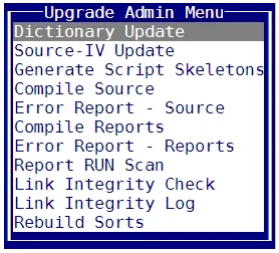
Dictionary Update
For more information see Dictionary Update in this manual.
Source-IV Update
Upgrade your Source-IV files.
Generate Script Skeletons
Recompile all of your existing scripts.
Compile Source
Recompile all your existing source files
Error Report – Source
Displays the view of source compile errors that were encountered during the last compile.
Compile Reports
Recompile all of your existing reports.
Error Report – Reports
Displays the view of report compile errors that were encountered during the last compile.
Report RUN Scan Scans Report-IV definitions for all instances of RUN program_name. This utility is intended to help the transition from older Report-IV definitions where the RUN command was support to OPENworkshop where RUN is no longer supported. Please refer to the current Report-IV Reference manual for details.
Link Integrity Check This must be run as part of the upgrade process (in addition to the Rebuild Sorts option below). This utility will perform various integrity checks and correct some anomalies in the Link header.
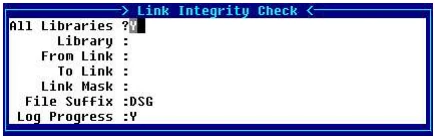
For the Links you want to check, select all libraries, a single library, and a range of Links with or without a mask, with or without a file suffix. Select Y to log the progress. Once the check is completed you can view the Link Integrity Log.
The Link Integrity Check reports all Dictionary-IV (“I”) file types that are not auto-expanding files (0 number of records). This helps identify files that could be converted to the auto-expanding types.
Link Integrity Log
View the results of the Link Integrity Check.
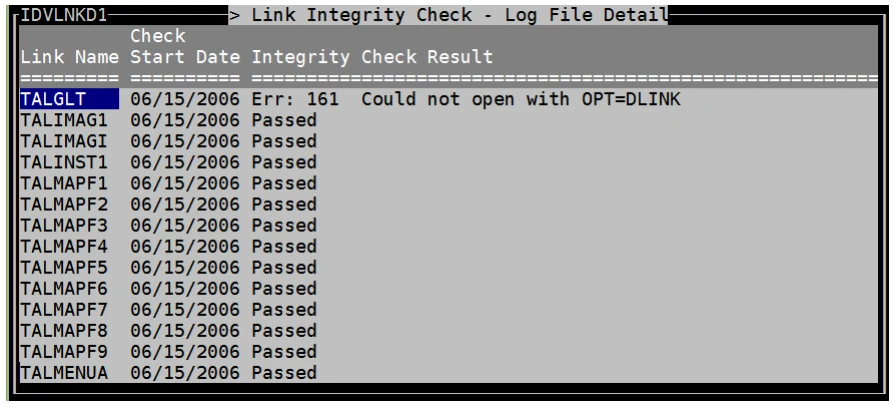
All Dictionary-IV and OPENworkshop Links will be skipped. Any problem with the integrity of a link will appear under the Results column.
Rebuild Sorts
Rebuilds all Link Sorts.
From the Dictionary-IV Administrator Guide, version 8.9.1. Open this page in the PDF