

Types of Formats
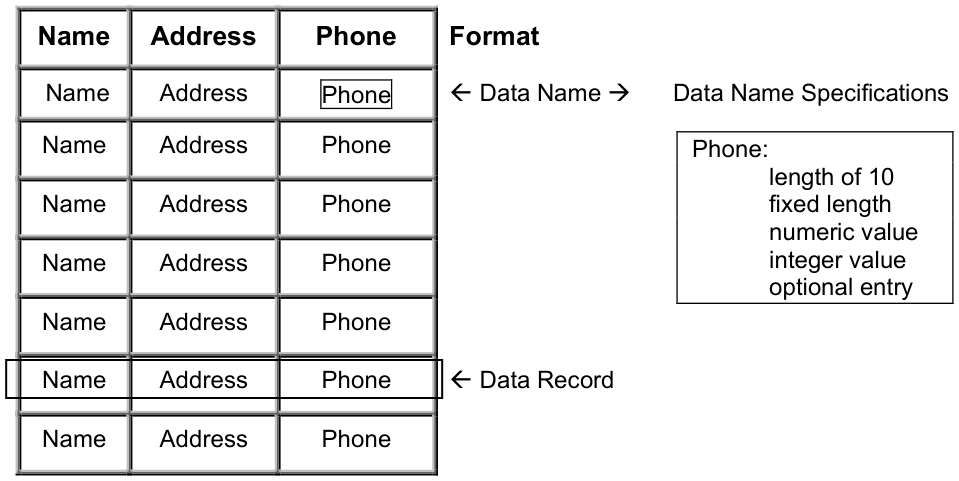
Physical Physical formats are a template for a data file. They contain the header information (format name and description), the Data Names (field names for this record), and data name attributes (field length, default value, valid entries, or pre- and post-processing).
Format/Data File Relationship
Data File
Logical Logical formats are not linked to a data file. You use this type of format in a menu or to collect a data set that does not correspond to any single data file.
In menus, screens, or scripts a format can be used independently of a data file or link. In this usage it is referred to as a logical format and can function similar to data names or variables.
Formats for menus contain the header information (format name and description), only one Data Name (for the menu option selection field), and Data Name attributes (field length, default values, valid entries, or pre- and post- processing).
When you save and exit this format, do not create a data file.
For more information, see Menus in this document.
In a script you may assign a value to a logical format. This value can be printed or passed to another script and can be manipulated as an item of data in several Script-IV commands. For more information, see the Script-IV Developer Guide and the Script-IV Language Reference Manual.
From the Dictionary-IV Developer Guide, version 8.9.1. Open this page in the PDF