

System Error Report
This utility produces a printed or displayed list of system errors that have been recorded during operation of Dictionary-IV. It also displays errors occurred while executing scripts. System errors are recognized by the display of a message on the top line of the screen:
System Error: Pgm-XXXXXX Ln-#### Err-## RETURN=Retry E=End
- Pgm
- is the Thoroughbred Basic Program in which the error occurred.
- Ln
- is the program line at which the error occurred.
- Err
- is the Thoroughbred Basic error condition.
Information on the program and line number in which the error occurred is displayed along with the Thoroughbred Basic error code.
Select System Error Report from the Dictionary-IV Utilities Menu. The system prompts:
Do you want a printed copy?
If you select a printed output, you will also be asked to select the printer if there is more than one configured.
Select Printer (LP): LP________
Type the name of the printer you wish to use and press Enter. The utility proceeds automatically. The system displays a report similar to following:
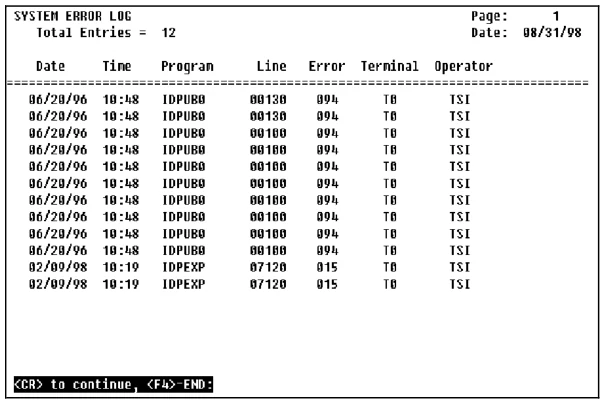
The error log is a record of the last 100 system errors and contains the content of the system error message along with the date and time that the error occurred. After recording 100 errors, the log is recycled.
This utility can be used to verify recurring errors and can be used by the support staff to isolate and identify problems.

From the Dictionary-IV Administrator Guide, version 8.9.1. Open this page in the PDF