

Configure Report-IV to PDF
Note: The following does not apply to the 3GL wrapper. Please see the 3GL wrapper section in this document.
Note: The following does apply when using T-Connect. For more information, please see the T-Connect Web Terminal Reference Manual.
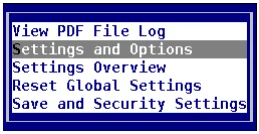
Configuring Report-IV to PDF is done through the Settings and Options and the Save and Security Settings. The settings and Options configuration is required. The Save and Security Settings configuration is optional.
Both are accessed from the Report-IV to PDF Utilities menu:
In this chapter
Section titled “In this chapter”- Settings and Options
- Path to PDF converter
- Path to Saved PDF Files
- Path to Background .pdf Files
- User Supplied PDF Name Enabled
- Post Save Method Enabled
- Post Save Method Name
- Pre Convert Method Enabled
- Pre Convert Method Name
- Cleanup Method Enabled
- Cleanup Method Name
- System Wait
- Email Enabled
- Enable Fax
- Save and Security Settings
From the Report-IV to PDF Installation and User Guide, version 8.9.1. Open this page in the PDF