

Printer Assignment
This utility is used to assign defined printer tables to specific printer codes. The assigned codes will be displayed in the select printer prompt whenever you select to print and the appropriate printer table will be accessed.
Select Printer Assignment from the Dictionary-IV Utilities Menu or System Administration options. The system displays the following screen:
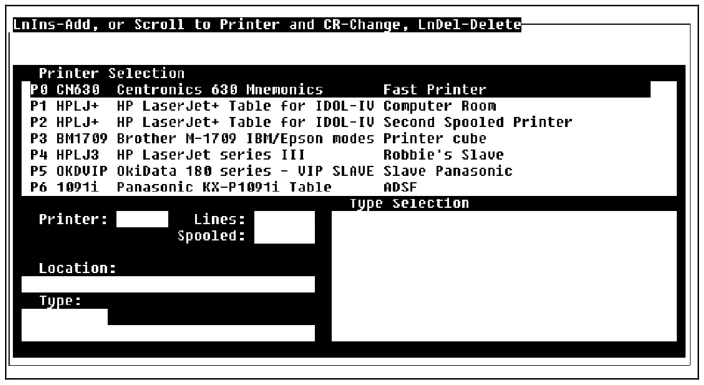
The Printer Assignment screen consists of three options:
- Add Printer Assignment
- Change Printer Assignment
- Delete Printer Assignment
Add Printer
Section titled “Add Printer”To assign a printer table to a new printer code, press the Line Insert key. The cursor is positioned at the Printer field.
Printer Type a 2-character alphanumeric printer code (e.g., P1, P2, LP, etc.) and press Enter. The cursor moves to the Lines field.
Lines Type up to 3 numeric characters for the number of lines to print (e.g., 8 1/2 x 11 paper = 66 lines) and press Enter. Now the cursor is on the Location field.
Spooled
Select one of the following:
Y Printer output to be sent to a print spooler.
N Printer output not to be sent to a print spooler.
Location Type up to 30 alphanumeric characters for the printer location and press Enter. The cursor moves to the Type Selection window.
Type Selection Scroll through the printer tables and press Enter to make a selection. The printer table name and description are displayed in the Type Selection field and the new printer assignment is added.
Change Printer
Section titled “Change Printer”Scroll to the printer name that you wish to change and press Enter. The printer table and location information are displayed in the assignment fields.
Scroll to the printer table that you wish to use and press Enter. The new table type and description is displayed and the cursor is located at the Location field.
Type a new location if necessary and press Enter to save changes.
Delete Printer
Section titled “Delete Printer”Scroll to the printer name that you wish to delete and press the Line Delete key. The selected printer information is displayed in the assignment fields and the system prompts:
Delete this printer?
Select one of the following:
Y Deletes the printer.
N Leaves the printer defined.
From the Dictionary-IV Administrator Guide, version 8.9.1. Open this page in the PDF