

Build Global Dictionary
This utility allows you to copy data elements from existing formats into the Global Dictionary. You can select formats by library, range, and mask.
Select Build Global Dictionary from the Dictionary-IV Utilities Menu. The system displays the following screen:
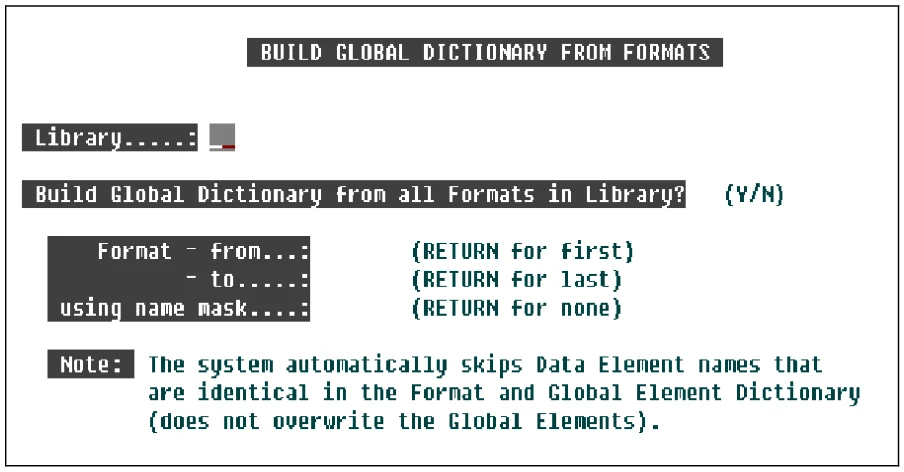
Library
Enter the 2 alphanumeric character name of the library where the Formats are located.
Build Global Dictionary from all Formats in Library?
This will build the Global Data Elements from all Formats in the selected Library.
Select one of the following:
Y Selects all Formats in the library and displays the first and last formats in the next fields. You may not select a range of names or a mask.
N Allows you to select a range of names or a mask.
Format - from Type from 3 to 8 alphanumeric characters for the format name in the range you wish to list. Press Enter to select the first format name in the library.
Format - to Type from 3 to 8 alphanumeric characters for the last format name in the range you wish to list. Press Enter to select the same format name in the Format - from field or if from field is First, press Enter to select the Last format.
using name mask
Type from 3 to 8 alphanumeric characters for the mask you wish to use in searching for the formats.
A name mask allows you to select Formats without specifying each individual name. If you do not wish to use a mask, press Enter to have None put in the field. This is the default.
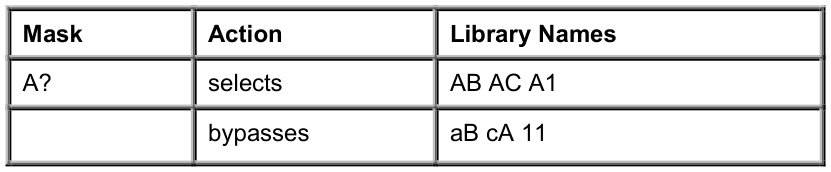
A mask sets up a matching test. If a Format name matches the mask, then it is selected. If no match is made, it is bypassed.
A mask contains match and passing characters. The characters in a Format name must match all of the match-characters (same character and position) for it to be selected. The pass character (?) is used to indicate that no match in this position is needed.
When you have completed the last field, the system prompts:
Selections correct?
Select one of the following:
Y Builds the Global Dictionary.
N Allows you to change the information.
For a global cross reference of the various Dictionary-IV definitions and Source-IV definitions, please see the OPENworkshop Reference Manual.
From the Dictionary-IV Administrator Guide, version 8.9.1. Open this page in the PDF