

1. Introduction
Thoroughbred Basic includes a number of powerful utility programs which enable the user to perform commonly required maintenance functions on programs and files quickly and easily.
| The following | list provides | the names and functions of the Thoroughbred Basic Utilities: |
|---|---|---|
| Utility Name | Short Name | Function |
| **PSD | ** | Utility Selector Menu and Maintenance Program |
| 8NPSD | Configure and Maintain Terminal Tables | |
| *APSD | *A | Print Disk Directory on Printer |
| *BPSD | *B | Build File Set List |
| *CPSD | *C | Compare Programs |
| *DPSD | *D | Rename Programs/Files |
| *EPSD | *E | Erase Programs/Files |
| *FID | File Identification | |
| *FPSD | *F | Display File Parameters |
| *GPSD | *G | Ghost Task Communication |
| *HEX | Hexadecimal Dump | |
| *HPSD | *H | List Programs on Terminal |
| *IPSD | *I | Hexadecimal File Dump |
| *JPSD | *J | Initialize Disk Environment |
| *KPSD | *K | List Programs on Printer |
| *LPSD | *L | List Disk Directory on Terminal |
| *MPSD | *M | Display Task Memory Allocation |
| *NPSD | *N | Terminal Configurator |
| *OPSD | *O | Define Files |
| *PPSD | *P | Renumber Programs |
| *PUB | Public Program Available Space | |
| *QPSD | *Q | String Search and Replace (for programs) |
| *REL | Print Utilities Release Information | |
| *RPSD | *R | Object File Maintenance |
| *SPSD | *S | Transfer Programs/Files |
| TESTTERM | Test Terminal Tables | |
| *TPSD | *T | File Transfer and Expand |
| *XPSD | *X | Channel Cross Reference |
Thoroughbred Basic Utilities are described in Section 2 of this manual.
The following list provides the names and functions of the Thoroughbred Basic Conversion Utilities:
- Utility Name
- Short Name Function
| *CNVT86 | Convert Level 6 direct and sort files. |
| *CNVTCGV | Convert CGV from B1 to B2 BASIC |
| *CNVTDKC | Adjust Deleted Keyblock Chain for Level 7. |
| *CNVTERM | Convert 7.4 TCONFIG to TCONFIG8. |
| *CNVTFP | Convert Level 6 Programs to Level 7. |
| *CVDKC | Adjust Deleted Keyblock Chain for Level 7. |
| *PROG8 | Convert Level 7 Programs to Level 8. |
Thoroughbred Basic Conversion Utilities are described in Section 3 of this manual.
The following list provides the names and functions of the Thoroughbred Basic Program Editors:
- Utility Name
- Short Name Function
| EDIT | Full Screen Program Editor |
| EDIT | Program Line Editor |
| EDITF | Formatted Program Editor |
Thoroughbred Basic Program Editors are described in Section 4 of this manual.
Running the Utilities
Section titled “Running the Utilities”To access the Utilities Menu from Thoroughbred Basic Console Mode, type RUN “**PSD” and press Enter. A screen similar to the following is displayed:
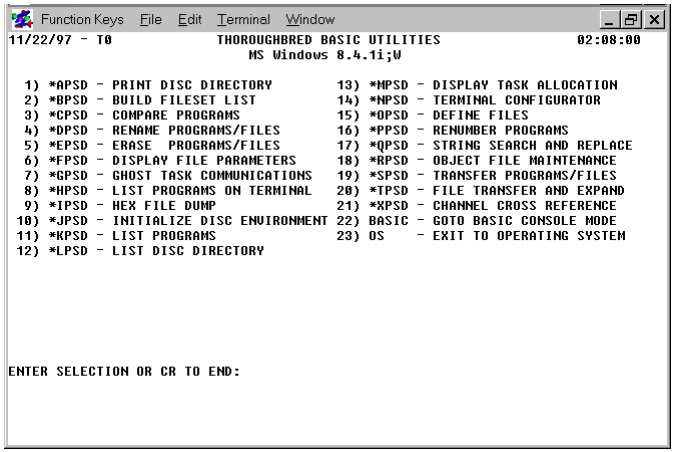
To select a particular utility from the menu program, enter either the utility name or number. Some systems allow you to use the first two characters as an abbreviation of the utility name (e.g., RUN “**PSD” is the same as RUN”**“). The valid abbreviations are listed in the beginning of this Section as the Short Name.
Using Control Keys
Section titled “Using Control Keys”The Thoroughbred Basic Utilities use the following control or function keys as shown:
| Function Key | Action |
|---|---|
| F1 | Yes response (Y) |
| F2 | No response (N) |
| F3 | Return to previous question |
| F4 | Restart utility or return to a previous menu |
Syntax Used in This Manual
Section titled “Syntax Used in This Manual”Each of the directives, functions, and variables in this manual follow a syntax as described below:
- UPPER CASE
- Words in capital letters are keywords and must be entered as shown. Thoroughbred Basic is case sensitive. This means that lower case letters are not the same as upper case letters. Keywords are shown in upper case letters and must be entered in upper case letters.
- lower case
- All items shown in lower case must be supplied by the programmer.
- [Optional]
- Items in small, square brackets ([ ]) indicate optional entries.
- [Required]
- Some directives, functions, and variables use the bracket as part of the actual syntax. In these cases, the brackets will be larger and bolder than those used for optional entries ([ ]).
- Punctuation
- Punctuation, with the exception of the ellipses (...), must be entered as shown. This includes commas, semicolons, colons, and parentheses. Ellipses indicate that an item may be repeated many times.
Example:
INPUT [(channel [,i/o-options])] [@(column [,row])] [,mnemonic…] [,output] [,variable-list [:verification]] [,IOL=]
The only required word in the above directive is the word INPUT. Next is an optional channel designator, and within that optional channel designator is an optional list of Input/Output commands. Then comes an optional cursor positioning phrase, which allows specification of column and row, with row optional.
DIM arrayname$ [element1 [,element2 [,element3]]]
[(length [,initialization-value])]
In the above example, the brackets around the elements are required and are truly brackets. The length and initialization-value are optional items.
Services Provided by TSI
Section titled “Services Provided by TSI”Thoroughbred Software International provides on-line documentation, support, and training.
On-line documentation
Section titled “On-line documentation”Beginning with Thoroughbred Basic 8.1, Thoroughbred Software International made on-line documentation available for its products. To use it, you must install the Dictionary-IV Developer Reference module.
You can access this documentation from Thoroughbred Basic or any Dictionary-IV menu:
- From Thoroughbred Basic Console Mode type RUN “8H” and press the Enter key.
- From the Thoroughbred Basic Utilities Menu type 8H and press the Enter key.
- From any Thoroughbred Dictionary-IV menu type /8H and press the Enter key.
You can also access our documentation on our website at www.tbred.com under the Documentation tab.
Support
Section titled “Support”Thoroughbred provides support for its products by telephone and email. For more information on Thoroughbred support, please contact your Thoroughbred dealer or sales representative.
Thoroughbred provides information and services on the Internet. Please visit Thoroughbred at http://www.tbred.com.
Training classes
Section titled “Training classes”Thoroughbred offers a variety of Thoroughbred Basic training classes to address a variety of needs. For more information, please contact your Thoroughbred Representative at 800-524-0430 or 732-560-1377.
From the Thoroughbred Basic Utilities, version 8.9.1. Open this page in the PDF