

DO
FUNCTION
This command enables you to specify a group of commands that can be executed zero, once, or many times.
SYNTAX
DO procedure [controlling-condition]
DO procedure-0 [, procedure-1 [, procedure-2] ...]   DEPENDING ON numeric-value
DO LOOP controlling-condition   command [command] ...ENDLOOP
   controlling-condition:
WHILE condition | UNTIL condition | CHANGING numeric-data-name/variable FROM numeric-value TO numeric-value [BY numeric-value]- procedure
- the name of a procedure to process.
- numeric-value
- for a DEPENDING ON clause, a data name, variable, constant, or expression that results in an integer.
- numeric-value
- for a FROM/TO/BY clause, a data name, variable, constant, or expression that results in a decimal number.
- condition
- an expression or statement that is tested to determine whether an action will be taken.
- command
- a Script-IV command.
- numeric-data-name/variable
- a valid numeric data name or variable.
NOTES
- The different forms to this command enable you to control whether the group of commands is performed and the number of times it is performed.
- After the group of commands is performed the specified number of times, script execution continues at the command following the ENDLOOP or DO.
DO procedure- The DO procedure command specifies a procedure to perform and an optional controlling-condition. If a controlling-condition is not specified, the group of commands is performed only once.
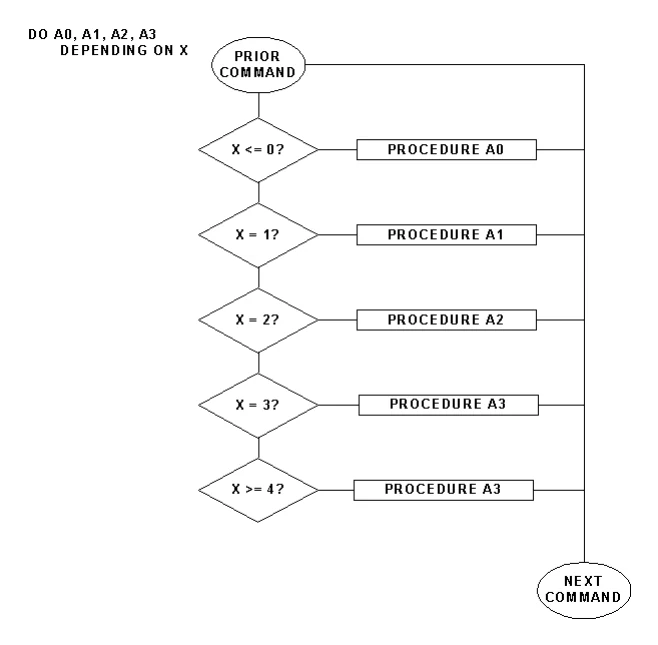
DO DEPENDING- The DO DEPENDING command specifies one or more procedures to perform depending upon a numeric value. The procedure that is performed is determined according to the following table:
| numeric value | Procedure Performed |
|---|---|
| negative | 1st |
| 0 | 1st |
| 1 | 2nd |
| 2 | 3rd |
| 3 | 4th |
| n | nth + 1 |
| n | last |
If the numeric value is greater than or equal to the number of procedures, then the last procedure is performed.
DO LOOP- The DO LOOP command identifies a group of commands to perform and specifies a controlling condition. The commands in a DO LOOP can be any Script-IV command, including other DO LOOP commands.
- Each DO LOOP must have a corresponding ENDLOOP.
controlling-condition- The listed controlling conditions are mutually exclusive. If the condition is met, the group of commands is executed. The WHILE, UNTIL, and CHANGING clauses are described below.
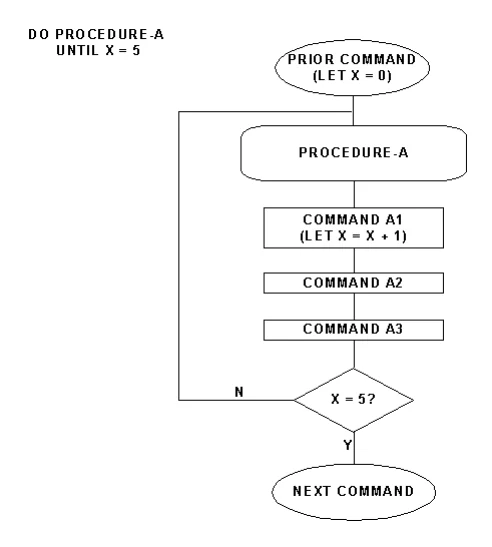
DO UNTIL- The UNTIL clause performs the group of commands and then checks the condition for a true or false result. If the result is true, the group of commands is performed. If the result is false, the DO is terminated. The UNTIL clause always performs the group of commands at least once. Use CONTINUE to skip the current iteration of the loop transferring execution to the ENDLOOP. Use BREAK to terminate the loop transferring execution to the first statement after the ENDLOOP.
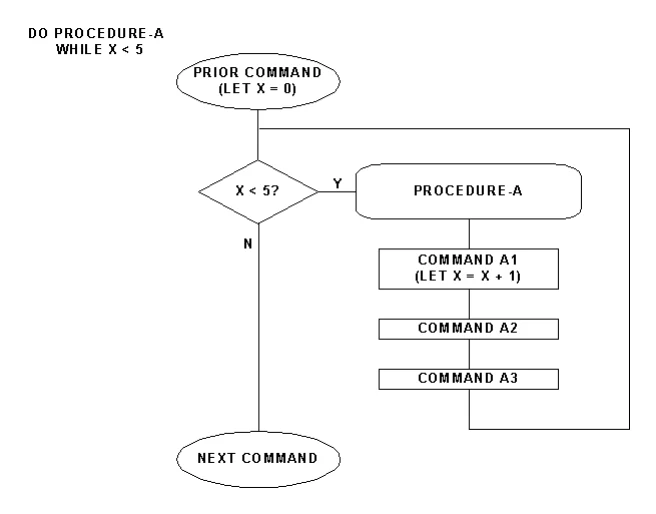
DO WHILE- The WHILE clause checks the condition for a true or false result. If the result is true, the group of commands is performed. If the result is false, the DO is terminated. The WHILE clause enables you to specify a group of commands that may not be executed. Use CONTINUE to skip the current iteration of the loop transferring execution to the ENDLOOP. Use BREAK to terminate the loop transferring execution to the first statement after the ENDLOOP.
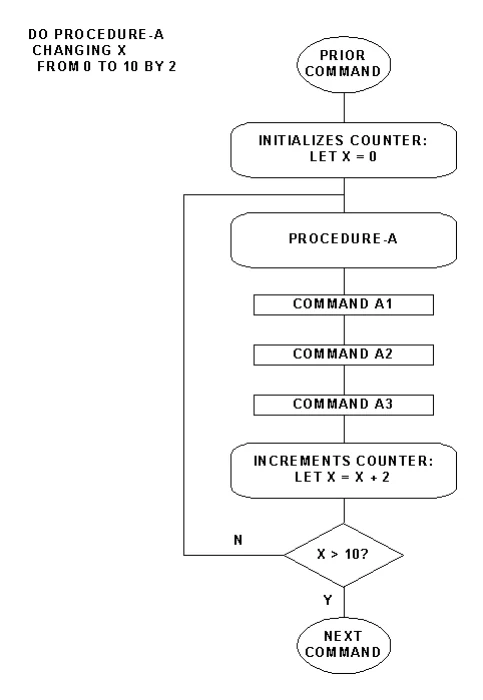
DO CHANGING- The CHANGING clause establishes a repetitive loop by counting the number of times the group of commands is performed. The starting and ending values are specified by FROM and TO. A numeric-data-name or variable is specified as the counter to control the number of times the group of commands is performed. The CHANGING clause sets the counter to the starting value specified by FROM, performs the group of commands, increments the counter, and checks whether it is greater than the ending value specified by TO. If the counter is greater than the ending value, then the DO is terminated. If the counter is less than or equal to the ending value, the group of commands is performed.
- The BY value specifies the size of the increment. The default is 1. A BY value of 0 (zero) is invalid.
- The clause can be set up to decrement the counter by setting the starting value higher than the ending value and using a negative BY value.
- The CHANGING clause always performs the group of commands at least once.
condition-
The logical condition is two or more values, consisting of constants, data names, variables, functions, or expressions that interact with relational or logical operators to form either a true or false result.
For more information on how to use logical conditions see the Logical Conditionals section of this manual.
EXAMPLES
DO LOOP UNTIL INPUT-FLAG = "D"      DO 5-GET-CUSTENDLOOP
DO 6-CUST-STUFF
DO A0, A1, A2, A3   DEPENDING ON TEST
DO LOOP CHANGING L0 FROM 1 TO 4   LET SALES-TAX-AMT = T0(L0),      4SSALDT.CUST-CODE = 4SCUST.CUST-CODE,      4SSALDT.ITEM-CODE = A$(L0*10-9,10),      LINE-NUMBER = L0   ADD 4SSALDT USING KEY REFERENCE-NUMBER+STR(LINE- NUMBER :"00")      DUPLICATE KEY PROCESS IS 20-INC-REF-NUMENDLOOP
The following four pages contain flowcharted examples of the DO CHANGING, DO DEPENDING, DO UNTIL, and DO WHILE commands.
SEE ALSO
TERMINATE, BREAK, CONTINUE DO CHANGING Example
DO DEPENDING Example
DO UNTIL Example
DO WHILE Example
From the Script-IV Language Reference, version 8.9.1. Open this page in the PDF