

Activation
If you have purchased a Site License version of TbredComm you will not be required to activate it.
To request an Activation Key please visit our Activation page at http://apps.tbred.com/activate/. You will be required to enter the TbredComm Serial Number and Installation Code. An Activation Key will be sent to you immediately by e-mail.
If you are unable to access the Web site, call Thoroughbred Software at 1-800-524-0430 and ask for Activation.
TbredComm will continue to display the activation dialog until it is authorized.
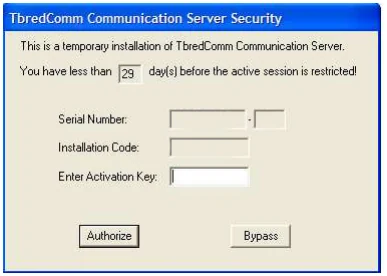
The Serial Number and Installation Code will display in the dialog above.
You will have 30 days to activate TbredComm. During the initial startup, you can select the Bypass button to skip the activation process. If you do not activate the TbredComm within 30 days, you will operate in a restricted access mode.
In restricted mode, you will be able to run only a single instance of TbredComm, telnet will be the only protocol enabled (i.e. SSH protocols will be disabled), and Autologons will be disabled. In addition, the title bar will state that TbredComm is running in restricted mode.
From the TbredComm Installation and Activation Guide, version 8.9.1. Open this page in the PDF