

Convert Screens Into Window Format
Converts standard Dictionary-IV Screens into Thoroughbred Windows format.
Select Convert Screens Into Window Format from the Window Conversion Utilities Menu. The system prompts:
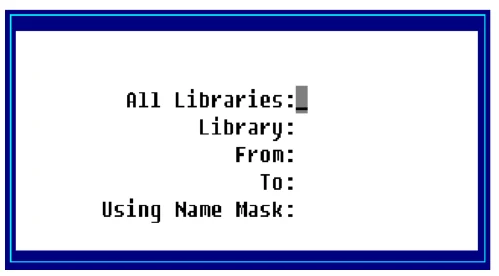
Enter the following information:
All Libraries
Select one of the following:
Y Convert Screens in all libraries.
N Convert Screens in the selected libraries.
Library
Type the 2 alphanumeric character library name you wish to select. Press F2 for a lookup in this field.
From Type up to 6 alphanumeric characters for the first Screen file in the range of files to be converted. The system defaults to First. Press F2 for a lookup in this field.
To Type up to 6 alphanumeric characters for the last Screen file in the range of files to be converted. The system defaults to Last. Press F2 for a lookup in this field.
Using Name Mask Type the name mask you wish to use in selecting the Screen files to convert. You may use a ? or @ for non-matching characters. The ? must be placed in the proper search position (AB?08?). The @ designates non-matching characters from the @ to the end of the file name (AB@).
The system defaults to None.
The system prompts:
Selections correct?
Select one of the following:
Y The information is correct, continue with conversion.
N The information is not correct, make corrections or exit.
From the Dictionary-IV Administrator Guide, version 8.9.1. Open this page in the PDF