

How to Compile from the Dictionary-IV Development Menu
Use the Dictionary-IV Development Menu to compile a single script, a range of scripts, or a library of scripts:
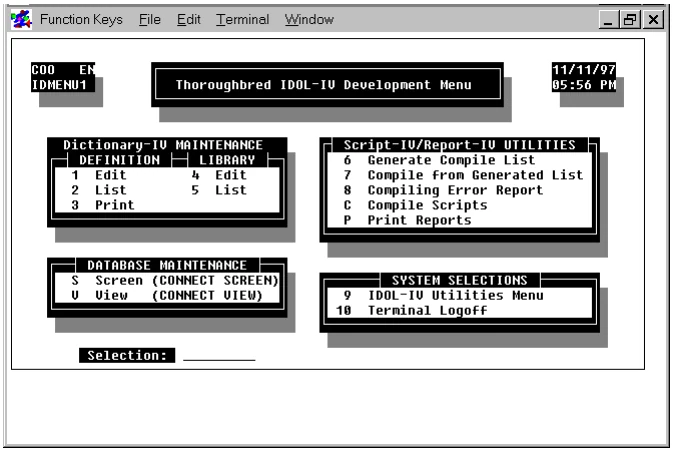
To compile from the Dictionary-IV Development Menu, type C and press the Enter key. The COMPILE SCRIPTS screen will be displayed:
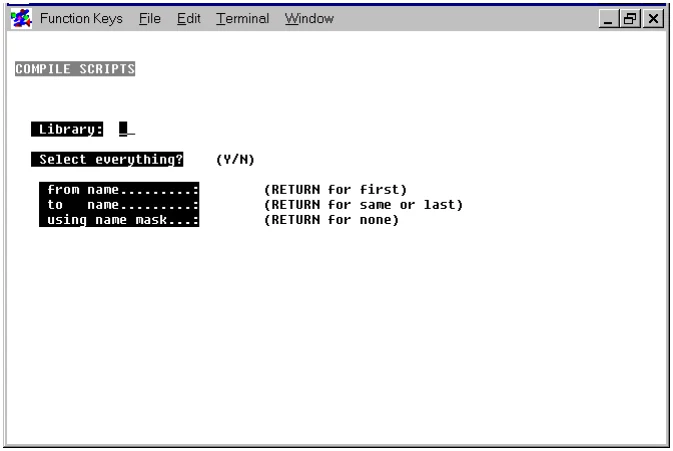
You must answer the following questions:
Library:Enter the name of the library that contains the scripts you plan to compile.
Select everything (Y/N)?Select one of the following:
Y means every script in the library will be compiled.
N means you plan to specify a range of scripts to compile.
from name:to name:To define a range of scripts, you can use the following specifications:
- To specify all the scripts in the library, press the Enter key in the from name field and press the Enter key in the to name field.
- To specify a range of scripts, type the name of the first script you plan to compile in the from name field and the name of the last script you plan to compile in the to name field.
- To specify a single script, type the name of the script you plan to compile in the from name field and press the Enter key in the to name field.
In most cases, you only need to type enough of a script name to identify it as a unique name, then press the Enter key and let the system fill in the rest of the name.
using name mask:A name mask enables you to select a set of scripts from a range of scripts. You do not have to compile all the scripts in the range and you do not have to select individual scripts to compile one at a time. If you do not plan to use a mask, press the Enter key.
Use the following information to define a mask:
-
A mask is a string of characters used to test the string of characters in the script name. A script name that matches the mask is selected for compilation.
-
A mask can contain match and passing characters. A character in a script name must be the same character as the match character and occur in the same position. The ? is the pass character, which means that no match in this position is needed.
Mask action definition names A? selects AB Ac A1
bypasses aB cA 11
After you have answered all of these questions, the following message will be displayed:
Is the displayed information correct (Y/N)?Enter one of the following:
Y begins compilation using the displayed information.
N enables you to respecify the displayed information.
Press the Y key to compile. The name of each script and its description will be displayed as it compiles. The script code will be listed below this information. To stop the compilation process at any time, press the Escape key.
Errors pause compilation. To continue compiling after an error is encountered, press the Enter key. For more information on the errors you may encounter, see the sections on How to Manage Compilation Errors and Error Messages.
After the compiler finishes processing, you will be returned to the COMPILE SCRIPTS screen.
From the Script-IV Developer Guide, version 8.9.1. Open this page in the PDF