

Security Overview
Introduction
Section titled “Introduction”This section provides an overview of the security features in Dictionary-IV. The specific information on each feature can be found by referring to the Utilities Reference section or the Dictionary-IV Developer Guide.
The security in Dictionary-IV is quite comprehensive and is, as most features are in Dictionary-IV, capable of being customized for your specific needs. To function, some of these features require that the System Security be active (refer to the System Security utility).
Dictionary-IV provides security in the following areas, restricting:
- Use of the Dictionary-IV application development capabilities.
- Access to and manipulation of the System Dictionary definitions.
- Access to and manipulation of data in Database Maintenance.
- Access to and use of the Dictionary-IV system.
- Use of sensitive Dictionary-IV utilities.
Dictionary-IV Development Capabilities
Section titled “Dictionary-IV Development Capabilities”The term development capabilities refers to the Dictionary-IV features that can be used to develop an application, specifically, Dictionary-IV Definition Maintenance of the System Dictionary, where a definition can be changed, renamed, copied, deleted, etc.
The developer may wish to restrict these capabilities to protect against unauthorized modification or enhancements of the application.
Libraries
Section titled “Libraries”Application development can also be restricted through library security. (Refer to the Library Maintenance section of the Creating Dictionary-IV Files section of this manual.) For example, by putting a password on the AR library (Accounts Receivable), you can lock out access to all definitions in that library without affecting the operation of the application. System Security must be active.
Definitions
Section titled “Definitions”Application development on individual definitions in the system dictionary can be restricted through definition security. For example, by putting a password on a script, you can lock out access to this script. Definition security is available for links, menus, reports, scripts, and views.
This is covered in more detail in the next section, because definition security affects not only application development but also application operation and use.
It is also possible to remove Dictionary-IV application development capabilities from a system by restricting the menus that are used to access these capabilities. You can password the Dictionary-IV menus and menu options, you can change the Dictionary-IV menu screens and on-line help to hide options, or you can separate the Dictionary-IV menu system from your application. In most cases this type of protection is not necessary because the security features already described can accomplish much of the same purpose.
Development Security for Classes, Libraries, and Definitions
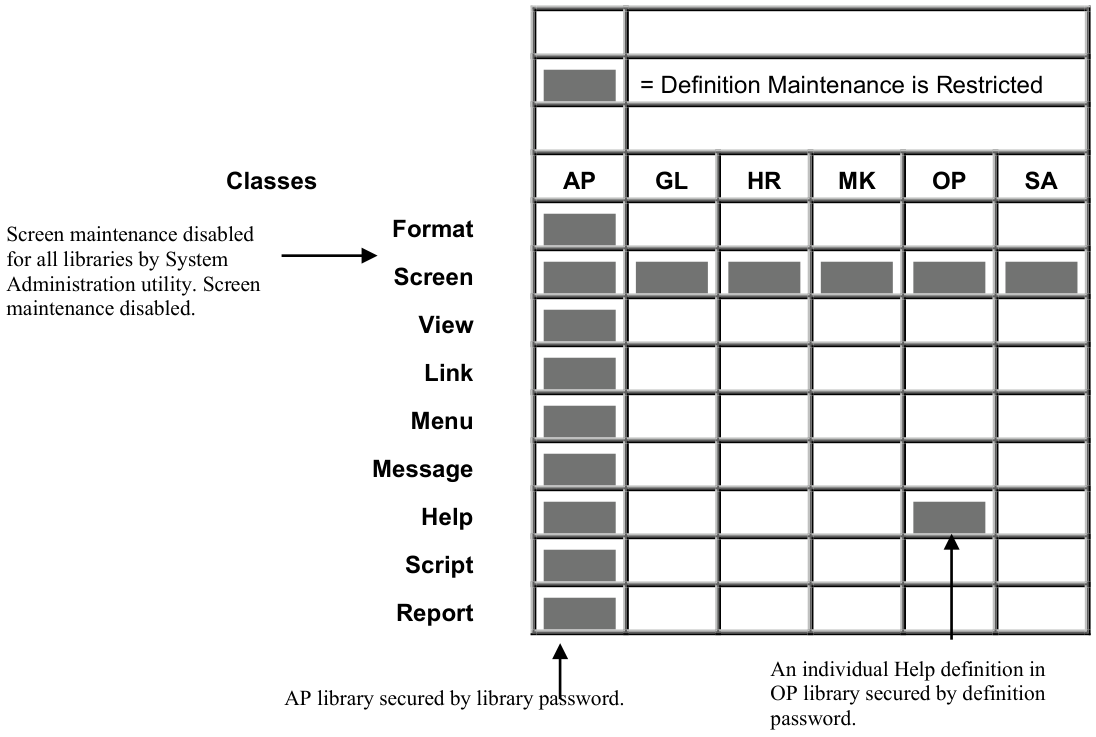
Application Operation and Use
Section titled “Application Operation and Use”The term application operation and use refers to the features of Dictionary-IV application that an end-user interacts with. For example, making a selection from a menu, running a report, and performing data entry.
The developer may wish to restrict these capabilities to protect against unauthorized use of an application feature, or to prevent unauthorized modification or enhancements of a feature. In many cases, this security serves a double purpose of restricting use and development.
Definitions
Section titled “Definitions”Use of individual definitions in the system dictionary can be restricted through definition security. For example, by putting a password on a menu, only people with knowledge of the password can display the menu to selecting options.
Definition security affects both application development and use. For example, if the menu has a password, only people with knowledge of the password can perform definition maintenance on the menu.
Definition security is available for menus, reports, scripts, links, and views. System Security must be active.
Menus The menu password is required before the menu is displayed, or in definition maintenance. Menu selection passwords are required before the menu selection is executed.
Reports
The report password is required before the report can be executed (or in definition maintenance).
Scripts
The script password is required before the script can be compiled (or in definition maintenance).
Links and Views The security for links and views largely affects Dictionary-IV database maintenance, and is covered in the following section on database maintenance.
Dictionary-IV Database Maintenance
Section titled “Dictionary-IV Database Maintenance”Dictionary-IV Database Maintenance provides security within the following class definitions.
The link password is required before the link can be used in Dictionary-IV database maintenance (or in definition maintenance). The link provides file-level security. This applies to any screen or view that uses a password link in database maintenance. System Security must be active.
Links also provide the capability to keep an audit trail of database maintenance activity on a file. The auditing function does not require System Security to be active.
The view password is required before the view can be used in Dictionary-IV database maintenance (or in definition maintenance). This is in addition to the link password. System Security must be active.
Each view also has the capability to prevent database maintenance using that view, by locking out data entry to all key fields and/or all data fields in the file. This does not require System Security to be active.
Formats
Section titled “Formats”Formats provide additional security capabilities in database maintenance. This includes field-level security, which covers adding, deleting, or changing data in a field. Field-level security provides data display and password options as well. Record deletion control is another level of security specified in the format. Formats also provide the capability to keep an audit trail of database maintenance activity on specified fields in a file. These features do not require System Security to be active.
Access to the Dictionary-IV System
Section titled “Access to the Dictionary-IV System”Access to the Dictionary-IV system is required by developers to create an application, as well as end-users that run applications that use the Dictionary-IV menu system.
Access to Dictionary-IV is controlled by the Operator Login Screen, where you must type in a valid operator code to obtain entry to Dictionary-IV. The operator codes can have a password (see the utility on Operator Information). Using this utility, you can also specify a start-up and exit menu for each operator as well as a start-up program. (You may specify a security program that you developed as the start-up program.) These features do not require System Security to be active.
As described previously, the menu system provides another source that controls access to Dictionary-IV or any application developed using the Dictionary-IV menu system, because the menu system can be customized. The menu system also provides two additional safety features. Menu selection conflict processing provides an additional level of menu controls. Automatic operator logoff from any menu results from a period of inactivity, and helps to protect unattended terminals.
Protected Dictionary-IV Utilities
Section titled “Protected Dictionary-IV Utilities”Some Dictionary-IV utilities may access sensitive information for system administration. Only people with knowledge of the system password can execute these utilities. System Security must be active.
The following Dictionary-IV utilities require the system password:
- Security
- Audit File Information
- Dictionary Report
- Multi-tasking Information
- Operator Listing with Passwords
Passwords
Section titled “Passwords”Passwords are not displayed when entered.
To change or remove a password when system security is active, you must be able to enter the password. If you do not know the password, turn security off before you attempt to remove the password. A password can be removed by entering three spaces (or Line Clear) followed by pressing Enter.
You can obtain a listing of passwords using the appropriate listing utility, for example, operator listing, library list, or definition list. If security is active, you are required to enter the system password to obtain the password listing.
From the Dictionary-IV Administrator Guide, version 8.9.1. Open this page in the PDF