

Introduction
By using XML (eXtensible Markup Language) and Thoroughbred Dictionary-IV definitions, TS XML DataServer extends your TS Environment to expose and share data residing on a remote server.
With SQL style syntax you can pull data from any Dictionary-IV defined database. The resulting data collection is returned to the requestor as an XML formatted string. The XML formatted data can be rendered as HTML in a browser or shared with other third-party tools.
TS XML DataServer also supports data maintenance on a remote server. Writing and executing XML Methods can accomplish this using simple Script-IV like directives to add, change or delete data or.
Concepts
Section titled “Concepts”TS XML DataServer is Dictionary-IV centric and assumes a working knowledge of Dictionary-IV. For more information see the Dictionary-IV, and OPENworkshop online reference manuals. For more information on XSchema Dictionary definitions see the Dictionary-IV XSchema Definitions section later in this document
TS XML DataServer takes advantage of Thoroughbred Dictionary-IV using Formats, Links and XSchema definitions to map the XML data collections.
- Format Class: A Dictionary-IV class of objects that define a collection of data elements. A Format contains all the attributes and properties for a data element. This is similar to a table definition.
- Link Class: A Dictionary-IV class of objects that “link” a database source with a Format. The database source can reference a Thoroughbred data file or a supported server table. The Link XML request provides simple, quick access for flat table mapping. Only the data file or server table defined by the Link is exposed to the XML request. When supplying a Link name in an XML request, the data set is constructed based on the Link definition.
- XSchema Class: A Dictionary-IV class of objects used to define a complex relational data mapping across multiple Links. The XSchema identifies all the Links, data elements, the relationships, and all the necessary logic to build a data set. When supplying an XSchema name in an XML request, a data set is constructed based on the design supplied by the XSchema definition.
- XML Method Class: A type of Thoroughbred compiled program that runs inside of the Thoroughbred environment on the remote server. Triggered by an XML request, the XML Method receives arguments in the form of an XML string and posts back an XML string to the requestor.
The TS XML DataServer currently supports READ schema, READ link, UPDATE link, DELETE link, INSERT link and XML Methods.
- READ schema-name enables you to query and pull data from a remote server using a Thoroughbred Dictionary-IV XSchema definition. The XSchema allows you to define complex relational data mapping across multiple links. The data result of the XSchema is returned in XML standard format.
- READ link-name enables you to query and pull data from a remote server using standard Thoroughbred selection parameters. READ link-name will read the specified Link and return the data in XML format.
- UPDATE link-name enables you to update a record in a Link with data supplied in XML format. All data is validated against the Format definition, I/O Triggers are executed and sorts are maintained.
- DELETE link-name enables you to delete a record from a Link using a key value supplied in XML format. I/O Triggers are executed and sorts are maintained.
- INSERT link-name enables you to add a new record to a Link with data supplied in XML format. All data is validated against the Format definition, I/O Triggers are executed and sorts are maintained.
- METHOD method-name enables you to execute a method on the TS XML DataServer. The method can receive and return XML formatted strings.
The process starts with a request to the XML DataServer. The following is an example XML READ XSchema request:
http://web.aaa.com/xml.tbred?xmlrequest=READ+OEFSCM02The TS XML DataServer processes the XML request, accesses the data and generates a XML string and returns the string to the requestor.
<?xml version="1.0" encoding="ISO-8859-1"?> <XMLSOURCE_OEFSCM02> <OELCUST> <CUST_CODE>100100</CUST_CODE> <CUST_NAME>Toot-Your-Horn</CUST_NAME> <CUST_STATE>TX</CUST_STATE> <CUST_CITY>Port Lavaca</CUST_CITY> <CUST_PHONE>555-2341</CUST_PHONE> <SR_CODE>AF</SR_CODE> </OELCUST> <OELSLRP> <SR_NAME>Albert Fisher</SR_NAME> </OELSLRP> <OELINVH> <INV_NUM>000001</INV_NUM> <INV_DATE>07/16/05</INV_DATE> <INV_AMOUNT>313.85</INV_AMOUNT> </OELINVH> <OELINVD> <INV_LNUM>01</INV_LNUM> <ITEM_CODE>00-000-000</ITEM_CODE> <INV_QTY>1</INV_QTY> <INV_LPRICE>5.00</INV_LPRICE> <INV_DISC>30.00</INV_DISC> <INV_LEXTEN>3.50</INV_LEXTEN> <INV_LTAX>.10</INV_LTAX> </OELINVD> <OELINVN> <ITEM_DESC>Drywall Screw</ITEM_DESC> <OELINVD> <INV_LNUM>02</INV_LNUM> <ITEM_CODE>10-100-000</ITEM_CODE> <INV_QTY>1</INV_QTY> <INV_LPRICE>1.40</INV_LPRICE> <INV_DISC>00.00</INV_DISC> <INV_LEXTEN>1.40</INV_LEXTEN> <INV_LTAX>.10</INV_LTAX> </OELINVD> <OELINVN> <ITEM_DESC>Little nails</ITEM_DESC> </OELINVN>…etc. (until the end of the detail lines) </XMLSOURCE_OEFSCM02>The returned XML string can be rendered or processed by various XML Tools and displayed in your browser.
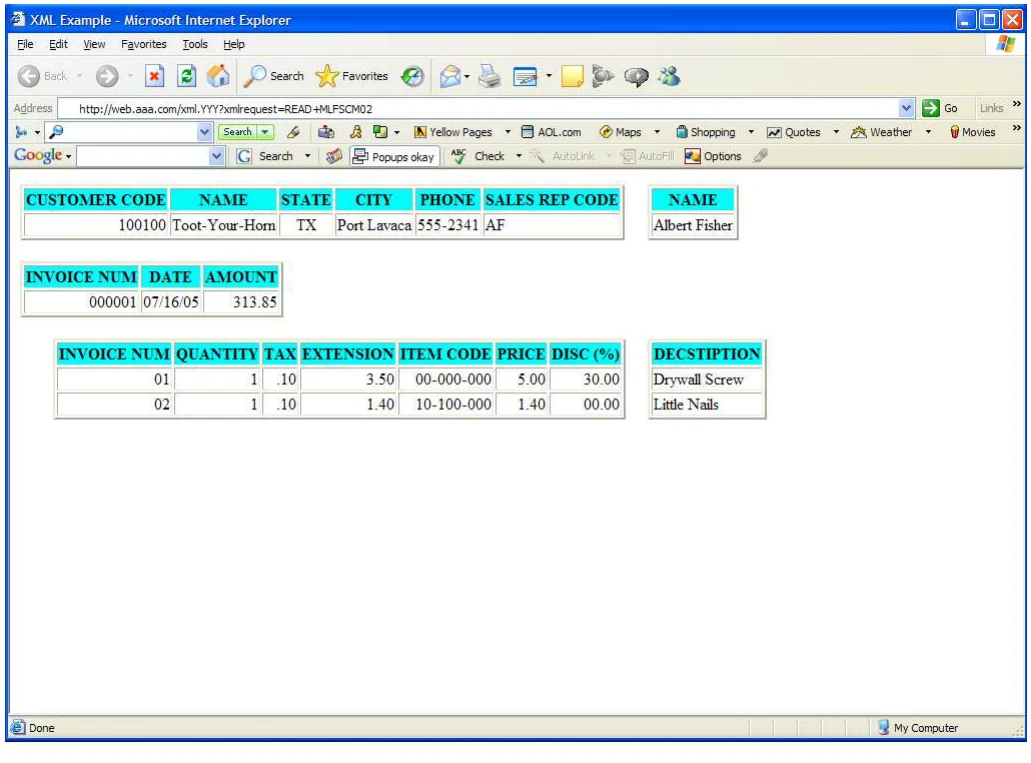
Example only
Architecture
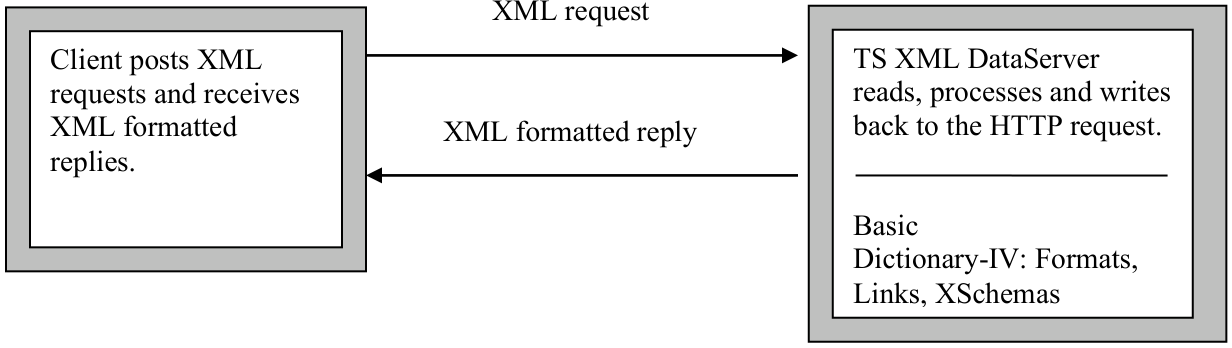
Section titled “Architecture”The TS XML server process manages all communication on the server. Requests are received as URL encoded HTTP query strings. The request is passed to the TS XML DataServer engine for parsing and processing. Using the Dictionary-IV Format, Link and XSchema definitions the data collection is built and formatted as an XML string. The XML string is passed back to the server process where it is written back to the HTTP/HTTPS requestor.
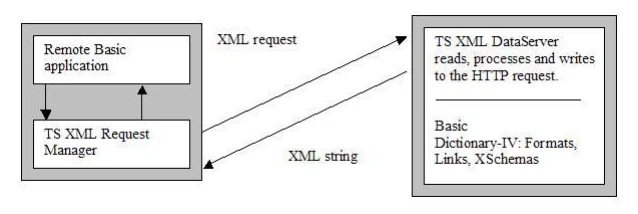
The TS XML DataServer also supports XML requests from within a TS Environment by CALLing the TS XML Request Manager. The TS XML Request Manager accepts standard Thoroughbred selection parameters, constructs a properly URL encoded HTTP query string and manages all communication with the server process running on the remote server.
Requirements
Section titled “Requirements”The remote server must have the TS XML DataServer components installed and the TS XML server process must be running.
- OOXMLSRV - TS XML DataServer control program
- IPLINPUT.XML - IPLINPUT file for the TS XML DataServer server process
- xml.tbred - TS XML DataServer server control file
- TS XML DataServer server process startup script
- OOXMLSRX, optional TS XML Request Manager installed with a local Basic environment.
- Linux-based Apache Web Server (HTTP Server)
Information and Organization
Section titled “Information and Organization”- SYNTAX
- Provides an outline of command or variable structure. Parameters and options are listed and described following the structural outline.
- NOTES
- Remarks and important information on command or variable syntax and the function of the command or variable.
- EXAMPLES
- Typical examples of command or variable usage.
Notational Symbols
Section titled “Notational Symbols”- Boldface
- Words in boldface are required syntax. These may be upper or lowercase and should be entered exactly as shown in the syntax.
- [optional]
- Elements contained in [square brackets] are optional syntactic elements.
- Lowercase
- Elements shown in lowercase letters identify parameters that need further information or items to be supplied by the user.
- . . .
- An ellipsis indicates that the preceding element can be repeated.
- |
- The vertical bar indicates that the user has a choice between two or more elements. At least one of the entries must be chosen unless the complete set of elements is enclosed in square brackets.
- "value"
- A value enclosed in quotation marks indicates a string value.
- Punctuation
- & symbols With the exception of the above symbols, all punctuation or relational symbols shown within a command format, such as commas, parentheses, semicolons, equal signs, and so on, are part of the syntax and must be included where shown.
From the TS XML DataServer Reference, version 8.9.1. Open this page in the PDF