

5. Thoroughbred Dictionary-IV Interface
Thoroughbred Dictionary-IV enables you to create a system dictionary, which provides a way to define and maintain specifications in a central location. The dictionary enables you to design and specify system resources that can be used by many Thoroughbred Basic programs. Modifying a Dictionary-IV resource implements the changes in every program that uses the resource. Thoroughbred Basic and Dictionary-IV are available in one package starting with Thoroughbred Basic 8.1.
This chapter contains the following sections:
- The system dictionary provides an overview of the services provided by a system dictionary.
- Dictionary-IV API Services provides information on how Thoroughbred Basic programs can use the resources defined in the system dictionary.
- Formats and data names provide more information on how formats and data names can be defined in Dictionary-IV and used in Thoroughbred Basic programs.
The system dictionary
Section titled “The system dictionary”The system dictionary is an external, centralized storehouse of structured information that can be shared by any number of programs. The system dictionary provides the means to build, change, delete, and manipulate the following resources:
- Data
- Help
- Messages
- Reports
- Formats
- Menus
- Screens
- Views
These resources are building blocks for software development. When working on the organization and planning stages of program development, the designer normally sets down some rules for the layout and format of the development effort. This planning assures that all programmers use the same organization for record formats, file layouts, screen layouts, menus, message layouts, on-line help features, and so on.
With some programming languages, like COBOL, these rules are normally included in every program. If a change is needed, each program must be changed and recompiled. If there were a way to externalize these rules, then a change in the rules would not affect existing programs.
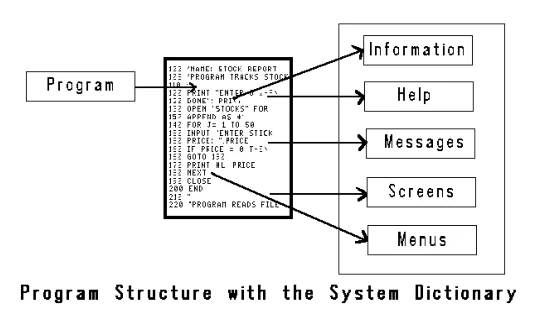
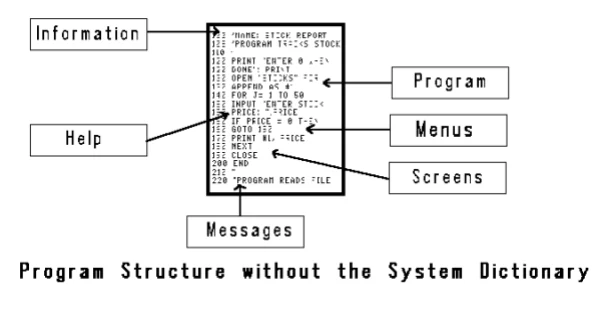
With Thoroughbred Basic the system dictionary concept is built-in but is external to the actual data. The system dictionary contains information about the organization of data for each installation.
In short, the system dictionary and its library of utility routines:
- Automatically perform all the necessary file maintenance.
- Reduce the amount of coding necessary.
- Improve the consistency of definitions.
- Eliminate redundancy.
- Allow resource sharing.
- Encourage structured design.
- Simplify the maintenance of procedures and definitions.
For more information on how to use the system dictionary, and how to define resources your Thoroughbred Basic programs can use, please refer to the Dictionary-IV Reference Manual. For more information on ways to use these resources in programs, please refer to the following sections.
Thoroughbred Dictionary-IV API Services
Section titled “Thoroughbred Dictionary-IV API Services”The Dictionary-IV API Services is a set of public programs that call and use system resources defined in Dictionary-IV. These public programs can be used in Thoroughbred Basic Console Mode or Thoroughbred Basic Run Mode.
To use the Dictionary-IV API Services, Thoroughbred Dictionary-IV must be installed on your system. Your terminal must be set up to use Thoroughbred Basic Windows.
The Dictionary-IV API Services include the following programs:
- OO41
- A public program (METHOD) you can use to READ and WRITE the following text objects:
- Text fields defined in a Dictionary-IV format definition and link definition. Only the new window style text is supported.
- Source-IV source documents.
- Window style Dictionary-IV help definitions.
For more information on the OO41 API Service, please refer to the subsection on OO41 Details below.
- OOIO
- activates/deactivates the Trigger Method for all data files on the trigger list.
This causes a lookup in OOLIOT1 to match the trigger-list-name. Then in OOLIOT0 is a data-file-list under that trigger-list-name. On each entry in the data-file-list for that trigger-list-name is a Data-File/Trigger-Method pair.
For more information see the 3GL Trigger section following.
- 8CALC
- An on-line calculator that displays in the same fashion as a hand-held model. The calculator performs standard mathematical functions. In Thoroughbred Basic Run Mode, the total generated on the calculator can be returned to a Thoroughbred Basic program.
- 8CLOSE
- Closes a screen, view, or format.
- 8COLORP
- Selects colors for Thoroughbred Basic Windows.
- 8FILEA
- Creates, erases, or renames a file.
- 8FILEB
- Dynamically expands, modifies, copies, or moves a file.
- 8FORMAT
- Reads, adds or updates formats defined under Dictionary-IV.
- 8HELP
- Prints an on-line help window.
- 8INPUT
- Inputs screen data from a defined screen under Thoroughbred Dictionary-IV.
- 8MENU
- Prints and selects options from a Thoroughbred Dictionary-IV menu.
- 8MOVE
- Moves a window on the screen.
- 8MSG
- Processes operator messages. Several types of operator messages can be defined in Thoroughbred Dictionary-IV.
- 8OPENP
- Opens a printer, using the definitions within Thoroughbred Dictionary-IV, for special mnemonics and control sequences.
- 8OPENS
- Opens a Thoroughbred Dictionary-IV defined screen, view, or format.
- 8PRINT
- Prints a Thoroughbred Dictionary-IV defined screen or screen data.
- 8RSIZE
- Resizes Thoroughbred Basic Windows.
- 8TEXTF
- Maintains text records for a text field defined by a format under Thoroughbred Dictionary-IV.
- 8TEXTR
- Reads text records for a text field defined by a format under Thoroughbred Dictionary-IV.
- 8VIEWF
- Prints and selects records from a data file.
- 8VIEWT
- Prints and selects options from an internal table.
- 8ZPHC
- Prints a hard copy of the screen.
These public programs enable you to reference data files, screens, columns of data file views, menus, and messages in a comfortable environment where certain types of knowledge are not assumed. When you open a data file, you do not have to know fields the data file contains. When you open a screen, you do not have to know how many fields the screen contains, where the screen is physically located on the terminal, or whether the screen is located in a Thoroughbred Basic Window.
For example, to open a data entry screen defined in Dictionary-IV, your Thoroughbred Basic program can use the CALL command to execute the 8OPEN public program. To enable your program to accept the information a user types on that screen, your program can use the CALL command to execute the 8INPUT public program. If new requirements force a change to the data entry screen, you can use Dictionary-IV to change the screen definition. You do not have to change the code in any Thoroughbred Basic program that uses the screen.
To execute one of these public programs, please refer to the appropriate command syntax below:
- READ or WRITE Text Objects
-
CALL “OO41”,TEXT$[ALL],LNK$[ALL],LNK[ALL]
Note: For more information on the OO41 API Service, please refer to the subsection on OO41 Details below.
- Load or Drop Trigger Definition
- Note: For more information on the OOIO API Service, please refer to the subsection on 3GL Trigger below.
- On-line Calculator
- CALL "8CALC", VALUE, VALUE$, ]SYSV$
- Closes a Screen, View, or Format
- CALL "8CLOSE", FUNC$, SCREEN$[ALL], FORMAT$[ALL], ]SYSV$
- Selects Colors for Thoroughbred Basic Windows
- CALL "8COLORP", FUNC$, ATTR, COLR, ]SYSV$
- Creates, Erases, or Renames Files
- CALL "8FILEA", FUNC$, PARM$, ]SYSV$
- Expands, Modifies, Copies, or Moves Files
- CALL "8FILEB", FUNC$, ]SYSV$
- Reads, Adds, or Updates Dictionary-IV Formats
- CALL "8FORMAT", MSG$[ALL], RV$, ]SYSV$
- Prints Help Window
- CALL "8HELP", FUNC$, HELP$, HELPTXT$, ]SYSV$
- Inputs Screen Data
- CALL "8INPUT", FUNC$, SCREEN$[ALL], FORMAT$[ALL], DATA$, ]SYSV$
- Prints and Selects Options from a Menu
- CALL "8MENU", FUNC$, MENU$, MENUSEL$, ]SYSV$, PPA$[ALL]
- Moves a window on screen
- CALL "8MOVE", MPARMS$, ]SYSV$
- Processes Operator Messages
- CALL "8MSG", FUNC$, MT$[ALL], C, ]SYSV$
- Opens Printer
- CALL "8OPENP", FUNC$, PT$[ALL], PCH, ]SYSV$
- Opens Screen,View, or Format
- CALL "8OPENS", FUNC$, SCREEN$[ALL], FORMAT$[ALL], DATA$, ]SYSV$
- Prints Screen or Screen Data
- CALL "8PRINT", FUNC$, SCREEN$[ALL], FORMAT$[ALL], DATA$, ]SYSV$
- Resizes Thoroughbred Basic Windows
- CALL ""8RSIZE", MPARMS$, ]SYSV$
- Maintains Text Records from a Data File
- CALL "8TEXTF", FUNC$, SCREEN$[ALL], FORMAT$[ALL], C, ]SYSV$
- Reads Text Records from a Data File
- CALL "8TEXTR", FUNC$, TPARM$[ALL], TEXT$[ALL], ]SYSV$
- Prints and Selects Records from a Data File
- CALL "8VIEWF", FUNC$, SCREEN$[ALL], FORMAT$[ALL], C, ]SYSV$
- Prints and Selects Options from an Internal Table
- CALL "8VIEWT", FUNC$, VIEWT$[ALL], ]SYSV$
- Prints Hard Copy of Screen
- CALL "8ZPHC",FUNC$, TH$,TEXT$[ALL], HDNG$[ALL], PT$[ALL], PC, ]SYSV$
For example, you can try the calculator in Thoroughbred Basic Console Mode. Use the following command:
CALL “8CALC”, A, A$, ]SYSV$
You can press the F6 key to display on-line help. When you want to stop using the calculator, you can press the F4 key.
For more information on the Dictionary-IV API Services, you can use the on-line help system. To display on-line help, type /8H on any Dictionary-IV menu and press the Enter key.
OO41 Details
Section titled “OO41 Details”OO41 supports reading and writing of text only in the Thoroughbred window style. For more information, please refer to the Dictionary-IV Developer Guide. For an example of how to use OO41 in a Thoroughbred Basic program, please refer to the following subsection.
OO41 assumes the necessary Dictionary-IV tables have been built. If your program executes a BEGIN or if you execute your program prior to running ID, you must include the following before performing any OPEN commands and prior to calling OO41:
CALL "8ZPSYS",]SYSV$Then, you may:
CALL "OO41",TEXT$[ALL],LNK$[ALL],LNK[ALL]where:
TEXT$[ALL]
TEXT$[0]
READ[LINK link-name, key-value, text-ID[LLLL.DDDDDDDD|LLDDDDDD[,L]]]
WRITE[LINK link-name, key-value, text-ID[LLLL.DDDDDDDD[,T][TITLE]|LLDDDDDD[,L][TITLE]]]- link-name
- defines the data file associated with the text field. OO41 will invoke the standard open link routine to retrieve the appropriate link information and open the necessary files. For more information, please refer to the descriptions of LNK$[ALL] and LNK[ALL].
- key-value
- is the primary key value for the text field. It does not include the special characters used to construct the full text field key (the $FF$ prefix, the text field ID, or the text field sequence number).
- text-ID
- is defined in the format.
- LLLL.DDDDDDDD
- is the four-byte Source-IV library name and the eight-byte Source-IV source document name. The . (period) that separates the library name from the source document name is required.
- ,T
- allows the program type to be specified. If the program type is not specified, the S type is the default.
- LLDDDDDD
- is the two-byte window help library name and the six-byte window help definition name. There is no . (period) separating the library name from the definition name.
- ,L
- is the one-byte language code for multiple spoken languages. This is not the two-character language code description typically displayed. In addition, the , (comma) that separates the help definition name and the language code is required. If the language code is not supplied, English is the default.
| Valid | values for L are: |
|---|---|
| $31$ | EN |
| $36$ | FR |
| $3B$ | GR |
| $40$ | IT |
| $45$ | SP |
| $4A$ | DU |
| $4F$ | SW |
| $54$ | NR |
| $59$ | DM |
| $5E$ | FN |
| $63$ | X1 |
| $68$ | X2 |
- TEXT$[1-N]
- is text to be written or read. Each entry represents a row of text. This is uncompressed text. It does not contain window maps.
- LNK$[ALL]
- contains link information. It is for internal use only. It improves performance when multiple READ or WRITE operations are required. Do not dimension this array in your program. Do not alter the contents of this array. OO41 will dimension and populate this array.
- LNK[ALL]
- contains link information. LNK[2] contains the channel number used for the text field READ/WRITE routines. This channel should be closed by your program after all text field processing is complete.
CLOSE(LNK[2])
Except for LNK[2], this is for internal use only. It improves performance when multiple READ or WRITE operations are required. Do not dimension this array in your program. Do not alter the contents of this array. OO41 will dimension and populate this array.
OO41 Example
Section titled “OO41 Example”The following sample code illustrates how OO41 can be used in a Thoroughbred Basic program. For more information on the directives used in this example, please refer to the Thoroughbred Basic Language Reference and to the previous subsection.
00010 REM "Example CALL to OO41"
* This program is an example of using the Dictionary-IV OO41 API* Service to write text fields. OO41 can write text fields to any* Thoroughbred file type that supports text fields.
* This program READs records from the DALTEST1 DIRECT file and WRITEs* a record to the DALTEST2 DIRECT file. Then, the program calls OO41* to write the corresponding text record to DALTEST2. The text field* for DALTEST2 is composed of the DESC1, DESC2, and DESC3 string* fields from DALTEST1.
* FORMAT DALTEST1:*     KEY-FIELD, DESC1, DESC2, DESC3, STR-FIELD
* FORMAT DALTEST2:*     KEY-FIELD, TEXT-FIELD, STR-FIELD
00100 BEGIN;                           ! Clear the environment.      PRINT 'WC';                      ! Clear the screen.
                                       ! The following call to 8ZPSYS                                       ! is only necessary from a                                       ! Thoroughbred Basic program                                       ! that contains a BEGIN or is                                       ! executed prior to running                                       ! "ID".
      CALL "8ZPSYS",]SYSV$;            ! Call to initialize                                       !    Dictionary-IV internals.      PRINT "creating text fields :"; ! Display message on screen.      U1=UNT;                          ! Get next available channel.      OPEN(U1) "DALTEST1";             ! Open first file.      U2=UNT;                          ! Get next available channel.      OPEN(U2) "DALTEST2";             ! Open second file.      FORMAT INCLUDE #DAFTEST1;        ! Include format for 1st file.      FORMAT INCLUDE #DAFTEST2;        ! Include format for 2nd file.      DIM TEXT$[3];                    ! Dimension text array.      LOOP=1;                          ! Turn main loop on.      WHILE LOOP;                      ! While loop is on,         READ (U1,ERC=1) #DAFTEST1;    !   Read record from DALTEST1,         IF ERC <> 1                   !      If not EOF,            #DAFTEST2.KEY-FIELD =      !        Set the key in               #DAFTEST1.KEY-FIELD,    !          the format area,            #DAFTEST2.STR-FIELD =      !        Set the other               #DAFTEST1.STR-FIELD;    !          appropriate fields,            WRITE (U2,KEY=             !        Write the record               #DAFTEST.KEY-FIELD)     !          for corresponding                  #DAFTEST2;           !            text field,            TEXT$[0]=                  !        Build text function:               "WRITE LINK DALTEST2,"+ !          func & link name +               #DAFTEST2.KEY-FIELD +   !          current key value +               ",A",                   !          text ID,            TEXT$[1]=                  !        Put description field               #DAFTEST1.DESC1,        !          into text array,            TEXT$[2]=                  !        Put description field               #DAFTEST1.DESC2,        !          into text array,            TEXT$[3]=                  !        Put description field               #DAFTEST1.DESC3;        !          into text array,            CALL "0041", TEXT$[ALL],   !        Call method to               LNK$[ALL],LNK[ALL];     !          write text field,            IF TEXT$[0]="."            !        If normal termination               PRINT " ",              !          print key of record                  #DAFTEST2.KEY-FIELD !             to process            ELSE                       !        Else               LOOP=0                  !          Turn off loop            FI                         !        Endif         ELSE                          !      Else            LOOP=0                     !        Turn off loop         FI;                           !      Endif      WEND;                            !   End of loop.
      CLOSE(U1);                       ! Close DALTEST1.      CLOSE(U2);                       ! Close DALTEST2.      CLOSE(LNK[2]);                   ! Close DALTEST2 opened for                                       ! text field WRITE by open                                       ! link routine called by OO41.      FORMAT DELETE #DAFTEST1;         ! Delete format      END
Formats and data names
Section titled “Formats and data names”Thoroughbred Basic programs can include data names and formats defined in Thoroughbred Dictionary-IV. This enhancement is available starting with Thoroughbred Basic 8.2. This section covers the following information:
- Background information about formats and data names
- How to include a format or data name in a Thoroughbred Basic program
Physical formats
Section titled “Physical formats”During file maintenance, formats are used to access data in files. A format is linked to a physical data file through a link definition. In this context, formats describe a record and the data elements in the record along with their characteristics, defaults, valid values, and related data entry restrictions.
Formats are also used to define the record layout of a data file. For single format files, every record in the file has the same layout, meaning that regardless of which record a data element is located in, it is always located in the same position and has the same characteristics.
For example, the specifications for the data element PHONE (length of 10, integer value, optional entry, and so on) in the diagram below are the same in every data record.
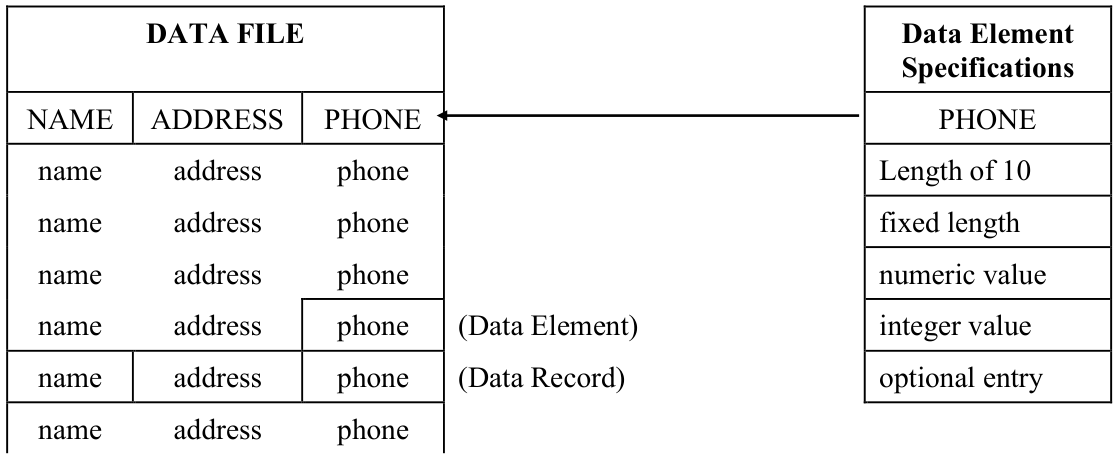
Type of file, as well as each data element, are determined by a format. Thoroughbred Dictionary-IV creates a file based on the key status of data elements in a format according to the following rules:
| Key Elements in Format | Type of File Created |
|---|---|
| One or more key elements | DIRECT file |
| All elements are keys | SORT file |
| No key elements | INDEXED file |
Logical formats
Section titled “Logical formats”In menus, screens, or scripts, a format can be used independently of a data file or link. In this context, it is referred to as a logical format and can function similarly to data names or variables.
In a script, a logical format can be assigned a value, its value can be printed or passed to another script, and it can generally be manipulated as an item of data in several Thoroughbred Script-IV commands.
A logical format used for a menu has only one data element for menu selection input; the data element is defined just as it is in any format, but it is not linked to a data file. A one-data-element format
(IDMENUIN) is provided in Thoroughbred Dictionary-IV as a default for menus, or you may create your own.
Data element requirements and options
Section titled “Data element requirements and options”At least two attributes must be defined for each data element in a file:
- Data Element Name
- Data Element Length (determines the element to be single or multiple occurrences and a string, integer, or decimal)
The following optional information can be specified for a data element:
- Whether the data element is a key (used for sorting and accessing data in the file).
- Numeric type.
- Multiple occurrences of a data element for defining repeating data fields.
- Whether a field separator will follow the data element.
- Predefined data types (text field, yes/no, date, telephone number, Social Security number, etc.).
- Assistance for the entry and editing of data (message, help, valid and defaults, optional or mandatory entry, justification, security for access or display).
- Processing controls (pre-/post-entry processing, deletion testing, auditing changes).
- Cross-indexing, or sorting, that is not defined in the format.
- A maintainable list of defined data elements, the global dictionary, is also available to aid in data element definition.
Format naming conventions
Section titled “Format naming conventions”A format name consists of a # (pound sign) and from three to eight characters for the name. A format name cannot contain spaces or any of the following characters:
= an equal sign
. a period
; a semicolon
, a comma
$ a dollar sign
& an ampersand
Examples
The following examples are valid format names:
#DNF #DNFFMT #DNFORMAT
Format names can be specified literally as in the previous example or they can be specified from within a Thoroughbred Basic variable as in the following examples:
Examples
A$ = “#DNF”
B$ = “#DNFFMT”
C$ = “#DNFORMAT”
The formats specified in A$, B$, and C$ can be used as literal format references in FORMAT directives and the EXTRACT, READ, and WRITE directives by preceding the Thoroughbred Basic variable name with # (pound sign).
Examples
FORMAT INCLUDE #A$, OPT=“DEFAULT”
FORMAT DELETE #B$
READ (C,KEY=K$) #C$
WRITE (C,KEY=K$) #C$
To reference data within formats specified within a variable, you must use the FMD directive or function, and, starting with release 8.3.0, the FMT directive and function. Literal data name references cannot be made.
A data name consists of a format name plus a . (period) and from one to 20 characters for the name. When a data name is defined to have multiple occurrences, the occurrence value follows the data name and is enclosed within parentheses.
Examples
#DNFFMT.D
#DNFFMT.DATA_NAME
#DNFFMT.WEEKLY-TOT(4)
#DNFFMT.DATA-ELEMENT-NUMBER1
#DNFFMT.AR_MONTHLY_TOTAL_BAL(12)
Assignment rules
Section titled “Assignment rules”The most important assignment rule when using data names is that the receiving field dictates the type of data to be received.
An alphanumeric data name may receive a value from a string variable, a numeric variable, a string constant, a numeric constant, or another data name. When storing a numeric value in an alphanumeric data name, the numeric value is converted to a string.
Examples
LET #DNFFMT.STRING=S$
LET #DNFFMT.STRING=S
LET #DNFFMT.STRING=“STRING VALUE 1”
LET #DNFFMT.STRING=100
LET #DNFFMT.STRING=#DNFFMT.STRING-2
LET #DNFFMT.STRING=#DNFFMT.NUMBERS
The value of an alphanumeric data name may be returned to that of a string variable, a numeric variable, or another data name. When a value is to be stored as a numeric variable or data name, it is converted to a numeric value. If the alphanumeric value does not contain a numeric value, the result is an ERR=26 for Thoroughbred Basic variables, or an ERR=166 for data names.
Examples
LET S$=#DNFFMT.STRING
LET S$=#DNFFMT.STRING
LET #DNFFMT.STRING-2=#DNFFMT.STRING
LET #DNFFMT.NUMBER = #DNFFMT.STRING
A numeric data name may receive a value from a numeric variable, a string variable containing a numeric value, a numeric constant, a string constant containing a numeric value, or another data name. When storing an alphanumeric (string) value in a numeric data name, the alphanumeric value is converted to a numeric value. If the alphanumeric value does not contain a numeric value, the result is an ERR=166.
Examples
LET #DNFFMT.NUMBER=S
LET #DNFFMT.NUMBER=100
LET #DNFFMT.NUMBER=#DNFFMT.NUMBER-2
LET #DNFFMT.NUMBER=S$
LET #DNFFMT.NUMBER=“100”
LET #DNFFMT.NUMBER=#DNFFMT.STRING
The value of a numeric data name may be returned to that of a string variable or another data name. When a numeric value is to be stored in a string variable or alphanumeric data name, it is converted to a string.
Examples
LET S=#DNFFMT.NUMBER
LET S$=#DNFFMT.NUMBER
LET #DNFFMT.NUMBER-2=#DNFFMT.NUMBER
LET #DNFFMT.STRING=#DNFFMT.NUMBER
A format may receive a value from a string variable or string constant and then return its value to that of a string variable.
Examples
LET #DNFFMT=F$
LET #DNFFMT=“010010ABC Sales Company 0012345.56”
LET F$=#DNFFMT
A special case exists when assigning one or more formats to another format:
**LET #**format1 = #format2 [[ & #format3] . . . ][ & #formatn ]]
Only the values of matching data element names are copied into the receiving format. In the case of multiple format assignments, the value of the last format with a matching data element name is copied into the receiving format. In other words, the following multiple format assignment:
LET #FORMAT1 = #FORMAT2 & #FORMAT3 & #FORMAT4
produces the same results as the following combination of single format assignments:
LET #FORMAT1 = #FORMAT2, #FORMAT1 = #FORMAT3, #FORMAT1 = #FORMAT4
Examples
Consider two format definitions, #DNFFMT and #DNFFMT2:
| #DNFFMT data names: | #DNFFMT2 data names: |
|---|---|
| NAME | NAME |
| ST-ADDR1 | STATE |
| ST-ADDR2 | ZIP |
| CITY | AMOUNT |
| STATE | |
| ZIP |
Consider the following format assignment statement:
LET #DNFFMT=#DNFFMT2
The values of NAME, STATE, and ZIP from #DNFFMT2 will be stored in #DNFFMT.
Now, consider four format definitions:
| #DNFFMT data names: | #DNFFMT1 data names: |
|---|---|
| NAME | NAME |
| ST-ADDR1 | ADDR1 |
| ST-ADDR2 | ADDR2 |
| CITY | CITY |
| STATE | STATE |
| ZIP | ZIP |
| SSN | AMOUNT |
| HM-PHONE | WK-PHONE |
- #DNFFMT2 data names:
- #DNFFMT3 data names:
- NAME
- NAME
- SOC-SEC-NO
- HM-PHONE
STREET-ADDR1
STREET-ADDR2
CITY
STATE
ZIP-CODE
Consider the following format assignment statement:
LET #DNFFMT=#DNFFMT1 & #DNFFMT2 & #DNFFMT3
The values of ZIP from #DNFFMT1, CITY and STATE from #DNFFMT2, and NAME and HM-PHONE from #DNFFMT3 will be stored in #DNFFMT.
A variable format may receive a value from a string variable or string constant and then return its value to that of a string variable.
Examples
LET FMT$=”#DNFFMT”
LET #FMT$=F$
LET #FMT$=“010010ABC Sales Company 0012345.56”
**LET F$=#**FMT$
The special case exists when assigning one or more variable formats to another variable format:
**LET #**str-var1 = #str-var2 [[ & #str-var3] . . . ][ & #str-varn ]]
Only the values of matching data element names are copied into the receiving variable format. In the case of multiple variable format assignments, the value of the last variable format with a matching data element name is copied into the receiving variable format. In other words, the following multiple variable format assignment:
LET #FMT1$ = # FMT2$ & # FMT3$ & # FMT4$
where:
LET FMT1$=”#FORMAT1”
LET FMT2$=”#FORMAT2”
LET FMT3$=”#FORMAT3”
LET FMT4$=”#FORMAT4”
produces the same results as the following combination of single format assignments:
LET #FMT1$ = #FMT2$, #FMT1$ = #FMT3$, #FMT1$ = #FMT4$
Programming with format and data names
Section titled “Programming with format and data names”The following list contains some helpful hints when programming with formats and data names:
- To reference a data name in a program, the data name’s format must be literally INCLUDEd by the program.
- A new program that contains format and data name references must be compiled or SAVEd before it can be RUN. If any unresolved format or data name references exist in the program, they will be reported in the ERRBUF system variable. All errors must be corrected before you RUN the program.
- If a statement containing data name references is added or a statement containing data names is modified, the program must be re-compiled, i.e., re-SAVEd, before it is RUN.
- Like SAVE, the FIXUP directive compiles format and data name references. This directive can be used to re-compile programs with modified format and data name definitions.
- The CPP function compiles format and data name references, as long as the data name’s format is INCLUDEd. This function can be used to generate code containing format and data name references to be executed by a public program.
- The compile process implemented by the SAVE and FIXUP directives only INCLUDEs a format defined in a program if it does not already exist in memory (i.e., it is not already INCLUDEd). However, if a format exists in memory and has been modified since it was INCLUDEd, the format is shuffled. In other words, it is re-INCLUDEd while preserving the format’s data area.
- Format data-name calculations perform rounding based on the definition of the data element. This feature is available starting with Thoroughbred Basic 8.3.1.
For more information
Section titled “For more information”Directives, functions, and system variables associated with formats and data names are:
- Directives:
- FIXUP FORMAT DEFAULT FORMAT DELETE FORMAT INCLUDE FORMAT INIT LET FMD LET FMT SAVE
- Functions:
- ATR CPP FMD FMT
- System Variables:
- DNE ERRBUF FMTNL
For more information on these directives, functions, and system variables, please refer to the descriptions in the Thoroughbred Basic Language Reference. For more information on formats and data names please refer to the Thoroughbred Dictionary-IV Reference Manual.
From the Thoroughbred Basic Developer Guide, version 8.9.1. Open this page in the PDF