

Desk Services / Hotkey Menu
From any Dictionary-IV menu press Ctrl-P.
The system displays the following pop-up menu:
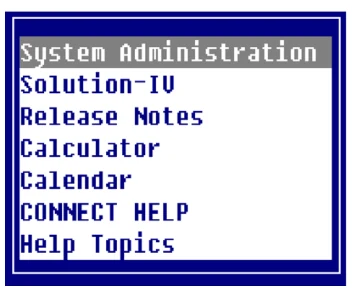
The hotkey menu that appears is controlled by the Hotkey Menu field in the operator code.
You may select the following options:
System Administration Displays the System Administration options. For more information see the specific option name in this section.
Solution-IV
Allows you to access Solution-IV from any menu by pressing Ctrl-P and selecting
Solution-IV.
Calculator
Displays a working calculator. You can use the following keys:
- F1
- View number from calculator tape.
- Enter
- Select highlighted number from tape. Print total on tape and clear total.
- F4
- Terminate view and do not select number.
- F2
- Print hard copy of calculator tape.
- F3
- Set precision (Left/Right Arrow keys change precision).
- F4
- End calculator.
- +
- Add.
- Subtract.
- Multiply.
- /
- Divide.
- Enter
- Total.
Calendar
Displays a calendar. You can use the following keys:
- Left Arrow
- Displays the previous month.
- Right Arrow
- Displays the next month.
- Down Arrow
- Displays the previous year.
- Up Arrow
- Displays the next year.
- Home
- Displays the current month and year.
Press F1 to toggle between the calendar body and the calendar heading. When the cursor is on the calendar body the arrow keys move from day to day.
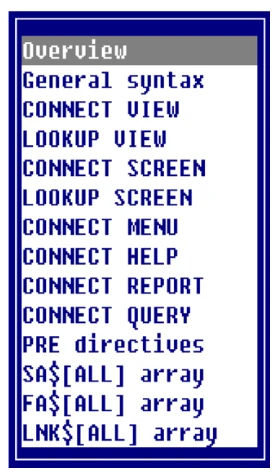
CONNECT HELP Displays a selection window for help with the CONNECT directive. You can select from the following list:
Help Topics
Displays a selection window for Dictionary-IV help. You may select from the following list:
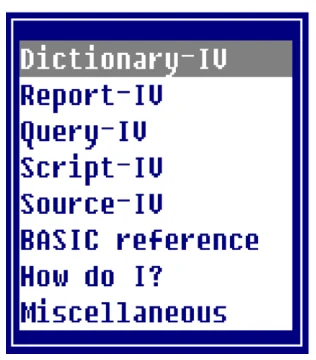
After making your selection, the system displays the help text. You may select a topic by pressing Enter. Press F8 to find a help topic by typing a KEYWORD and pressing Enter. Press F10 to go to a specified topic.
From the Dictionary-IV Administrator Guide, version 8.9.1. Open this page in the PDF