

Client and Server Environment
To set up TS DataServer for MySQL, the following files must be created or modified:
- SERVER.MAP
- IPLINPUT
- tsmysql.ini
SERVER.MAP
Section titled “SERVER.MAP”The SERVER.MAP text file establishes a relationship between a 2-character server ID used by Thoroughbred and the server system. This file is a simple text file.

Thoroughbred uses the Server ID to reference the server system. Each line in the file represents an entry for one Server. The syntax for an entry is:
server-id:[host-name or TCP/IP-address]:TCP/IP-port :database @ alt-host-name- server-id
- is a 2-character alphanumeric string used within Basic to reference a particular server system.
- host-name
- is the host name for the server system. For installations where the Thoroughbred client and database server environments reside on the same physical system (Windows Network Basic) this field can contain the loop back address or host name.
- TCP/IP-address
- is the TCP/IP address for the server system. For installations where the Thoroughbred client and database server environments reside on the same physical system (Windows Network Basic) this field can contain the loop back address or host name.
- TCP/IP-port
- port number is an optional parameter. It is used to override the default port number (5675), in the event of a conflict with another process using TCP/IP. The transport protocol layer of the TCP/IP process uses the port number to deliver the packet data to the appropriate application.
In the event of a conflict on a particular system, add the port number to the SERVER.MAP file and execute the server process using the port number as an argument. For more information see Server Process in the following section.
- database
- this is the name of the database where Basic will access tables.
- Alt-host-name
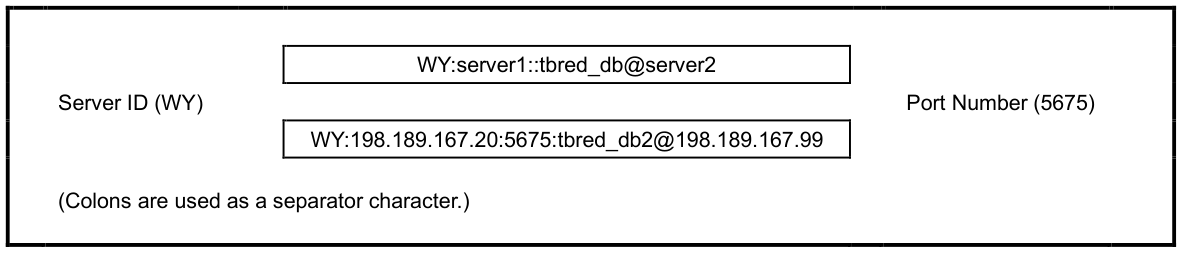
- is the host name of another system running MySQL,
Example
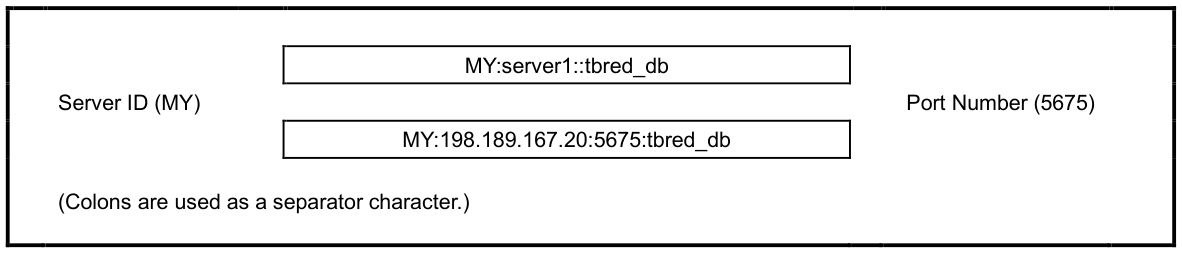
The fields in a SERVER.MAP entry are separated by a colon ( : ). The following are examples of valid SERVER.MAP entries:
Server ID or TCP/IP Address
Connecting to a MySQL database on another system
IPLINPUT
Section titled “IPLINPUT”Once you establish the server ID you can make the required entries for the IPLINPUT file.
Each DEV line corresponds to a directory on the Server. The syntax for a DEV line is:
DEV device-name,1,,server-flag,,logon-cache,case-sensitivity,server-id:log/pswd- device-name
- is device ID used to reference logical disk directories. Valid values range from D0 through D9, DA through DZ, and Da through Dz.
- server-flag
- indicates that this will be a client to the configured server system. The value for the MySQL is 5.
- logon-cache
- configures a value for the maximum number of active logins to the MySQL database. For more information see Logon Cache in the Performance Tuning section.
- case-sensitivity
- indicates whether or not to perform a case sensitive comparison of the key value returned from the SQL data server during a READ, KEY= operation. The default is to perform a case sensitive comparison (blank or 0). To have Basic perform a case insensitive comparison, set this flag to 1.
- server-id
- is the two-character alphanumeric code assigned to this server. The server ID on the DEV line must match an entry in the SERVER.MAP file.
- log/pswd
- when using MySQL authentication, this is the MySQL login and password used to access the database. The id and password are optional. If omitted, the system prompts for the information when the client is executed.
If multiple MySQL servers are configured and the login/password are the same for each, the PRM MYSQL-LOGIN may be used as a shortcut to defining the login/password on each DEV line.
PRM MYSQL-LOGIN=login/passwordlogin/password is the MySQL login and password used to connect to the database. Only the login and slash ( / ) character are required. A prompt for the password will appear when the client connects.
PRM CREATWDBATTRThis parameter will create new tables using the attributes from the system dictionary. Mandatory fields (Entry Type 2 and 3 and the first key field) will be created with a NOT NULL constraint. In addition, any fixed length fields (Entry Type 1 or 3) will be created with the CHAR data type so the field always contains data.
PRM ORA_NVLNULLSPRM ORA_DONTWRITENULLSThese parameters control how the system orders records when the key field contains nulls. For more information see Null Processing.
PRM SQL_NO_SEPARATORSThis parameter controls how short data values are sent to/from the SQL DataServer. If enabled, a short data value will be sent with trailing spaces. If disabled, the short data value will be sent with a trailing field separator, $8A$.
PRM SQL_NUMERIC_NULLSThis parameter controls how numeric null values are stored in the database. When the data for a numeric field is sent over from a Thoroughbred Basic application as all spaces, if enabled, then this data will be written to the database as a null value, otherwise, it will be written to the database as a 0 value.
PRM UNIQUE-KEYSThis parameter will force all table creates to have unique secondary keys. This is accomplished by adding the Primary key to each sort definition. Some accommodations are made when the same data element name is used more than once in a sort definition. This is not supported by MySQL.
PRM SQL_WAIT_TIMEOUT=#This entry is used to override the WAIT_TIMEOUT entry in tsmysql.ini and MySQL’s wait_timeout setting, the number of seconds the MySQL server will wait for activity before the connection is closed, which will produce a Basic ERR=150 with TCB(20)=2006. MySQL’s default wait_timeout is 28,800 seconds ( i.e. 8 hours ). This override applies to just the SQL DataServer process(es) started by a Basic session.
tsmysql.ini
Section titled “tsmysql.ini”The tsmysql.ini contains control parameters for the tsmysql server process. The tsmysql.ini file is located in the /usr/lib/basic directory.
CLIENT-SYSTEM-INFOThis flag will enable process and host information to be logged. For more information see Using the Debugging Facility.
COMMIT-COUNT=#This entry is used to specify the commit count. The maximum commit count is 65535. If the specified commit count is greater than the maximum, the maximum value will be used. The default commit count is 1.
The commit count can be overridden by SET CTC in Basic.
DEBUG-LEVEL=#This entry is used to specify the debugging level. For more information see Using the Debugging Facility.
DEBUG-FLAGS=#This entry is used to enable or disable additional information that can be written into the debug log file. The Flag values are:
| Flag Number | Description |
| 1 | Disable logging of the process ID number |
| 2 | Enable logging of a time stamp. |
| 4 | Enable logging of parameter values. |
| 8 | Enable logging of fetched values. |
| 16 | Enable logging of I/O to/from the SQL DataServer. |
| 32 | Enable logging of connection information for the SQL DataServer. |
DEBUG-WIDTH=#The entry is used to specify the width of the output in the /usr/lib/basic/tsmysql.debug file. The default width is 80.
LDA-CACHE=#The entry is used to specify the logon cache count. For more information see Logon Cache.
NO-OPENLOCKThe flag will disable the use of the TS_TABLE_LOCK table.
NO-PLUGINThe flag is used to signal that MySQL is running without the InnoDB plugin.
UNIQUE-SORTSThis flag will enable tables to be created with unique secondary keys.
WAIT-TIMEOUT=#This entry is used to override MySQL’s wait_timeout setting, the number of seconds the MySQL server will wait for activity before the connection is closed, which will produce a Basic ERR=150 with TCB(20)=2006. MySQL’s default wait_timeout is 28,800 seconds ( i.e. 8 hours ). This override applies to any SQL DataServer process started by a Basic session.
Starting with release level 8.9.0, a tsmysql.ini.dflt file will be included in the master file. All control parameters in this tsmysql.ini.dflt file are disabled.
Setup Example
Section titled “Setup Example”This environment consists of two MySQL databases on two different host systems.
Existing server-name TCP/IP address information:
The SERVER.MAP file may be set up in one of the following ways:
- Using host names S1:acct::acct_db S2:dev::dev_db
- Using TCP/IP addresses S1:125.32.1.1::acct_db S2:125.32.1.10::dev_db
- Using a combination of host names and TCP/IP addresses S1:125.32.1.1::acct_db S2:dev::dev_db
In this example the login information to the MySQL database is as follows:
- acct:
- login id = mary password = mjs
- dev:
- login id = kurt password = ktc
The IPLINPUT should reflect the following:
DEV D8,1,,5,,,,S1:mary/mjs
DEV D9,1,,5,,,,S2:kurt/ktc
After Basic is executed, there will now be a tsmysql process on each of the server systems (acct and dev).
Start the Server Process (tsmysql)
Section titled “Start the Server Process (tsmysql)”The tsmysql program is a system daemon that is installed on the server system. Each time a Basic client executes, a child tsmysql process is started. It should be added to the appropriate startup procedure, but it must be executed subsequent to the execution of the database server program. Verify that the account that executes the startup procedure has any required MySQL shell values. Consult your MySQL DBA for the correct shell variable names and values.
This program is executed with the following syntax:
tsmysql [-dx] [port-num] [-s]
- -dx
- is the debugging level. For more information see Using the Debugging Facility.
- Port-num
- is the TCP/IP port number for the process. The default is 5675.
- -s
- causes process and host information to be logged. For more information see Using the Debugging Facility.
The tsmysql process requires /usr/lib/basic to exist on the system where it is executed. Once it is started, execute Thoroughbred Basic using the IPLINPUT file that contains the reference to the Server IDs.
Start the Server Process (tsmysql) as a Service
Section titled “Start the Server Process (tsmysql) as a Service”Installing the TS DataServer for MySQL Service
Section titled “Installing the TS DataServer for MySQL Service”To install the TS DataServer for MySQL service, the loadservice.sh script will copy service file from the TSMYSQL directory to the appropriate system directory or the service files can be loaded manually.
To install the TS DataServer for MySQL service via the script, run the following as root:
# cd /usr/lib/basic/TSMYSQLTo manually install the TS DataServer for MySQL service:
# cp /usr/lib/basic/TSMYSQL/tsmysql.systemd /etc/systemd/system/tsmysql.service# systemctl daemon-reloadThe service file defaults to running the TS DataServer for MySQL from the /usr/lib/basic directory, listening on port 5675. If the TS DataServer for MySQL has been installed into a different directory or needs to listen on a different port, change the tsmysql.systemd file before installing the service.
These service files are available starting with release level 8.9.0.
Managing the Service
Section titled “Managing the Service”To start the TS DataServer for MySQL service:
# systemctl start tsmysqlTo have the TS DataServer for MySQL service start automatically when the system boots:
# systemctl enable tsmysqlTo stop the TS DataServer for MySQL service:
# systemctl stop tsmysqlTo prevent the TS DataServer for MySQL service from starting automatically when the system boots:
# systemctl disable tsmysqlFrom the TS DataServer for MySQL Reference, version 8.9.1. Open this page in the PDF