

SQL Server Tables
The following describes how to process SQL Server tables from the TS Environment.
Accessing SQL Server Tables
Section titled “Accessing SQL Server Tables”The following describes how to create SQL Server tables and then access these tables from the TS Environment. For more information specific to Script-IV and Dictionary-IV see Script-IV/Dictionary-IV Tables.
Using Basic
Section titled “Using Basic”Existing server files are accessed using the following syntax:
OPEN(CH,OPT="LINK")"link-name"- "LINK"
- specifies that the file to be opened on this channel is found in the system dictionary in the link-name record.
- "link-name"
- specifies a valid link-name containing the necessary server references.
New server files may be created from the Basic environment as follows:
OPEN(CH,OPT="LINK|CREATE")"link-name"- "CREATE"
- is a parameter that causes Basic to generate the server commands necessary to build the file. The SQL Server table definition is based on the format listed in the Link Definition. If the table already exists on the SQL Server, the CREATE is ignored and the table opened.
A special OPEN syntax is used for access to text field data. This syntax is used internally by the Dictionary-IV system for accessing text field data. For more information see the Text Fields for SQL Server section later in this manual.
OPEN(CH,OPT="LINK|TEXT")"link-name"- "TEXT"
- specifies that the text file from the link is to be opened.
If multiple SQL servers are configured, existing server files on different servers can be accessed using the following syntax:
OPEN(CH,OPT="LINK|SID=’server-id’")"link-name"- "SID="
- is a parameter that causes Basic to access the specified server instead of the server ID defined in the link definition.
- "server-id"
- specifies the id of one of the configured SQL servers.
Server files with names different from the names defined in a link may be accessed using the following syntax:
OPEN(CH,OPT="LINK|TABLE-NAME=’table-name’|TEXT-FILE=’text-table-name’")"link-name"- "TABLE-NAME="
- is a parameter that causes Basic to use the specified table name instead of the one defined in the link definition.
- "table-name"
- specifies the table name.
- "TEXT-FILE="
- is a parameter that causes Basic to use the specified text field table name instead of the one defined in the link definition.
- "text-table-name"
- specifies the text field table name.
The following code fragments show multiple ways of using the new OPEN syntax to access files. The examples assume a Link definition with information in the Server ID and Table Name fields and a file type of M.
Example 1
OPEN/READ server file into IOLIST (variables)
10       IOLIST CUST_CODE$,CUST_NAME$,ADDRESS$
100      CH=UNT;         OPEN(CH,OPT="LINK") "UTCUST"         READ(CH,KEY="0001")IOL=10
This example assumes a Format containing field separators.
Example 2
OPEN/READ server file into FORMAT
10       CH=UNT;         OPEN(CH,OPT="LINK") "UTCUST";         FORMAT INCLUDE #UTCUST;         READ(CH,KEY="0001")#UTCUST
This example can be used on any format with or without field separators.
Example 3
OPEN/READ server file into record variable
10       CH=UNT;         OPEN(CH,OPT="LINK") "UTCUST";         READRECORD(CH,KEY="CUST0001)REC$
This example shows access using a Format without field separators. The data in REC$ could be used to populate the format data area.
Under certain circumstances an error 167 may be returned when writing to a Link opened with OPT=“LINK”. When employing a Format directly or a Format that contains field separators, the system assigns that data to the data element name.
If this data is invalid for the particular data element name (invalid value for Yes/No fields, blank mandatory fields, or invalid data in a date field) an error 167 occurs. Printing the DNE system variable at the instance of the error will display the data element name for which the assignment failed.
Example 4
OPEN a link’s table on a different server
10       CH=UNT;         OPEN(CH,OPT="LINK|SID=Q2") "UTCUST"
Example 5
CREATE and OPEN a link’s tables using different table names
10       OV$=”|TABLE-NAME=BUCUST|TEXT-FILE=BUCUST_TXT”;         DCHL=UNT;         OPEN(DCHL,OPT="LINK|CREATE"+OV$) "UTCUST";         XCHL=UNT;         OPEN(DCHL,OPT="LINK|TEXT"+OV$) "UTCUST
ERASE Server tables are deleted from within the Basic environment by specifying the Link name and OPT=“LINK”.
ERASE"UTCUST",OPT="LINK"This deletes the table from the server referenced in the Link UTCUST. It also deletes the text field table if any text fields were defined.
INITFILE Server tables may be cleared of all data by using the INITFILE directive. This directive is useful for clearing a table without the extra step of performing an erase.
INITFILE "UTCUST",OPT="LINK"This clears the table on the server referenced in the Link UTCUST by doing a DROP followed by an
ADD. It also clears the text field table if any fields are defined.
RENAME
The rename function allows a table name to be changed on the server from the client process.
RENAME "UTCUST","UTTEMP",OPT="LINK"This renames the table referenced in Link UTCUST to the table UTTEMP. No changes are made to the original Link.
FID Function When the FID is executed on a channel where a Link referencing a server table is opened, the resulting string contains (in addition to the standard FID information) the following:
- Byte 1
- Value is "S". Indicates that this is a channel opened to a link referencing a server table.
Byte 2 - 3 The two character Server ID from the Link.
The bytes that normally contain the file name now contain the Link name.
TCB Function Error 150 has been added to the Basic error list to reflect errors resulting from server operations. To return the specific server error, an argument has been added to the TCB( ) function. The TCB(20) now returns the server error in the same way that the TCB(3) returns the operating system error. The value returned for the TCB(20) can be interpreted by referencing the Microsoft knowledge-base. Often Basic directives will generate multiple SQL commands. Therefore it is possible for multiple SQL errors to occur. See the Virtual Error Table in the Error Message section of this manual.
DUMP Directive
Several of the DUMP options have been changed to be aware of server access.
DUMP CHANNELS now display the link name when a link has been OPENed with OPT=“LINK”.
DUMP IPLDEVS will specify that devices configured as a server will return “Access using server xx.” XFD Function The following describes the current values returned for server tables:
| Option = 0 | |
|---|---|
| Bytes | Description |
| 1-2 | Unused |
| 3-10 | N/A |
| 11-35 | Unused |
| 36-38 | N/A |
| 38-41 | N/A |
| 42-47 | Unused |
| 48 | “N” |
| 49-53 | Unused |
| 54-59 | N/A |
| 60-65 | N/A |
| 66-71 | N/A |
| 72-85 | Unused |
| 86+ | N/A |
Option = 1
As documented in the Thoroughbred Basic Reference Manual.
| Option = 3 | |
| Bytes | Description |
| 1 | $05$ |
| 2 | $83$ |
| 3 | Number of sorts (binary) |
| 4 | Current sort number (binary) |
| 5-12 | "NNY" (bytes 8-12 Unused) |
| 13-14 | N/A |
| 15-16 | COBOL only |
| 17-42 | Unused |
| 45+ | Sort definition parameters (For more information see the Thoroughbred Basic Reference Manual.) |
Option = 4
As documented in the Thoroughbred Basic Reference Manual.
| Option = 6 | |
| Bytes | Description |
| 1 | $06$ |
| 2 | $00$ |
| 3-6 | $00000000$ |
| 7-8 | Bytes per record (binary) |
| 9+ | Link name |
Option = 10
Returns -1 FST Function This function is not supported for server tables.
IND Function SQL Server does not support an IND function. IND for a channel opened to an SQL Server table will always return 1. Errors will be reported when trying to access SQL Server tables using IND.
Using Sorts
Section titled “Using Sorts”Sorts, also known as indexes, are handled in substantially the same manner for server tables as they are for local files. Created in the Link definition, they can be used for access in any operation that currently supports sorts. As with MSORT, if the Link references an existing file, the link definition can be updated to include sorts defined in the file without rebuilding the file. The differences occur in the way that sorting is applied to the server table.
Indexes do not need to physically exist in the server environment to use Link sorts anywhere in Dictionary-IV. As long as the sort definition is established in the Link definition, Dictionary-IV can use it to access the SQL tables. Basic will expand the sort statement defined in the Link into the appropriate field names, rather than passing only the sort number.
SQL sort statements will refer to these field (column) names, not index names, when defining an ORDER BY statement. So if the index does not exist, SQL performs the sorting operation in-line. However, if an SQL index exists for the columns in the ORDER BY statement, the index is used to access the data file. However, the Indexes will be used only if one of the columns has been defined with a NOT NULL constraint. For more information see the Performance Tuning section later in this manual.
If sort definitions exist in the Link and the table is recreated, the indexes will be defined automatically on the server as part of the create process.
Under the current Dictionary-IV methodology first build a Link header and create the table. Modify the Link header to define the sorts. Erase and recreate the table. The indexes for all sorts are now defined on the server.
SQL Server does not support sorts on substrings of fields.
The sorts (indexes) are created using the following naming convention:
“I_” + table-name + “ _ “ + Dictionary-IV sort number
Example:
For sort number 2 on a Link with a table-name defined as TSISERVER, the index would be created as “I_TSISERVER_2”.
Adding and deleting sorts is not supported from within the Basic client (ADDSORT/REMSORT). These functions are reserved for the database administrator.
Locking Records
Section titled “Locking Records”The locking facilities available with SQL Server provide the developer with resources to ensure data consistency. Many of the features designed for these goals occur automatically. For more information refer to the appropriate Microsoft SQL Server documentation.
This section explains how these locking mechanisms correlate to Thoroughbred directives and how to relate locking that occurs in the Thoroughbred application to that, which occurs in an SQL application.
The following table summarizes the relationship of Thoroughbred directives to SQL statements and the level of locking associated with each.
Thoroughbred Directives/SQL Statements
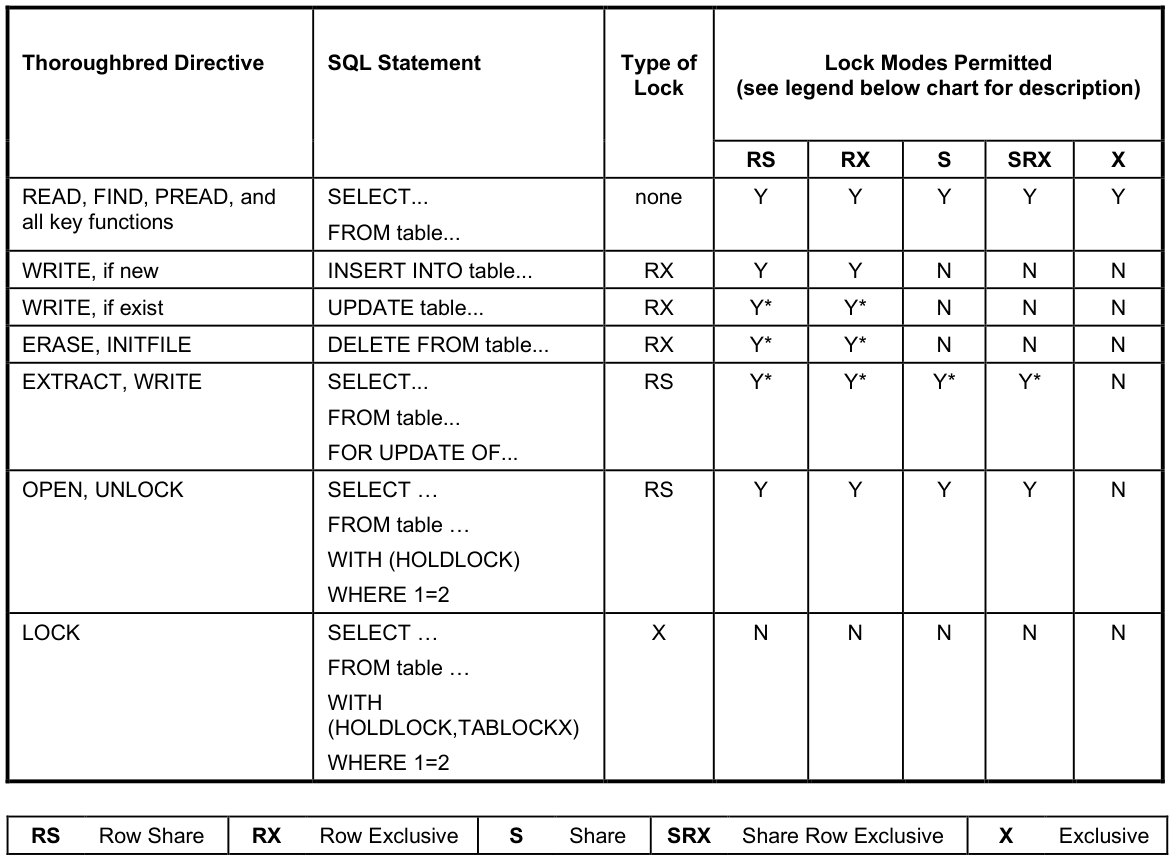
* Valid as long as no conflicting records are involved.
For more information about the WRITE statement see the Generated SQL Code section later in this manual.
The Lock Modes Permitted column indicates what type of lock may be placed on the file (table) or record (row) while the particular directive is in effect. For example, if a record is EXTRACTed in Thoroughbred, exclusive (X) locks by another client or an SQL task are not allowed and produce an error. All other lock types are valid as long as a different row is locked.
Since the query-type functions (READ, FIND, etc.) do not generate a lock, it will not fail under any locking mode the table or record may currently have. This means that READing locked records will not require PRM READONLY to access tables or rows locked by either an SQL task or another Thoroughbred client process.
Null Processing
Section titled “Null Processing”By default, null key values will be returned to the Thoroughbred Basic application following all other records for ascending sorts and before all records for descending sorts. This is an MS SQL Server convention and cannot be changed. However, two options exist to alter this behavior. Both methods involve the modification of the null data so that the sorting mechanism treats the null key value as non-null data. This is more consistent with a Thoroughbred Basic application where null keys appear at the top of an ascending sort and at the bottom of a descending sort.
In the first method, the null data is logically changed. This is accomplished by using the MS SQL Server ISNULL function in the ORDER BY clause of the SELECT statement. Each column listed in the ORDER BY clause is passed through this function which will map null values to the value supplied to the function. In this case, the value is a single space. This value will then be passed to the sorting process so that these records will sort at the appropriate end of the result set. While this method makes no modification to the physical data, it may cause sorts to perform poorly for composite indexes. To activate this method, specify the PRM ORA_NVLNULLS in the IPLINPUT file.
In the second method, the data is changed physically. Whenever a null character field is written or updated to an MS SQL Server table, it will be changed to a single blank. All subsequent accesses with indexes will return the data with the blank fields sorted appropriately. This method will allow the index to be used for queries so that the result set is returned efficiently, but the data is modified. It will be important for other applications to maintain the space in the data. To activate this method, specify the PRM ORA_DONTWRITENULLS in the IPLINPUT file.
As an alternative to the above methods, the table could be created so that columns used as indexes can never contain null values. This will happen if the field is defined in Dictionary-IV as a fixed length type, either optional or mandatory (Entry Type 1 or 3). This attribute will ensure that the data for that column will not be null.
For access to existing tables, all of the options are available, however, care must be taken if new data is written to a table when the ORA_DONTWRITENULLS parameter is specified. This will create a situation where only the new records with null keys appear in the proper sorted order.
Processing existing SQL Server Tables
Section titled “Processing existing SQL Server Tables”To access existing SQL Server tables you must build a Format and Link with the appropriate table information. Be sure to use the exact spelling for data element names and the table name.
SQL Server supports many data types. Not all of the SQL data types have a one-to-one Thoroughbred equivalent. Many of the data types can be derived using Basic code. For example, SQL Server supports 4 different integers (bigint, int, smallint, and tinyint). Each of these data types are binary byte swapped. Using DEC and SWP you should be able to determine their values. Refer to your Microsoft documentation for specific information on the SQL Server supported data types.
Be aware of the following SQL Server constructs:
- Variable length fields where data greater than 255 characters.
- Numeric fields exceeding Thoroughbred’s maximum of 14 significant digits.
- Column names exceeding 20 characters in length.
You may be able to access a table that contains the above characteristics for reading and updating. By defining a format that contains a partial list of the fields defined in the table, data can be read and updated without affecting the fields not included in the format.
Text Fields for SQL Server Data
Section titled “Text Fields for SQL Server Data”Dictionary-IV treats server tables internally as MSORT for I/O processing. Therefore, text field data associated with servers must be stored in a separate file as is the current convention with MSORT type files. This file, referenced as the text file in the Link header, must be stored on the server with the main table to maintain data integrity, to provide access to all clients, and for backing up.
If the Format defines one or more text fields, then a separate table for the text data is automatically generated when the table for the record data is created. The record data is stored in the table referenced by the Table Name field and the text field data is stored in a table referenced by the Text File field. If present, a dot ( . ) in the file name is converted to an underscore ( _ ).
The definition of the text table is derived from the record data and a number of preset fields that are used internally by Dictionary-IV. This does not appear as a Dictionary-IV Format but exists as an SQL Server table. A logical Format called IDSV1 has been created to aid in the handling of this information. It is used by the system and is not associated with any specific Link.
The SQL Server table layout is as follows:
KEY_FIELD varchar (len=length of primary key)TEXT_ID varchar (len=1)CREATE_DATE datetimeCHANGE_DATE datetimeTEXT_WIDTH decimal (3,0)TEXT_FIELD textKEY_FIELD Contains the key to the record. This is similar to the current key structure of text field data, except there is no need for a sequence counter since the entire text field is stored in one record. This is possible because the text data type has a maximum storage capacity of 2 gigabytes.
TEXT_ID
Contains the text field identifier. (See Format definition).
CREATE_DATE
Specifies the creation date.
CHANGE_DATE
Specifies the date of the last change.
TEXT_WIDTH
Used by Dictionary-IV for compatibility to local MSORT processing.
TEXT_FIELD Because this text data has been made available as an SQL table, the data is comprised of purely printable characters (except line terminating $0A$). Therefore, any color or attribute information is stripped prior to storage in the table. Graphic characters are converted to a standard ASCII character representation. Changes made from an SQL Server application are available to the Thoroughbred application.
All file level access (create, erase, and clear) performed on the record table is also executed on the text table. However, all record level access requires a distinct OPEN of the text table. This is consistent with the current MSORT text field operation.
During I/O processing a $FF$ is implied in the first byte of the key. This byte does not appear in the data but is required for programming consistency. The byte is required for all key access and is returned in all key functions (KEY, FKY, LKY, and PKY).
The Text field data is automatically maintained when accessed via Dictionary-IV. No changes are required to CONNECTs, Scripts, Reports, or Queries that currently use Text fields.
From the TS DataServer for MS SQL Server, version 8.9.1. Open this page in the PDF