

Data Resources in Script-IV Methods
Script-IV methods have a wealth of data resources to satisfy all the needs of developers. In addition to the Dictionary-IV resources, local 4GL data element names and 3GL variables can also be utilized.
Compile-time Definitions
Section titled “Compile-time Definitions”Compile-time definitions contain data that needs to be resolved when the script is compiled.
Compile-time definitions include all definition names specified in data declarations. The data declarations include all formats, screens, views, links, and local data element names. These definitions must be declared before they can be used in a script.
Each data declaration consists of a command followed by a definition name. The command must begin in the left-most column of the line and the definition name must be indented at least one tab stop on the same line. More than one declaration is allowed per line if the definition names are separated by commas or spaces. For more information on the different data declaration commands, see the Script-IV Language section of this manual.
Example:
FN LCFORMAT, LMCUSFLSN LMSCUSFL| Definition | Data Declaration Command |
|---|---|
| Data Name | DN |
| Format Name | FN |
| Link Alias | LA |
| Link Name | LN |
| Screen Name | SN |
| View Name | VN |
A script name is a compile-time definition when used in the INCLUDE command:
| Definition | Command |
|---|---|
| Script Name | DN |
| Format | FORMAT INCLUDE |
When used in script commands, these compile-time names must not be delimited by quotes. They cannot be parameterized or passed to a command in a data element name or variable. They must be hard-coded in your script, for example:
OPEN SCREEN LMSCUSFLFor more information on data declaration commands, see the descriptions of the DN, FN, LA, LN, SN, and VN commands in the Script-IV Language Reference.
Run-time Definitions
Section titled “Run-time Definitions”Run-time definitions contain only data resolved at execution time. Run-time definitions include all program, on-line help, and message dictionary definitions, and all script names, except when used in the INCLUDE command:
| Definition | Command |
|---|---|
| Message Dictionary | All Applicable |
| On-Line Help | All Applicable |
| Program Name | All Applicable |
| Script Name | All except INCLUDE |
These definition names are used in script commands without being declared and can be used in string constants, variables, data element names, or expressions. They can be soft-coded in your script; for example, OPEN MESSAGES “ARMSGS” or OPEN MESSAGES MESSAGE-LIST.
Data Element Names in Script-IV
Section titled “Data Element Names in Script-IV”Data element names must be declared before they are referenced. Data element names can be used in expressions, functions, assignments, and calculations. In general, a data element name is limited to a length of 20 characters. Valid characters are uppercase and lowercase alphabetic characters, numerals, and the hyphen character. Data element names must not contain a period or any special characters that may cause a conflict within the Script-IV syntax, operating system, or third generation language. Data element names must not conflict with any procedure names, declared format, link, screen, or view names, or keywords. If a data element name has the same name as a Thoroughbred Basic variable, the data element name takes precedence.
Data element names can be defined to hold string, integer, or decimal data. Additional attributes can be specified. Data names only hold a single type of data defined in the dictionary or script. For example, if CUS-NAME is defined, it is handled as a single element. If it needs to be handled as a first and last name, you must define it as two parts, for example: CUS-NAME-FIRST and CUS-NAME-LAST.
Types of Data Element Names
The three types of data element names that can be used in Script-IV are format data element names, link alias data element names, and local data element names.
-
Format data element names
Data element names that are defined in a format can be used in a script if the format has been declared using an FN command. These format data element names are dictionary-based because the format definition resides in Dictionary-IV.
Format data element names can have additional capabilities over local data element names. You can specify many different data types such as string, integer, decimal, date, phone number, social security number, yes/no, or text field, as well as specifying automatic controls on the entry and editing of the data such as prompts, help, valid entries, default values, etc.
When used in a script, these data element names can, and in some cases must, be qualified by the format name. The name of the format must precede the data name limited by a period, for example, ARFORMAT.CUS-NUMBER. This is necessary if your script uses data element names that match in multiple formats.
For more information on format data element names, see the description of the FN command in the Script-IV Language Reference.
-
Link alias data element names
For each link alias declared in the script, a duplicate format with an additional set of matching data element names is available to the script. To be accessed, these data element names must be qualified by the link-name-alias rather than the format name. For more information on link alias data element names, see the description of the LA command in the Script-IV Language Reference.
•
Local data element names
Data element names can be defined in a script using the DN data declaration command. These local data element names do not reside in the dictionary but are handled much like a format data element name. They are not qualified by a format name or other name, and therefore must be unique among any other local data element names or data element names used in a format. For more information on the DN data declaration command, see the description of the DN command in the Script-IV Language Reference.
Logical versus Physical Formats
Section titled “Logical versus Physical Formats”A format is used to describe a structure of data within a data record, usually via a link.
In scripts, a format can be used independently of a data file or link. In this usage, it is referred to as a logical format and can function like a data element name or a variable. It can be assigned a value, its value can be printed or passed to another script, and it can generally be manipulated as an item of data in several commands. Logical formats are a powerful feature of Script-IV.
For example, INPUT SCREEN enables an operator to enter data into a format or part of a format, CALL can pass a format to a script. LET can assign values or other format names to a format string. For more information on how formats operate in these commands, see the Script-IV Language Reference.
The ability to manipulate a logical format provides greater freedom in script design. The following two examples each describe a different way to INPUT two data records and write them to two files.
The first example uses two independent screens and two physical formats. The second example accomplishes the same task using one screen with one logical format and two physical formats.
Formats for Examples 1 and 2:
Example 1:
PRINT SCREEN ONEINPUT SCREEN ONEADD LINK-ONEPRINT SCREEN TWOINPUT SCREEN TWOADD LINK-TWOScreen ONE is printed then used to input data into format ONE. The data in format ONE is added to the data file using LINK-ONE. The same procedure is performed for screen TWO, format TWO, and LINK-TWO. In this example, the two screens are displayed and manipulated independently of each other.
Example 2:
PRINT SCREEN ABCINPUT SCREEN ABCLET ONE = ABCADD LINK-ONELET TWO = ABCADD LINK-TWOScreen ABC is printed then used to input data into format ABC. Format ABC contains data element names from two different physical formats: ONE and TWO. Format ONE is loaded with data in a format assignment statement, and the data in format ONE is added to the data file using LINK-ONE. Format TWO is loaded with data in a format assignment statement, and the data in format TWO is added to the data file using LINK-TWO. In this example, a single screen is used to collect data.
Example 1 illustrates a multiple screen design. Example 2 illustrates single screen design using a logical format.
Local versus Global Formats
Section titled “Local versus Global Formats”OPENworkshop allows the developer to create global or local working copies of a Dictionary-IV format. A global instance of a format is created in memory when it is invoked, and remains in memory until the class or method that invoked it terminates (or deletes it). A global instance of a format is available to all other classes and methods within the OPENworkshop environment.
By contrast a local instance of a format, while it remains in memory until the method that invoked it terminates (or deletes it), is not available to any other classes or methods.
To specify that you wish to create or reference a global instance of a format, precede the format name with a # (pound sign). For example, contrast:
LET #OEFINVD.INV-DISC = DISCOUNTLET OEFINVD.INV-DISC = DISCOUNTThe first example assigns a value to a global instance of format OEFINVD, while the second assigns the value to a local instance.
The Importance of Global Formats in OPENworkshop
Section titled “The Importance of Global Formats in OPENworkshop”The ease with which developers can connect between classes and methods while maintaining the context of current data records is largely due to the existence of global formats. All OPENworkshop views and screens create a global instance of the format on which they are based.
Because the instance of the format is global, any methods that are invoked using the CONNECT directive (either directly from the view or screen or via any chain of other views, screens, and menus) are available to those methods. In this way, methods are able to derive the current data context with ease simply by reading the current contents of the #FORMAT.
Handling of Global Formats
Section titled “Handling of Global Formats”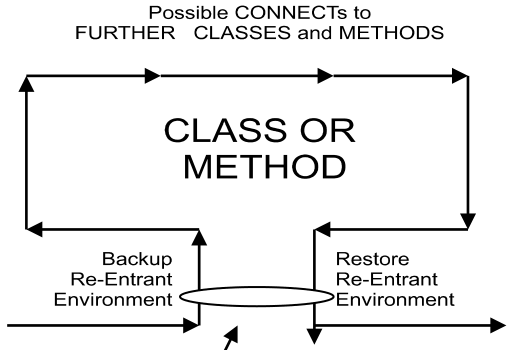
All OPENworkshop views and screens must be based on a format. The format name is specified in the definition of the view or screen in Dictionary-IV. Views and screens may, additionally, refer to other formats through joins specified in their definition. On entry to a view or a screen
OPENworkshop creates a global instance of the format on which it is based, and any joined formats (having first made a backup copy if formats were included prior to entry).
When a CONNECT directive is executed, the global format is populated with the contents of the record currently active, i.e., the row at the cursor position in the case of a view.
This instance of the global format is available to all other classes or methods invoked from this time until either it is replaced by another instance of the global (this happens, for example, when view OEVCUST is invoked while another instance of the same view is open) or the view or screen that created this instance terminates. When a view or screen terminates, the instance of the global format that it created is deleted and the backup copy that it created is restored.
This behavior enables you to create re-entrant applications.
The Control structure section later in this manual discusses how OPENworkshop manages classes and methods through a structure of levels; each CONNECT, explicit or implicit, causes OPENworkshop to move to the next higher level.
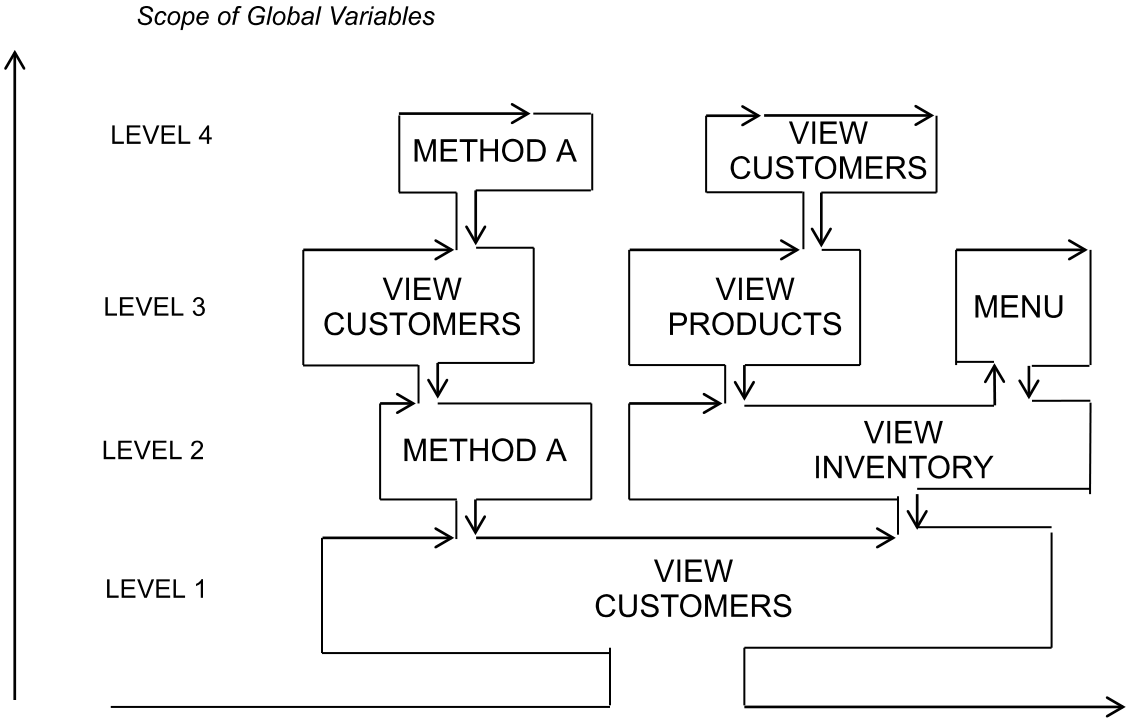
The diagram above depicts how any instance of a global format is available to all higher level classes or methods.
How to Use Global Formats in a Script Method
Section titled “How to Use Global Formats in a Script Method”If you wish to access the contents of an existing global format from within a script method, you must first declare the structure of the format, using the statement:
FORMAT INCLUDE #format-name OPT="NONE"This statement, placed in the Procedure Section of the method, loads the attribute table of the format into memory for the run-time environment to use.
If you wish to modify the contents of a global format you must first make a backup copy of its current contents, and must restore the pre-existing copy of the global format before you exit. This discipline ensures that the re-entrance capability of your application is preserved.
If you wish to create an instance of a global format for other classes or methods to access, and have that global format persist after your method has terminated, create it using FORMAT INCLUDE, and set global variable ]FMT$ to null before the method terminates. This step prevents OPENworkshop from deleting the global formats included in your method when it terminates. See the information on environment tables in the Variables section later in this manual.
A Warning About Assignments with Global Formats
Section titled “A Warning About Assignments with Global Formats”An assignment of one format to another, such as
LET OEFCUST1 = OEFINVNormally compares the two formats and moves the contents of all data element names that are present in both formats from the format in the right hand side to the format in the left hand side of the statement. This is not true for any assignment that has a global format on one side and a local format on the other side. In such cases, OPENworkshop assumes that both formats are compatible and simply moves the data, i.e., simply moves the string.
Example:
LET #OEFCUST1 = OEFCUSTMoves the data from the local format to the global format. An assignment between two dissimilar formats, such as:
LET #OEFCUST1 = OEFINVis likely to lead to unexpected and undesirable results.
I/O and Formats
Section titled “I/O and Formats”Script methods perform I/O using directives such as READ, ADD and CHANGE. These always use a link to determine the file to be used, and the memory-resident format definition to be used.
OPENworkshop script methods always use a local format for these I/O functions. It is not possible, for example, to read to a global instance of a format. Instead, you must read to the local format, and then assign the data to the global.
Constants
Section titled “Constants”Constants are data elements that do not change value during script execution. Constants are also called literals because values such as 1.25 or “string” are literal values. There are two types of constants:
- Numeric constants can be positive or negative numerals in integer, fixed point, or floating-point format.
- String constants include ASCII characters delimited by quotes, such as “ABC”, or hexadecimal values delimited by dollar signs, such as $414243$.
For more information on constant values, see the Thoroughbred Basic Reference Manual.
Variables
Section titled “Variables”Variables are data elements that contain values. The value contained in a variable can change during execution. Script-IV recognizes numeric, string, and system variables. You can create numeric and string variables. System variables are numeric or string variables that Script-IV defines for you.
Data Element Names versus Variables
Because data element names are treated as single elements in scripts, substring operations cannot be performed on data element names. However, the value in a data element name can be moved to a variable on which string operations can be performed. Data element names and variable names can be used interchangeably in Script-IV syntax, except when specifically stated otherwise.
Variables are not dictionary-based. They provide an alternative way of holding and manipulating data and do not have the requirements that are built into data element name definitions. However, these very characteristics can defeat a primary purpose of using the system dictionary for data definition: to obtain data independence. Much productivity provided by fourth generation languages is tied to data independence, and this can be lost if variables are not used wisely.
Numeric Variables
Numeric variables contain numeric values. These values can be integers, fixed-point numbers, or floating point numbers. You can use the LET command to assign numeric values to the numeric variables you define.
For more information on how to define numeric variables, see the Thoroughbred Basic Reference Manual. To establish control of naming conventions for variables, see the descriptions of the .LONGVAR and .SHORTVAR commands in the Script-IV Language Reference. To specify how integer values are rounded, see the description of PRECISION in the Script-IV Language Reference.
Elastic String Variables
Elastic string variables contain string values. These values are any alphanumeric value; lengths of strings can range from 0 to 65000 bytes long. You can use the LET command to assign string values to the elastic string variables you define.
For more information on how to define string variables, see the Thoroughbred Basic Reference Manual. To establish control of naming conventions for variables, see the descriptions of the .LONGVAR and .SHORTVAR commands in the Script-IV Language Reference.
System Variables
System variables are numeric or string variables that Script-IV defines to help you manage certain types of tasks. In most cases, these variables interact with a Script-IV command. Examples of Script-IV variables include:
| VARIABLE | INTERACTS WITH |
|---|---|
| COLUMN | INPUT SCREEN |
| ESCAPE | ESCAPE-KEY |
| FIELD | INPUT SCREEN |
| FILE-SUFFIX | OPEN |
| LENGTH | INPUT SCREEN |
| LINE | INPUT SCREEN |
| MENU-PARMS | NOT APPLICABLE |
| SYSTEM-DATE | SET |
| SYSTEM-TIME | SET |
| TERM-KEY | INPUT MESSAGE |
| INPUT SCREEN | |
| TERMINAL-DATE | SET |
| TEXT-END | READ |
Restrictions on Variables
You cannot define a Script-IV reserved word as a variable name. For a list of reserved words, see the Script-IV Language Reference.
OPENworkshop defines a number of string arrays, for which the meanings are reserved. See the String Arrays section of this manual.
Environment Tables
Section titled “Environment Tables”OPENworkshop maintains a number of environment tables to help it manage the run-time data environments and to deliver re-entrance:
| ]FMT$ | Format Name Table |
|---|---|
| ]WIN$ | Windows Name Table |
| ]PUB$ | Resident Public Programs Name Table |
| ]CH$ | Current List of Open Channels |
| ]PREC | Precision |
| ]PFX$ | OPEN files using a full system path |
On entry to any Script-IV or Thoroughbred Basic Method OPENworkshop saves the current contents of these tables before passing control to the method. On exit from the method, it restores the saved status.
You may override this behavior if you wish any changes your method has made to persist. Use the following statements with care:
LET ]PUB$=""This statement prevents restoration of the Public Programs Table, leaving any resident public programs you have added in place.
LET ]FMT$=""Prevents deletion of the format table(s) you have INCLUDED, leaving added global formats in place.
LET ]WIN$=""Leaves any windows that you have opened in place.
LET ]CH$=""Prevents open file channels from being closed.
LET ]PREC=PRCPrevents precision from being reset to its original setting.
LET ]PFX$="file-name"Lets you create a path for OPENing the data file. CONNECT VIEW, CONNECT SCREEN, and OPEN LINK will call the FILE-SUFFIX Method before attempting to open the data-file defined for the Link. The data-file name will be appended to this path and the system will attempt to OPEN this file using the full path. If an error occurs, the normal error processing will take place
Note: The FILE-SUFFIX method now executes for an OPEN LINK link-name regardless of whether or not an ampersand (@) has been specified in the data-file-name.
From the OPENworkshop Reference, version 8.9.1. Open this page in the PDF