

Introduction
TS Network Basic with DataServer is an integral part of the Thoroughbred Software network solution. Server data can be made available across platforms for use in Dictionary-IV file maintenance, Report-IV, Query-IV, Script-IV, and Basic applications.
With TS Network DataServer software:
- Applications can now be configured to access a Network DataServer.
- New or existing applications can access and share data across a network.
When you access a file on another computer there is a large amount of network communication associated with accessing keys and locking records. This network traffic is in addition to the communication necessary to transfer the data.
Current file sharing capabilities with NFS, Netware, and Microsoft Network provide low-level access to files on other systems. They do not, provide acceptable levels of performance or ensure data integrity.
TS Network DataServer allows much of the logic required for distributed file I/O to reside on the system that contains the data. This process minimizes network exchanges and provides improved performance.
This guide first describes the Client side of TS Network DataServer, which is provided with every Thoroughbred Environment installation. It then provides specific information for Thoroughbred servers.
Package Contents
Section titled “Package Contents”You should have received the following:
- An Order Confirmation email containing a License Assignment Card and a link for downloading the products in your order.
Download Thoroughbred Products
Section titled “Download Thoroughbred Products”All Thoroughbred products are available for download via the Thoroughbred Download Center.
To download your product(s):
- Click on the link in the Order Confirmation email to open the Downloads page.
- On the Downloads page:
- Enter your Customer ID and Order Number from the Order Confirmation email.
- Enter your name and email address.
- Click on the Lookup Order button to open the Verification page.
- On the Verification page:
- Click on the product to download.
- Click on the button to accept the Thoroughbred License Agreement.
- Click on the Download button.
- Repeat these steps until all products from your order are downloaded.
- Once all products from your order are downloaded, copy them to the system where you will be installing your product(s).
Requirements
Section titled “Requirements”To run TS Network DataServer your system must meet the following requirements:
- Windows 10/Windows 11/ Windows Server 2016/Windows Server 2019/Windows Server 2022/Windows Server 2025
Once the installation is complete, server access is enabled by the addition of a number of configuration items. Refer to the sections that follow for instructions about creating or modifying the SERVER.MAP and IPLINPUT file, TERM.MAP file, and executing the Server Startup Program.
TS Network Basic with DataServer Components
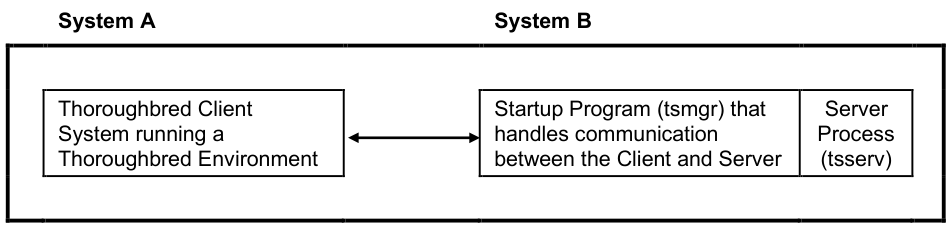
Section titled “TS Network Basic with DataServer Components”The TS Network Basic with DataServer consists of three components:
- A Client enabled Thoroughbred Environment,
- A Startup Program (tsmgr), and
- A Server Process (tsserv) for each connection.
Client Enabled Thoroughbred Environment
Section titled “Client Enabled Thoroughbred Environment”The client side is enabled in a standard Thoroughbred Environment. When configured for data server access, it detects requests for data that reside on a server. When this event occurs, it sends the I/O request to the server for processing. The server responds with the resulting set and processing continues.
Startup Program (tsmgr)
Section titled “Startup Program (tsmgr)”The Startup Program (tsmgr) creates server processes for clients as needed. When the Startup Program detects a client attempting to connect, it tries to create a Server Process for the client. If a server process is created successfully, they can perform client/server communications.

Server Process (tsserv)
Section titled “Server Process (tsserv)”The Server Process (tsserv) is triggered by requests from the client. Once a request is received, it is processed and the results returned to the client.
System Architecture
Section titled “System Architecture”The following diagram describes the configuration of components for the Thoroughbred Client.
Client on System A and Server on System B.
From the TS Network Basic with DataServer Installation Guide, version 8.9.1. Open this page in the PDF