

Open External Windows Files
TbredComm supports opening and executing external Window files such as image files, Word documents, Excel spread sheets, etc. Any file that can be opened or launched from the Windows Run dialog (Start button, Run) can be executed from within TbredComm.
If a program name is not supplied, the file will be opened with the default application defined by the file extension. For example if .jpg files are associated with a browser, that browser will be used to open .jpg files.
This is accomplished using two new mnemonics.
OB Open Begin
OE Open End
The TBREDCON terminal table entries for these mnemonics are:
39 OB 00 0 0 0 KE[5j
39 OE 00 0 0 0 KE[4j
The Basic syntax to open a file is:
PRINT 'OB',”file name_and_arguments”,'OE'If the path to the file is not defined in the system path variable you must supply the full path name.
TbredComm will recognize the PRINT command, the OB mnemonic, the OE mnemonic, the file name, and any arguments encapsulated between these mnemonics. For TbredComm to capture the file name, the PRINT must print to the visible screen. The recommended technique is to:
First create a window,
Execute the PRINT statement,
Then pop the window.
The following example first creates an 1x1 window at column 0 row 24 then executes the PRINT statement that will open a .doc file using the default application associated with the .doc file extension:
WINDOW CREATE (1,1,0,24);PRINT 'OB',"C:\MyFiles\TbredOBOE.doc " ,'OE';WINDOW POPThe following example will launch file explorer using an argument list to open an expanded folder view of the D drive:
WINDOW CREATE (1,1,0,24);PRINT 'OB',"explorer.exe /E,/N,C:\",'OE';WINDOW POPThe Basic engine will intercept and will not process a PRINT statement that attempts to print off the visible screen. The following example will NOT work:
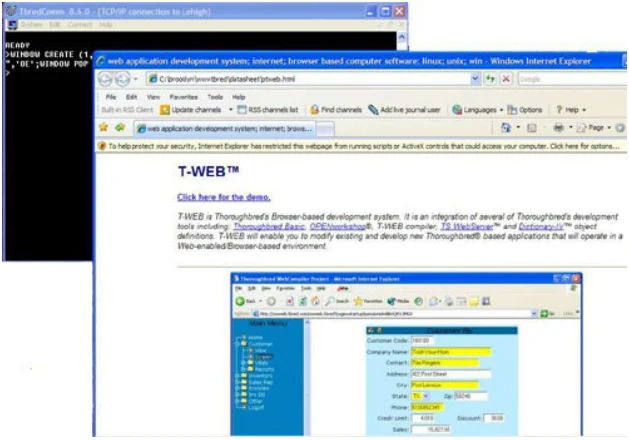
WINDOW CREATE (80,1,200,24);PRINT 'OB',”C:\MyFiles\TbredOBOE.doc”,'OE';WINDOW POPThe following example illustrates an .HTML file opened using the PRINT ‘OB’,C:\path\file-name,‘OE’ syntax. In this case the .HTML file is associated with the IE browser.
From the TbredComm Reference, version 8.9.1. Open this page in the PDF