

TbredComm
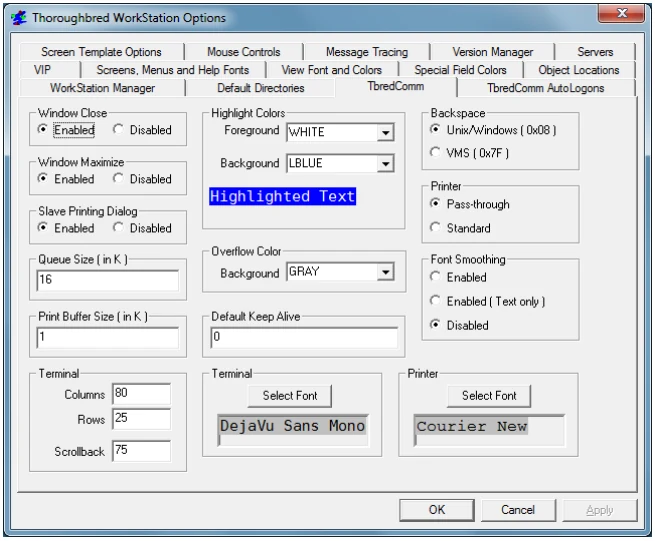
Windows Close
Enable or Disable the use of the close button in the TbredComm window.
Windows Maximize
Enable or Disable the use of the maximize button in the TbredComm window.
Slave Printing Dialog Enable displays the Print Dialog (printer selection) during slave printing. Disable turns this option off.
Queue Size (in k)
This parameter defines the size (in k) of the inbound message queue used by
TbredComm. The default size is 16. The minimum size is 8 and the maximum size is
8192.
Print Buffer Size (in k)
This parameter defines the size (in k) of the slave printing buffer used by TbredComm. The default value is 1k.
Highlight Colors Allows you to define the foreground and background colors when highlighting text in the TbredComm window. The default Highlight Colors are white on blue.
Overflow Color When resizing the TbredComm window, the Basic window ‘region’ is resized based on the current font and point size. It is possible to expand the TbredComm window beyond the region defined by Basic. The Overflow Color defines the color to be used for that area of the TbredComm window. The default Overflow Color is black.
Default Keep Alive This parameter defines the default keep alive value for new TbredComm connections and Autologons. To enable, enter the number of seconds of inactivity before a “KeepAlive” packet is sent to keep the connection alive. To disable, enter 0 for the number of seconds.
Backspace Allows you to select the backspace character, either a UNIX/Windows backspace, 0x08, or a VMS backspace, 0x7F.
Printer
Allows you to select Pass-through or Standard print manager mode.
In Pass-through mode, all output will be spooled to the Microsoft Windows Print Manager and use existing Dictionary-IV printer tables. If you use the Windows Print Setup facility to change printer type, you must reassign your printer table to the new type.
In Standard mode, all output will be spooled to the Microsoft Windows Print Manager and use a standard printer table, which enables you to use the Windows Print Setup facility to change printer type without having to reassign your printer table to the new type.
To use a standard printer table, you must create a printer table that contains a set of escape sequences. For more information on how to create the printer table, please refer to the Thoroughbred Environment for Windows Supplemental Guide.
For more information on Dictionary-IV printer tables, please refer to the Dictionary-IV Administrator Guide.
Font Smoothing
Allows you to enable or disable the use of Microsoft’s Clear Type technology.
Terminal
Allows you to set the default characteristics for TbredComm window.
- Columns
- The width of the window, in characters. The default value is 80.
- Rows
- The length of the window, in characters. The default value is 25.
- Scrollback
- The number of rows the window can scroll backwards. The default value is 75.
Terminal Font
Allows you to set the default terminal font for TbredComm.
Printer Font
Allows you to set the default printer font for TbredComm.
From the WorkStation Manager, version 8.9.1. Open this page in the PDF