

Save and Security Settings
Note: At this time, this option is not supported on the Windows operating systems.
The Save and Security Settings allows you to configure save directories and optional security settings for PDF files by Report-IV definition name. This is done using a combination of a User Access ID (OPENworkshop security group or IDOL-IV Operator Code), a Report ID and a Save Directory.
When PDF is selected as the output device, a table lookup will be performed attempting to match the user to the full report name. If a match cannot be found, the last character of the report name is removed and the lookup is repeated using LIKE logic. For example, the first lookup would test LIKE “OERCUST”. If a match was not found, the next lookup would test LIKE “OERCUS*”. This is repeated until either a match is found or match cannot be found. If a match cannot be found, the operator will not be allowed to generate the .pdf file and a security error will be displayed.
Example using OPENworkshop security groups:
User Access ID Report ID Save Directory
============= ========= ==============
- 100 OER
- /usr/lib/PDFOut
102 OERCUST /usr/lib/PDFOut/PDF999
2001 AP /usr/lib/PDFOut/PDFAP
2002 AP /usr/lib/PDFOut/PDFAP
2002 AR /usr/lib/PDFOut/PDFAR
In the above example, members of group 100 can generate PDF files for any report that begins with OER except OERCUST. Only members of group 102 can generate a PDF file for report OERCUST. The PDF for report OERCUST will be saved in /usr/lib/PDFOut/PDF999. All other reports beginning with OER will be saved in /usr/lib/PDFOut.
Members of groups 2001 and 2002 can generate any report in the AP library. All AP reports will be saved in /usr/lib/PDFOut/PDFAP.
Only members of group 2002 can generate reports in the AR library. All AR reports will be saved in /usr/lib/PDFOut/PDFAR.
To define save locations without any security settings, simply leave the User Access ID blank.
User Access ID Report ID Save Directory
============= ========= ==============
OE /usr/lib/PDFOut/PDFOE
AP /usr/lib/PDFOut/PDFAP
AR /usr/lib/PDFOut/PDFAR
In the above example all OE* reports will be saved in the PDFOE directory, all AP* reports will be saved in the PDFAP directory, and all AR* reports will be saved in the PDFAR directory.
The Save and Security Settings can be accessed at any time from the main OPENworkshop menu. Select Utilities, select Report-IV to PDF Utilities, then select Save and Security Settings. When selected the configuration view will display.
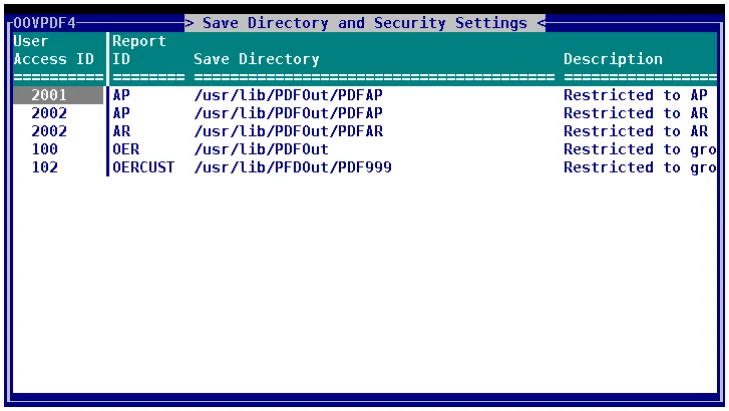
Initially your view will be empty. Use standard OPENworkshop View functions to maintain the Save Directory and Security Settings view: add a row to create a new entry, delete a row to delete an entry, modify column data to change the values.
User Access ID
Section titled “User Access ID”The User Access ID code is used in combination with the Report ID to control which users can generate the corresponding PDF file. Leave this blank to give all users access.
The User ID can be either a 3-character IDOL-IV operator code or an OPENworkshop security group, from 1-6 characters in length.
OPENworkshop security groups and IDOL-IV operator codes should not be mixed, only one methodology should be used. If OPENworkshop security is active, the security group methodology will be used. If not active, the IDOL-IV operator code methodology will be used.
Report ID
Section titled “Report ID”The Report ID is used in combination with the User Access ID to control which users can generate the corresponding PDF file. The Report ID can be from 1 to 8 characters. LIKE logic is applied when matching Report ID to User Access IDs. Entering “OE” for a Report-IV definition name is equivalent to LIKE “OE*”.
Save Directory
Section titled “Save Directory”Enter the full path to the directory where the PDF file is to be saved. If none is supplied, the default path defined in the Settings and Options screen will be used.
All directories must have the same root directory. The root directory must be the default save path defined in the Settings and Options screen (#OOFPDF1.RPT-PATH). Assuming #OOFPDF1.RPT-PATH is set to “/usr/lib/PDFOut”, the following save directories are valid:
/usr/lib/PDFOut
/usr/lib/PDFOut/PDFAP
/usr/lib/PDFOut/PDFAR
Description
Section titled “Description”Optional description. This is for system administrative purposes only, this is not used when generating PDF files.
Important: To activate this feature set the default value of #OOFPDF1.SAVE-CONFIG to “Y”. If this is not set, all users will be able to generate any PDF file and all PDF files will be saved to the default directory defined on the Settings and Options screen. This can be set at run time or can be set by modifying the data element preset value using Format maintenance.
From the Report-IV to PDF Installation and User Guide, version 8.9.1. Open this page in the PDF