

*RPSD - Object Library File Maintenance
Purpose
This utility reads and places Thoroughbred Basic programs into an object library. Thoroughbred Basic requires Dictionary-IV be loaded to run this utility.
Procedure
To run this utility from Thoroughbred Basic Console Mode, type:
RUN “*RPSD” and press Enter.
To select this utility from the Thoroughbred Basic Utilities Menu, type one of the following:
R and press Enter.
*R and press Enter.
*RPSD and press Enter
Menu option # and press Enter
The following screen will be displayed:
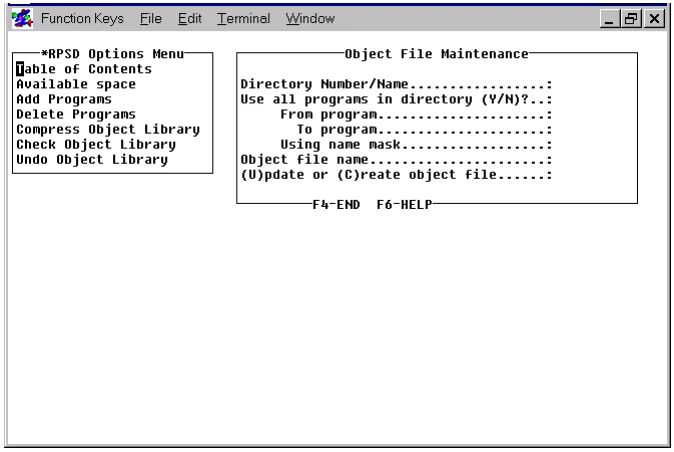
The screen contains two windows. You must select an option from the *RPSD Options Menu and enter the required information in the Object File Maintenance window.
The *RPSD Options Menu contains the following selections:
- Table of Contents lists the program directory of a specified object library.
- Available Space lists the available space in a specified object library.
- Add Programs enables you to add programs to an existing object library or create a new object library. It adds programs from a specified directory using an optional name range or mask.
- Delete Programs deletes programs from a specified object library using an optional name range or mask.
- Compress Object Library compresses a specified object library. All available space is moved to the end of the library.
- Check Object Library checks the integrity of a specified object library.
- Undo Object Library unpacks the programs from a specified object library into a specified directory using an optional name range or mask.
The Object File Maintenance window contains the following selections:
-
Directory Number/Name is used to specify the number or the name of a directory:
When you use the Add Programs function it specifies the directory from which Thoroughbred Basic programs are read and placed into an object library.
When you use the Undo Object Library function it specifies the number or name of the directory where programs will be saved after they are removed from the object library.
-
Use all programs in directory (Y/N)? specifies whether all the programs in a directory will be placed in the object library:
Y specifies that all of the programs in the selected directory will be placed in the specified object library. For the Undo Object Library function, all programs from the specified object library will be placed in the specified directory.
N specifies that programs from the specified directory will be placed in the object library using the subsequent From program and To program values or the Using name mask value.
-
From program specifies the beginning of a range of values. A valid value is the name of the first program to be included in the object library. You can press the Enter key to specify the first program in the directory.
For the Add Programs function, if the programs already exist in the object library, they will be replaced by the programs from the specified directory.
For the Undo Object Library function, if the programs already exist in the specified directory, they will be replaced by the programs from the specified object library.
-
To program specifies the end of a range of values. A valid value is the name of the last program to be included in the object library. You can press the Enter key to specify the first program in the directory.
For the Add Programs function, if the programs already exist in the object library, they will be replaced by the program from the specified directory.
For the Undo Object Library function, if the programs already exist in the specified directory, they will be replaced by the programs from the specified object library.
-
Using name mask specifies a mask, which enables you to select a group of files without specifying individual names. Valid values are alphanumeric characters and question marks, which match characters in the same position as the question mark.
Examples:
ABC??? matches file names that begin with ABC.
12??ab matches file names that begin with 12 and end with ab.
To select the files named AAA123, AAA456, AAArty, AAABCD, and AAAQWE, you can specify the AAA??? mask.
To select the files named 12TT34, RTTTTT, TTTT, aaTT, 1TTT23, you can specify the ??TT?? mask.
-
Object file name is the name of an object library into which the selected programs will be placed or from which selected programs will be removed. Valid values are up to 8 characters long. You can specify any combination of letter, numbers, or other characters except for the space character, ?, /, \, *, [, ], or @.
For the Add Programs function, if the specified object library exists, the system automatically puts a U in the (U)pdate or (C)reate new object file field. If the specified object library does not exist, the system puts a C in the (U)pdate or (C)reate new object file field.
-
(U)pdate or (C)reate new object file specifies whether an object library will be created or updated. There are two valid values:
C specifies that the object file will be created. If the object library exists and you use this object, the object library will be erased, then recreated. The selected programs will then be placed in the object library.
U specifies that the object library will be updated with the programs from the specified directory.
Error Messages
DIRECTORY SPECIFIED NOT VALID, RETURN TO CONTINUE.
The directory you selected is not valid. Press Enter and try again.
VALUE ENTERED IS NOT ALLOWED, RETURN TO CONTINUE.
Valid entries include U and C. Press Enter and type either U or C and press Enter.
From the Thoroughbred Basic Utilities, version 8.9.1. Open this page in the PDF