

Print Edit Session History
This selection allows you to print the Edit Session History for a specified Source document. The Edit Session History contains all the changes made to that Source, along with comments. For more information, see the section on Source Locking and Edit History.
When you select Print Edit Session History from the Source-IV Main Menu the system prompts:
Select Printer (LP P1):__________The system displays the Print Edit Session History window:
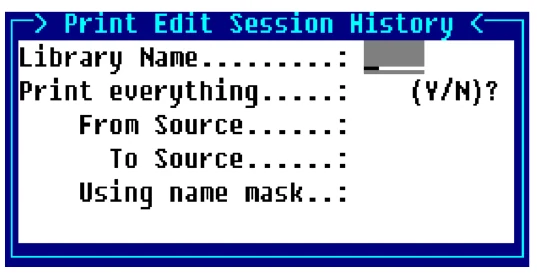
Library Name
This is a name that is used to specify a library in which Source documents are kept.
The library name can be from 1 to 4 characters long and can consist of any combination of letters, numbers, or characters except (spaces ? / \ * [ ] @).
At this field you can press F2 to display a view of library names. This list contains all of the currently defined libraries. The Up Arrow and Down Arrow keys can be used to scroll to the desired library name. Pressing Enter will select that library name.
The last library name used by the editor will be automatically displayed in this field. Pressing Enter will select that library name.
Print everything?
Y Edit Session History for every Source in the selected library will be printed.
N Option to enter a range or a single Source to be printed will be given.
From Source Enter the name of the first Source document. If you want to start with the first Source document in the library, press Enter.
At this field you can press F2 to display a view of Source documents in the selected library. The Up Arrow and Down Arrow keys can be used to scroll to the desired Source document name. Pressing Enter will select that Source name.
To Source Enter the name of the last Source document to be selected. If you pressed Enter on the From Source field and you want to end with the last Source document in the library, press Enter. Otherwise pressing Enter will apply the same name as the name entered in the From Source field.
At this field you can press F2 to display a view of Source documents in the selected library. The Up Arrow and Down Arrow keys can be used to scroll to the desired Source document name. Pressing Enter will select the Source name.
Using name mask A mask allows selection of similar names without specifying each individual name. The mask specifies which part of the name must match exactly and question marks are used to indicate that any characters in the same position as the question mark are allowed.
Examples:
mask ABC??? (selects names that begin with ABC)
mask 12??ab(selects names starting with 12 and ending with ab)
To select names:
AAA123 AAA456 AAArty AAABCD AAAQWE
Use mask: AAA???
To select names:
12TT34 RTTTTT TTTT aaTT 1TTT23
Use mask: ??TT??
From the Source-IV, version 8.9.1. Open this page in the PDF