

Dictionary-IV Overview
Dictionary-IV is a DBMS. It serves as a repository of information and is used by application designers to store the description and definition of data elements, file formats, screens, menus, views, messages, and help.
Thoroughbred Dictionary-IV is a primary component of Thoroughbred Dictionary-IV. It is a dictionary-driven system that provides a database manager, menu manager, screen developer, message dictionary, and help manager.
In Thoroughbred Dictionary-IV, portions of the program are externalized, or separated, from the program, and are defined in a system dictionary.
The following are the components of Dictionary-IV:
Formats
Define the data item names, attributes (such as validation rules), and keys within a logical or physical file.
Global Cross Reference Contains definitions of all system-wide data elements. For each element, the Global Dictionary records name, type, validation rules, default value, and access rules (for security).
Whenever you access an item defined in the Global Dictionary from a format, it will be treated consistently and reliably.
Screens Control the layout, coloring, and other display attributes of user interface screen displays. Fields can be straight data-entry, lookup, calculated, or scrolled.
Views Display multiple records from a file in rows and columns on the user’s screen. File-wide commands can be used to make changes to the whole file or selected groups of records.
Links Define the relationships between files, sorts, formats, screens, and views within the application. A link gives an application designer the flexibility to create several logical schemes for manipulation of physical files.
Menus
Control access security, function selection, and provide help for menu selections.
Messages Provide a central repository for all user messages. Messages define not only the text but also validation rules and display location.
Help
Defines context-sensitive help, on-line help for menus, database maintenance, data entry, and messages.
System Dictionary
Section titled “System Dictionary”This is the dictionary for which Thoroughbred Dictionary-IV is named. A 4GL script or 3GL program can then use definitions from the dictionary.
At this point, it will help to define the meaning of the system dictionary. (You may also refer to the glossary in this manual for additional terms.)
The system dictionary is a central storehouse of structured information that can be shared by programs. It contains data definitions as well as other types of definitions and is more inclusive than a data dictionary.
Resource Sharing One benefit of this design is the definitions in the system dictionary can be shared by any script or Basic program, which uses Dictionary-IV APIs.
Since data and system definitions are not contained in programs or scripts but are centrally located in the system dictionary, the programs and scripts can share those definitions.
The system dictionary provides the capability for shared resources. The data definitions and system definitions in the dictionary may be shared among any number of scripts or programs using the library of Dictionary-IV APIs. For example, five different scripts (or programs) may use the same help window because the help window definition is external to the scripts (or programs). This resource sharing between scripts (or programs) allows an efficient implementation of an application design.
Data Independence Data independence is a result of defining the structure of data in a system dictionary, independent of the script (or program) that uses it. The system dictionary provides the capability of sharing the data definitions and significantly reducing maintenance. If you need to change a definition, you only have to do it once in the dictionary rather than many times in every application program that uses the definition.
Standardized User Interface The user interface tools Thoroughbred Dictionary-IV provides can help to standardize the user interface design of your application and maintain consistency. You can design a standard user interface based upon your needs and implement it with the advanced development tools in Thoroughbred Dictionary-IV.
Because these are high-level tools, it is easier to produce a consistent user interface. These tools include free-form screen design, scroll-bar menus, windows, and views. How you combine these features to realize your design is up to you because Thoroughbred Dictionary-IV is very flexible.
Database
Section titled “Database”A database is an organized collection of information.
The telephone directory is a database: the names, addresses, and telephone numbers are the data, and the names are organized alphabetically.
| LAST-NAME | FIRST-NAME | STREET | CITY | TELEPHONE |
|---|---|---|---|---|
| Agassiz | Rick | 21 Hill St. | Hot Springs | 555-1889 |
| Donato | Elyse | 94 Red Rd. | Brookville | 555-6391 |
| Franklin | John | 102 Main St. | Stover | 555-3077 |
| Sandlar | Penny | 22 W. Elm St. | Tulsa | 555-0425 |
An ordinary dictionary is also a database. The words and definitions are the data, and the words are organized alphabetically.
A checkbook register, in which you record check payments, is another database: the date, check number, payee, payment amount, and account balance are the data, and the payments are organized by date and check number.
Thoroughbred Dictionary-IV stores the information in computer data files. A database consists of one or more related files.
In the preceding examples, each database contained a single file. A database can be as small or as large as you need it. The telephone database could contain additional files, depending on how much information you needed to control. This could be a directory for all the areas in the state, all the states in the country, or all the countries in the world.
Files, Records, Fields One thing that makes a database so useful is that the information is organized. If the telephone directory were not organized alphabetically, it would be a useless collection of information.
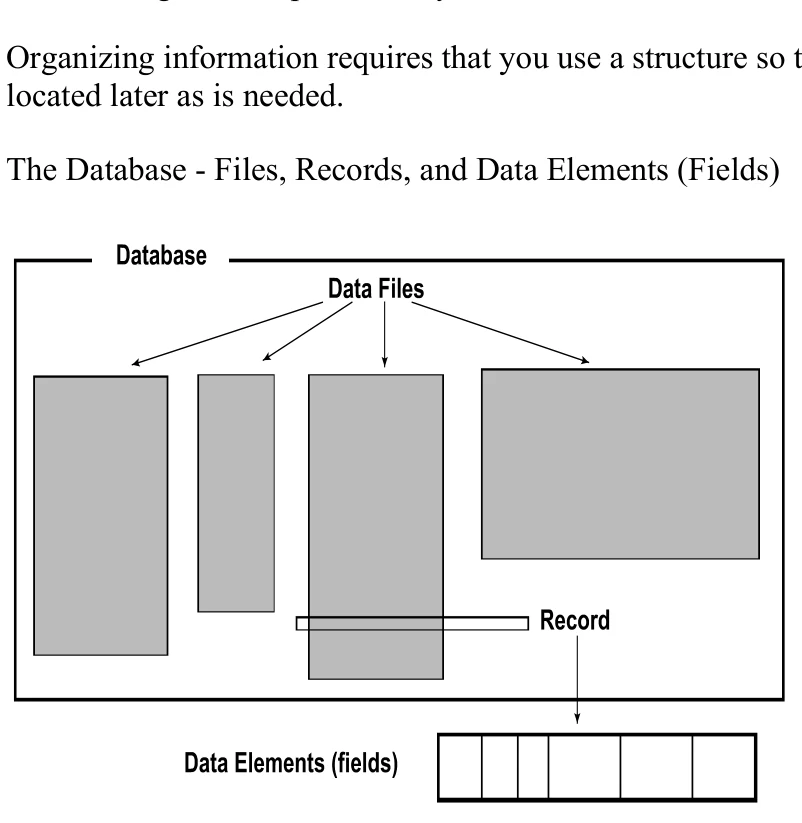
Organizing information requires that you use a structure so the information can be stored away and located later as is needed.
The Database - Files, Records, and Data Elements (Fields)
The database is the largest structure and can contain a number of related data files. We will discuss a small database with only one file.
The information in data files is organized into records. A record in the telephone file example would be the information for one person: last name, first name, street, city, and telephone number. Records are shown as rows.
The information in records is organized into data elements (fields). The data elements in the telephone file are the last name, first name, street, city, and telephone number. The data elements are shown as columns.
| Data elements | are usually, | but not always, | the smallest pieces | of data in the organization. |
|---|---|---|---|---|
| LAST-NAME | FIRST-NAME | STREET | CITY | TELEPHONE |
| Agassiz | Rick | 21 Hill St. | Hot Springs | 555-1889 |
| Donato | Elyse | 94 Red Rd. | Brookville | 555-6391 |
| Franklin | John | 102 Main St. | Stover | 555-3077 |
| Sandlar | Penny | 22 W. Elm St. | Tulsa | 555-0425 |
| Below is a listing of | some common synonyms. |
|---|---|
| Data File | Table, Relation |
| Record | Row, Tuple |
| Data Element | Field, Data Name, Column, Attribute |
The information contained in each data element is referred to as a value. In the above example under the data element LAST-NAME we have the following values: Agassiz, Donato, Franklin, and Sandlar.
A record has a standard format so every record in the file has the same data elements. When you define a record, you define a format or the sequence of data elements in the record.
Data elements have certain characteristics, including a name and attributes such as size, the type of data it can hold, and whether it is used as a key to organize the file. The following topics provide a basic understanding of data elements.
Data Name and Size When you create a data element, you give it a name and define the attributes. In the telephone file example, you might name one data element LAST-NAME and give it a size of 20. Values entered in this field cannot exceed 20 characters.
The following example is a 20-character field:
Robinson

Rosencrantz-Guildenstern
| R | o | s | e | n | c | r | a | n | t | z | - | G | u | i | l | d | e | n | s |
|---|
One reason for having a fixed size for data elements is so your system can find information very quickly. Since data elements have a fixed length, every record has a fixed length. No matter which record you access, the data elements can be found in the same position.
Types of Data
Information comes in many forms. A name is information and so is a word, a date, a number, or an
amount of money. Each type of information is handled differently. A number can be added, subtracted,
and multiplied with another number, but not so with a person’s name.
| DATA-NAME | TYPE | DATA |
|---|---|---|
| LAST-NAME | Text | Krupchezki |
| QTY-ON-HAND | Numbers | 9301 |
| ORDER-DATE | Dates | 3/31/97 |
| ORDER-TOTAL | Money | $1,532.09 |
| CUSTOMER-PHONE | Telephone | 908-555-0302 |
| EMPLOYEE-SS | Social Security | 911-00-9019 |
Key Fields Keys are data elements that help you to organize and locate information in a file. In the telephone file, the LAST-NAME is a key field because the file is in order by last name. If you want to locate Sam Jones in the telephone file, you look up Jones.
Keys help to identify the information for you. For most files, the system needs a special key so that it can identify information: the primary key.
Primary Keys The primary key is a unique identifier for the record. If everyone in the telephone directory had a different last name then you could use LAST-NAME as the primary key. Since this is not likely to be the case we must use some other method to uniquely identify each person.
If the people with the same last name all had different first names, then you could use the LAST-NAME plus the FIRST-NAME. In this case, the primary key would consist of two key fields: LAST-NAME and FIRST-NAME.
The primary key must contain a unique value that is the name of one and only one record. A social security number is a good example of a unique identifier.
Sometimes it is easier to invent a primary key. For example, you might create a data element named
Code, which contains values from 0001 to 9999.
The primary key is often informally called the key of the file; however, the key may contain one or more primary key fields. In this example the company name is the primary key.
| Primary | Key Order: COMPANY | Name | ||
|---|---|---|---|---|
| COMPANY | STREET | CITY | PHONE | BALANCE |
| Boots & Saddles | 21 Hill St. | Hot Springs | 555-9561 | $203.00 |
| Chamois by Kate | 94 Red Rd. | Brookville | 555-1352 | $174.59 |
| Great Rider | 102 Main St. | Stover | 555-0880 | $962.05 |
| Patently Leather | 22 W. Elm St. | Tulsa | 555-0465 | $564.23 |
In order by COMPANY name (ascending alphabetically).
The primary key is used to organize the file and to locate information. You may also use secondary keys to help you locate information that is not in the primary key.
Secondary Keys Secondary keys allow you to access a file in an order other than primary key order. Unlike primary keys, secondary keys in Dictionary-IV do not have to be a unique identifier.
Secondary keys are also known as cross-indexes, or sorts. In this example BALANCE is the secondary key. The same data is listed in ascending order by BALANCE.
| Secondary | Key Order: | BALANCE | ||
|---|---|---|---|---|
| COMPANY | STREET | CITY | PHONE | BALANCE |
| Chamois by Kate | 94 Red Rd. | Brookville | 555-1352 | $174.59 |
| Boots & Saddles | 21 Hill St. | Hot Springs | 555-9561 | $203.00 |
| Patently Leather | 22 W. Elm St. | Tulsa | 555-0465 | $564.23 |
| Great Rider | 102 Main St. | Stover | 555-0880 | $962.05 |
The same data in ascending order by BALANCE.
Database Management System
Section titled “Database Management System”The need to control and use information in business is critical to success. A computerized database management system provides a powerful tool to manage and process information.
A database management system (DBMS) is used to create and maintain databases. It is used to create the database structure (the fields, records, and files), and maintain the information in the database by adding, deleting, or changing records (database maintenance).
When you create a file in a simple database, you must define the names and sizes of the fields in the record and define the fields that make up primary key of the record.
Creating a large database requires more preparation due to the greater complexity and need for efficiency. The technique of Structured Analysis and Design provides methods and procedures used to define a large database.
Once the database is set up you can add the information to it. Database maintenance allows you to add, change, or delete a record. You may also browse through the file (inquiry) and do other things such as count or copy records, and run reports.
Types of Data Files
Section titled “Types of Data Files”Thoroughbred Dictionary-IV supports six types of data files:
- Direct
- Index
- Sort
- MSORT
- TISAM
- Text
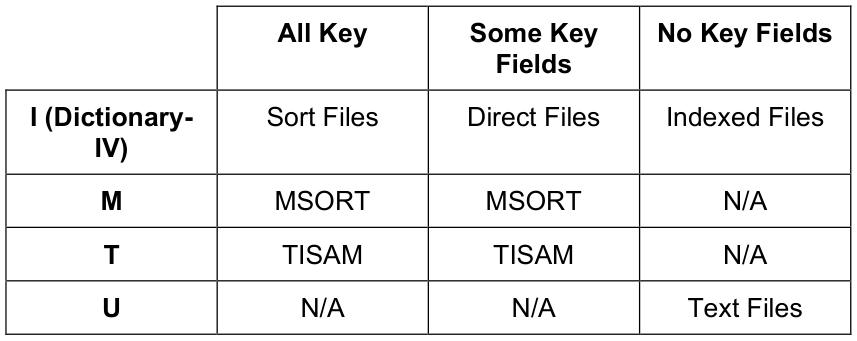
The file type affects how records are stored and accessed and is determined by:
- Whether or not the record contains any primary key fields
- Whether or not the record contains any non-key fields
- What is defined in the file type field in the Link definition
The following chart shows how each file type is defined by the Format and Link.
Key Indicator in Format
Link
File
Type
Direct The direct file is used to store records that are to be accessed randomly and is the most commonly used file type. The direct file contains at least one primary key field and at least one non-key field. The records are sorted in order by the primary key values and can be accessed by these values. (The key to the file is the combination of all primary key fields.)

Index The index file contains all non-key fields; it does not contain any primary key fields. The records are stored and accessed by record number, or index number, and are usually processed sequentially.

Sort The sort file contains all primary key fields; it cannot contain any non-key fields. The records are accessed by the primary key, or a combination of the primary key fields, the same as a direct file.

MSORT An MSORT file is a multiple key data file. Each MSORT file may contain up to 16 sort key definitions, each containing up to 16 segment definitions, which contain field and offset positioning.

TISAM A TISAM file is a Thoroughbred ISAM file (Indexed Sequential Access Method) that is structurally compatible with C-ISAM. It may have multiple key fields.

Text
A text file is a file containing straight text. File maintenance is not allowed on these files.
Non-Key Fields

From the Dictionary-IV User Guide, version 8.9.1. Open this page in the PDF