

READ
FUNCTION
The READ command is used to read a data record from a file. The data file specifications are obtained from the link definition.
SYNTAX
READ link-name [USING key-file-access | index-file-access]      [MISSING KEY PROCESS IS procedure]      [BUSY PROCESS IS procedure]      [RETRY IS retry-code-string]      [END PROCESS IS procedure]      [ERROR PROCESS IS procedure]      [SELECT WHEN condition]      [PROCESSING IS procedure]      [TEXT "text-id" INTO string-data-name/variable         [PROCESSES IS|ARE procedure [, end-of-text-procedure]]]
      key-file-access:
         KEY [SORT numeric-value] IS record-access |         record-range
      index-file-access:
         RECORD NUMBER [SORT numeric-value] IS         record-access | record-range
      record-range:
         RANGE IS [REVERSE]         ALL | FROM record-access TO record-access
      record-access:
         value | NEXT | FIRST | LAST | PREVIOUS
      retry-code-string
C Continue with next command I Ignore error zero. Clear data area and set key area. Do processing procedure, continue with next command. N Do END PROCESS, continue with next command S Skip busy record Y Use standard busy processing- link-name
- the name of the link where the data file is specified.
- numeric-value
- a data name, variable, constant, or expression that results in an integer.
- procedure
- the name of a procedure to perform.
- retry-code-string
- specifies the action to take if the command needs to be retried.
- condition
- an expression or statement that is tested to determine whether a record will be selected.
- text-id
- a string data name, variable, constant, or expression that specifies a one-character text ID.
- string-data-name/variable
- a string data name or variable name.
- value
- a data name, variable, constant, or expression that results in a string value.
NOTES
-
This command reads data from a file and makes it accessible to the script by loading the data into the format. The READ command does not lock the record.
-
File access options enable you to specify a random individual record, a record relative to the current record position, or a range of records. Other options enable you to specify record selection criteria, a standard record processing procedure, text field access and processing, and other special processing.
-
Key-access files must use key-file-access. Indexed files must use index-file-access.
Indexed files can be accessed by record number or by an existing sort defined in the link. The USING RECORD NUMBER clause is only used to access specific record numbers. Using a defined sort to access a record in an indexed file is the same as using a sort to access a record in a keyed file.
-
The SORT option specifies a sort definition that can be used to access the records in the file by a secondary key.
When a SORT option is used, a string value must be specified and the MISSING KEY procedure is not valid. File access using a secondary key will access the record closest to the specified key. A record will always be accessed unless an end of file is reached.
-
The record-access can specify a record by using a string key value for key-file-access or a numeric record number for index-file-access. If the SORT option is used, you must specify a string key value. Record-access can also specify the FIRST or LAST record in the file or specify the NEXT or PREVIOUS record.
-
The record-range can specify the entire file by using the ALL, FIRST TO LAST, or LAST TO FIRST options, or specify a smaller range of records. You must use the REVERSE clause to specify the direction of the range from high to low key values when the direction of the range is not apparent from the statement. Ranges such as “G-500” TO CUS-CODE, or TEMP-CODE TO CUS-CODE are assumed to be forward unless the REVERSE clause is used.
-
If a record-range is specified, it must make sense, such as NEXT TO LAST, FIRST TO “R-250”, or “A-100” TO “C-200”. A REVERSE range FIRST TO LAST is invalid.
-
If a record-range is specified, it requires a processing procedure if any processing is to occur during the read.
-
A missing key condition occurs if the READ command specifies a primary key that does not exist in the file. If a missing key condition occurs, the MISSING KEY procedure is performed. If the MISSING KEY procedure is not specified, script execution continues with the next command or with the next record in the range, if a range is specified. MISSING KEY is not applicable when a record-range is specified.
-
A busy record condition occurs if the record being accessed is in use and locked by another user. The CHANGE and DELETE commands lock a record.
By default, if the READ command specifies a record that is busy, the BUSY procedure is performed and, after five seconds, the command is retried. You can change this behavior by specifying a value for the WAIT-TIME Script-IV variable or by specifying a value for the PRM WAITLOCK statement. For more information on the PRM WAITLOCK statement see the Thoroughbred Basic Customization and Tuning Guide.
Even if the BUSY procedure is not specified, script execution continues to wait until the record is available. The operator can press the Escape key to force script execution to continue, depending on the escape processing set for the script.
-
The BUSY PROCESS IS procedure is executed before the RETRY option is evaluated.
-
An end of file condition occurs when the file-access options attempt to read a record that is beyond the last record in the file or beyond the last record in the range. If the READ command encounters an end of file, the END procedure is performed. If the END procedure is not specified, script execution continues with the next command.
-
If an error occurs, other than the missing key, busy record, or end of file condition, during the processing of this command, the ERROR procedure is performed. If ERROR is not specified, script execution continues with the next command or with the next record in the range, if a range is specified.
-
The SELECT WHEN option can be used with an individual record or a range of records to select a record for processing based upon a logical condition.
The logical condition is two or more values, consisting of constants, data names, variables, functions, or expressions, which interact with relational or logical operators to form either a true or false result. The record is accessed and the test performed. If the specified condition is true, the record is selected for processing. If no SELECT WHEN is specified, all records accessed are selected.
For more information on logical conditions see the section on Logical
Conditionals in this manual. -
The PROCESSING procedure specifies a standard record processing procedure. If this procedure is not specified, the record processing can occur in a subsequent command. However, if a range is specified, you must specify a PROCESSING procedure, otherwise no record processing will occur. Record processing occurs before text processing.
-
The TEXT option is used for reading and processing text fields, such as displaying text field data on the terminal. The READ command does not enable you to change the text field data in the record.
The CHANGE command enables you to change text field data in the record and process text field data. -
The reading and processing of text fields is independent of the reading and processing of data records. To read text fields, the format must have the text field defined and the READ command must specify the correct text field and a data name or variable. If the text is read into a data name, the data name must be defined for the correct length of the text field data.
-
The text field is read one line at a time starting at the beginning of the text field and continuing until an end of text condition is encountered. Each text line is read into the specified data name or variable and can be displayed or processed by the text processing procedure, defined as PROCESSES IS procedure or the first procedure of the PROCESSES ARE clause, before the next text line is read.
-
The processing procedure can override automatic reading of the entire text field by setting the TEXT-END variable to “E” to cause an end of text condition.
-
An end of text condition occurs at the end of the text field or when the TEXT-END variable equals “E”. If the READ command TEXT option encounters an end of text condition, the end of text procedure, which is the second procedure of the PROCESSES ARE clause, is performed if specified.
-
If no processing procedure is specified, only the last line of the text field is read. This line can be processed in a subsequent command only if the READ does not specify a record range. If the READ command specifies a record range, the TEXT option must specify a text processing procedure for the text field data to be displayed or processed.
EXAMPLES
READ 4SSLSRP USING KEY 4SSLSRP.SALES-REP-CODE      MISSING KEY PROCESS IS 4-REDO-INPUT
READ 4SRQMSTR USING KEY REQ-NO      PROCESSING IS EDIT-RECORD      MISSING KEY IS MISSING-RECORD      BUSY IS BUSY-RECORD      END IS END-OF-MAIN-FILE
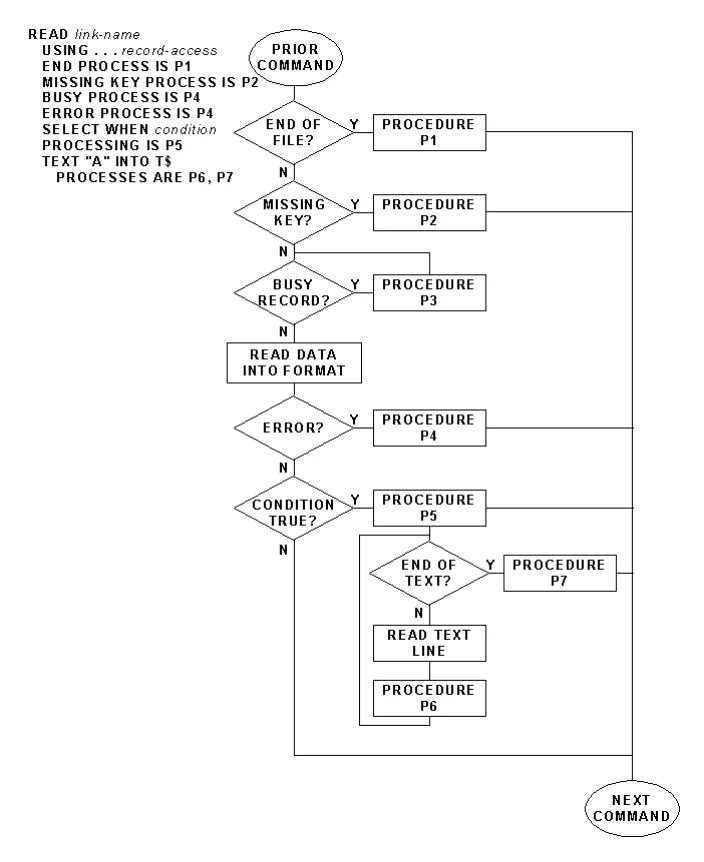
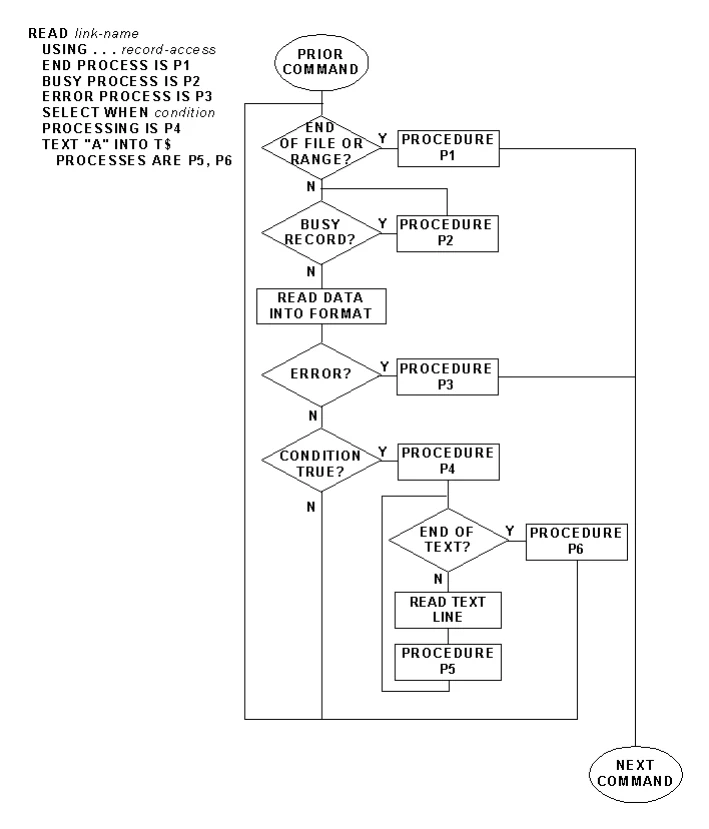
The following two pages contain flowcharted examples READ commands in single-access mode and multiple access mode.
SEE ALSO
ADD, CHANGE, DELETE, KEY-NAME, LN, OPEN, RETRY, TEXT-END, WAIT-TIME. RETRY directive, ERR system variable, ERR system function in the Thoroughbred Basic Language Reference. Error Codes in the Thoroughbred Basic Developer Guide. PRM WAITLOCK statement in the Thoroughbred Basic Customization and Tuning Guide.
READ (Single Access) Example
READ (Multiple Access) Example
From the Script-IV Language Reference, version 8.9.1. Open this page in the PDF