

TFF
Text Formatting Functions
Section titled “Text Formatting Functions”The TFF string function provides functions for formatting text. The general syntax is:
Syntax
Section titled “Syntax”TFF (string-value [,optional-arguments,…], option-string[,ERR=line-ref|,ERC=error-code])The text string to be formatted is specified by string-value and the function is specified by option-string. The number of optional-arguments depends on the function. The available functions are described in the following sections.
String Search and Replace functions
Section titled “String Search and Replace functions”This TFF string function performs search and replace functions on a string.
Syntax
Section titled “Syntax”TFF (string-value, search-for, replace-with [,separator], option-string[,ERR=line-ref|,ERC=error-code])- string-value
- is the string to be searched.
- search-for
- is a string specifying one or more values to search for.
- replace-with
- is a string specifying one or more replacement values.
- separator
- is an optional separator character.
- option-string
- is a string specifying the option code.
- line-ref
- is the program line number or label to branch to if an error is produced by this function.
- error-code
- is a programmer-defined error code. Valid values are positive or negative whole numbers.
Option codes
Section titled “Option codes”This TFF function searches the string-value replacing each matching search-for value with the corresponding replace-with value. If the optional separator character is included, multiple search and replace pairs are processed in a single function call. Appending a plus sign to the option-string causes leading and trailing spaces and tabs to be removed from each replace-with value.
- "S"
- Replace all matching search strings.
- "s"
- Replace only the first matching search string.
Examples
Section titled “Examples”LET U$ = TFF("Your code is %C", "%C", "1234", "s" )U$ will contain “Your code is 1234”
LET S$ = TFF("Dear %NAME;", "%NAME", #UTCUST.CUST-NAME, "s+")S$ contains “Dear Warren Baseball Club;” with trailing spaces removed from CUST-NAME.
SEP$ is the character used to separate search and replace strings. Every occurrence of
“[[sessionid]]” in HTML$ will be replaced with the contents of SESSION$ and every occurrence of “[[format]]” in HTML$ will be replaced with the contents of FORMAT$. If there will be only one match for each search argument, a lower case “s” option-string should be used to improve performance.
Internet Uniform Resource Locator functions
Section titled “Internet Uniform Resource Locator functions”This TFF string function implements encoding and decoding of Internet URL strings.
TFF (string-value, option-string [,ERR=line-ref|,ERC=error-code])- string-value
- is the string to be encoded or decoded.
- option-string
- is a string specifying the option code.
- line-ref
- is the program line number or label to branch to if an error is produced by this function.
- error-code
- is a programmer-defined error code. Valid values are positive or negative whole numbers.
Option codes
Section titled “Option codes”URL encoding converts all but specific ASCII characters into a %HH notation consisting of a percent sign character and two hexadecimal characters. Alphanumeric characters 0-9, A-Z, and a-z, and the special characters !()*-.\_~ are not encoded. Decoding converts an encoded string back to its original form.
- "E"
- Encode string-value.
- "D"
- Decode string-value.
- "E+"
- Encode string-value and replace space characters with a plus sign.
- "D+"
- Decode string-value and replace plus sign characters with a space.
Examples
Section titled “Examples”LET U$ = TFF("This is a simple & short test","E")U$ will contain “This%20is%20a%20simple%20%26%20short%20test”
LET U$ = TFF("This is a simple & short test","E+")U$ will contain “This+is+a+simple+%26+short+test”
PRINT TFF(U$,"D")If U$ contains the result of the first example, “This is a simple & short test” will be printed.
PRINT TFF(U$,"D+")If U$ contains the result of the second example, “This is a simple & short test” will be printed.
Encrypt a String function
Section titled “Encrypt a String function”This TFF string function uses internal cipher routines to encrypt a string.
TFF (string-value, key-string, option-string[,ERR=line-ref|,ERC=error-code])- string-value
- is the string to be encrypted or decrypted.
- key-string
- is a string specifying an encryption key or password. Minimum size is 4 characters. Maximum size is 8 characters.
- option-string
- is a string with the value "C" to select this function.
- line-ref
- is the program line number or label to branch to if an error is produced by this function.
- error-code
- is a programmer-defined error code. Valid values are positive or negative whole numbers.
Remarks
Section titled “Remarks”This TFF function uses internal cipher routines with the specified key-string to produce a random eight-byte string. The XOR string function is then called to reverse random bits in string-value to produce the result string. When string-value is the result of a previous encryption and the original key-string is provided, the new result will be the original string-value.
This function produces strings containing binary characters that could be misinterpreted by applications, such as the Basic Field Separator ($8A$), the Basic Escape ($1B$), ASCII control characters such as TAB ($09$), and String Terminators ($00$ and $24$). The HTA string function may be useful to convert an encrypted string to ASCII format.
Since a particular key-string will always produce the same random string*, key-strings* should be changed periodically.
Examples
Section titled “Examples”LET E$ = TFF("123-45-6789","SSNKEY","C")E$ will contain $F59D6CB0DC97540CF39766$
LET A$="123 Old Lake Shore Road", P$="PASSWORD";LET B$=TFF(A$, P$, "C"), C$=TFF(B$, P$, "C")B$ will contain the encrypted result string and C$ will contain the same value as the original A$.
XML Output function
Section titled “XML Output function”This TFF string function produces an XML formatted string from a FORMAT.
TFF (format-name [,data-names], option-string[,ERR=line-ref|,ERC=error-code])- format-name
- is a string specifying the name of a format that has been loaded into memory using the FORMAT INCLUDE directive and populated with data.
- data-names
- is an optional string specifying data elements to be selected from format-name.
- option-string
- is a string specifying the option codes.
- line-ref
- is the program line number or label to branch to if an error is produced by this function.
- error-code
- is a programmer-defined error code. Valid values are positive or negative whole numbers.
Option codes
Section titled “Option codes”This function creates an XML formatted string from all or selected elements of a format in memory. The option-string begins with “XO” and may be followed by any of the optional codes listed below. See the remarks section for complete descriptions. Commas, spaces and tabs may be included to improve readability.
- "XO"
- Selects the XML Output function.
- "C"
- Include Century in dates.
- "D"
- Use data element descriptions.
- "R"
- Special character replacement.
- "E"
- Special character encoding.
- "e"
- Special character encoding without semicolons.
- "V"
- The data-names argument uses variable length entries.
- "Y"
- Include empty fields.
- "S"
- Use XML shorthand for empty fields.
Remarks
Section titled “Remarks”The optional data-names argument is used to select data elements to output. Non-matching data names are ignored. All elements in the format are output if data-names is omitted.
When the “V” option is omitted, the data-names argument is processed as fixed length 20 character entries. When the “V” option is included, the data-names argument is processed as variable length entries connected by one or more spaces. Each data element name in the argument can include an occurrence value enclosed in parenthesis. The “V” option must be used when the combination of name and occurrence value exceeds 20 characters.
Each selected data element is formatted with an XML Start-Tag, the data element’s contents converted to text, and an XML End-Tag. Dashes in the XML tags are replaced with underscores. The optional codes invoke additional formatting as needed.
Five markup delimiters &, <, >, ’, and “ are prohibited in XML tags. These characters are automatically encoded with &, <, >, ', and ". The “E” option requests that this encoding be applied to the formatted text. The “e” option does not produce the semicolons.
The “D” option requests that data descriptions contained in format-name be used to create the XML tags. A language selection must have been present in the #IDSV system format when the FORMAT INCLUDE for format-name was executed. This option is ignored if descriptions are not available.
The “R” option specifies character replacement. This option requires arguments in the form: DFDTD, where D is a user selected delimiter character, F is one or more characters to be replaced, and T is zero or more replacement characters. The readability characters are considered normal characters in these arguments. Characters from the F list found in the formatted text are replaced with corresponding characters in the T list. When the F list is longer than the T list, the extra F list characters are removed from the text.
The “C” option requests that the century be output if included in a date element. The default is two year digits.
The “Y” option requests that the XML tags be output when a data element is considered empty. The default is to skip empty elements.
The “S” option requests that XML shorthand <TAG/> be used for empty fields. This option also sets the “Y” option.
There are additional considerations when outputting data elements that specify multiple occurrences. In the data-names argument an element name can include an occurrence value. This will cause OC=value to be included in the XML Tag and the specified data element occurrence will be formatted. In all other cases only the first occurrence will be formatted.
This option is generally available starting with release level 8.8.0.
Examples
Section titled “Examples”For the examples the following code is used to FORMAT INCLUDE and populate a FORMAT. Line Feeds are inserted in the output for clarity.
FORMAT INCLUDE #TFFORDERLET #TFFORDER.ITEM-CODE="2008RC"LET #TFFORDER.DESCRIPTION="Rocking Chair"LET #TFFORDER.ORDER-QUANTITY=2LET #TFFORDER.ORDER-DATE=DTN("060708","MMDDYY")LET #TFFORDER.SUPPLIER-TELEPHONE(1)="8885551111"LET #TFFORDER.SUPPLIER-TELEPHONE(2)="5552222"This is an example of the default XML formatting. Dashes have been replaced with underscores.
LET XML$=TFF("#TFFORDER","XO"); PRINT XML$
<ITEM_CODE>2008RC</ITEM_CODE><DESCRIPTION>Rocking Chair</DESCRIPTION><ORDER_QUANTITY>2</ORDER_QUANTITY><ORDER_DATE>06/07/08</ORDER_DATE><SUPPLIER_TELEPHONE>888 555-1111</SUPPLIER_TELEPHONE>
This example shows how the “D” option code uses Data Descriptions to create XML tags. Spaces in the descriptions are replaced with underscores.
LET XML$=TFF("#TFFORDER","XOD"); PRINT XML$
<Item_Code>2008RC</Item_Code><Item_Description>Rocking Chair</Item_Description><Quantity_Ordered>2</Quantity_Ordered><Order_Date>06/07/08</Order_Date><Supplier_Contacts>888 555-1111</Supplier_Contacts>
This example selects a single Data Element and uses the “C” option code to include century in a date. Complete formatting of dates can be accomplished by using the DM= Valid Value option in the Format.
LET XML$=TFF("#TFFORDER",PAD("ORDER-DATE",20),"XOC"); PRINT XML$
<ORDER_DATE>06/07/2008</ORDER_DATE>
This example shows how to select and control the order of Data Elements.
LET SEL$=PAD("ORDER-DATE",20)+PAD("ITEM-CODE",20)LET XML$=TFF("#TFFORDER",SEL$,"XOD"); PRINT XML$
<Order_Date>06/07/08</Order_Date><Item_Code>2008RC</Item_Code>
Below is an example of occurrence values and a variable length data-names argument.
LET SEL$="SUPPLIER-TELEPHONE(1) SUPPLIER-TELEPHONE(2)"LET XML$=TFF("#TFFORDER",SEL$,"XOVD"); PRINT XML$
<Supplier_Contacts OC=1>888 555-1111</Supplier_Contacts><Supplier_Contacts OC=2>    555-2222</Supplier_Contacts>
XML Input function
Section titled “XML Input function”This TFF string function uses an XML formatted string to update a FORMAT.
TFF (format-name, xml-string [,data-names], option-string[,ERR=line-ref|,ERC=error-code])- format-name
- is a string specifying the name of a format that has been loaded into memory using the FORMAT INCLUDE directive.
- xml-string
- is a string containing XML formatted data.
- data-names
- is an optional string specifying data elements to be selected from format-name.
- option-string
- is a string specifying the option codes.
- line-ref
- is the program line number or label to branch to if an error is produced by this function.
- error-code
- is a programmer-defined error code. Valid values are positive or negative whole numbers.
Option codes
Section titled “Option codes”This function uses data extracted from an XML formatted string to update elements of a format in memory. The option-string begins with “XI” and may be followed by any of the optional codes listed below. See the remarks section for complete descriptions. Commas, spaces and tabs may be included to improve readability.
- "XI"
- Selects the XML Input function.
- "D"
- Use data element descriptions.
- "R"
- Special character replacement.
- "E"
- Special character decoding.
- "e"
- Special character decoding without semicolons.
- "V"
- The data-names argument uses variable length entries.
- "L"
- Produce a list of data elements that were updated.
Remarks
Section titled “Remarks”This function uses XML tags in xml-string to select data elements in format-name. Non-matching tags are ignored. The output of this function is an XML formatted list of errors that prevented a successful update. Each error entry is formatted <ERR>NNNTag</ERR>, where NNN is a Basic error number from –99 to 999 and Tag is the XML Start-Tag in xml-string.
The optional data-names argument is used to select data elements to be updated. Data names matching XML tags but missing from data-names will be skipped.
When the “V” option is omitted, the data-names argument is processed as fixed length 20 character entries. When the “V” option is included, the data-names argument is processed as variable length entries connected by one or more spaces. Each data element name in the argument can include an occurrence value enclosed in parenthesis. The “V” option must be used when the combination of name and occurrence value exceeds 20 characters.
Five markup delimiters &, <, >, ', and " are automatically decoded in XML tags as &, <, >, ’, and “. The “E” option requests that this decoding be applied to the formatted text. The “e” option does not require the semicolons.
The “D” option requests that data descriptions contained in format-name be used to match XML tags. A language selection must have been present in the #IDSV system format when the FORMAT INCLUDE for format-name was executed. This option is ignored if data descriptions are not available. When the data-names argument is included, a data name selected by matching a description must also exist in data-names.
The “R” option specifies character replacement. This option requires arguments in the form: DFDTD, where D is a user selected delimiter character, F is one or more characters to be replaced, and T is zero or more replacement characters. The readability characters are considered normal characters in these arguments. Characters from the F list found in the XML formatted text are replaced with corresponding characters in the T list. When the F list is longer than the T list, the extra F list characters are removed from the text.
The “L” option produces a list of data names that were successfully updated. The list will contain variable length entries if the “V” option was used or 20-character entries if the “V” option was omitted. The list follows the list of errors in the output string.
There are additional considerations when updating data elements that specify multiple occurrences. If an XML Tag includes OC=value that value will be used to select the occurrence to update. Otherwise, the first occurrence is assumed. In the data-names argument, an element name can include an occurrence value. The XML Tag will only be selected if there is a matching OC=value.
This option is generally available starting with release level 8.8.0.
Examples
Section titled “Examples”The examples refer to a FORMAT named #TFFORDER defining five Data Elements shown in the table below. A successful FORMAT INCLUDE #TFFORDER has been executed and language “EN” has been set in the #IDSV system format.
Element Name Size Type EN Description============== ==== ========= ================ITEM-CODE 6 Character Item CodeDESCRIPTION 20 Character Item DescriptionORDER-QUANTITY 3.0 Integer Quantity OrderedORDER-DATE 6.0 SQL Date Order DateSUPPLIER-TELEPHONE 10*3 Phone Supplier ContactsIn the example below the formatted string in XML$ is used to set all five fields in FORMAT #TFFORDER. Underscores are automatically converted to dashes.
XML$="<ITEM_CODE>2008RC</ITEM_CODE> <DESCRIPTION>Rocking Chair</DESCRIPTION> <ORDER_QUANTITY>2</ORDER_QUANTITY> <ORDER_DATE>06/07/08</ORDER_DATE> <SUPPLIER_TELEPHONE>888 555-1111</SUPPLIER_TELEPHONE>"LET ERR$=TFF("#TFFORDER",XML$,"XI")In the example below the “D” option code indicates Data Descriptions are used in the XML string in place of Element Names. The order of Data Elements does not need to match the XML data. Underscores are automatically converted to spaces. The use of OC=value to specify an occurrence is shown.
XML$="<Quantity_Ordered>2</Quantity_Ordered> <Item_Code>2008RC</Item_Code> <Item_Description>Rocking Chair</Item_Description> <Order_Date>06/07/08</Order_Date> <Supplier_Contacts OC=1>888 555-1111</Supplier_Contacts> <Supplier_Contacts OC=2> 555-2222</Supplier_Contacts>"LET ERR$=TFF("#TFFORDER",XML$,"XID")This example shows how DM= can be used in an XML Tag to specify the format of a date in the XML data.
XML$="<ORDER_DATE DM=YYYYMMDD>20080706</ORDER_DATE>"LET ERR$=TFF("#TFFORDER",XML$,"XI")This example shows an update list produced by the “L” option code. The example also shows how to use a data-names list to select specific XML Tags. The data-names list must be in the same order as the XML data for the update list to match.
XML$="<ITEM_CODE>2008RC</ITEM_CODE> <DESCRIPTION>Rocking Chair</DESCRIPTION> <ORDER_QUANTITY>2</ORDER_QUANTITY> <ORDER_DATE>06/07/08</ORDER_DATE>"LET SEL$=PAD("ORDER-QUANTITY",20)+PAD("ORDER-DATE",20)LET LST$=TFF("#TFFORDER",XML$,SEL$,"XIL"); PRINT LST$<updatelist>ORDER-QUANTITY ORDER-DATE </updatelist>This example shows the use of a variable length data-names argument to select Data Elements to be updated.
XML$="<Quantity_Ordered>2</Quantity_Ordered> <Item_Code>2008RC</Item_Code> <Item_Description>Rocking Chair</Item_Description> <Order_Date>06/07/08</Order_Date> <Supplier_Contacts OC=1>888 555-1111</Supplier_Contacts> <Supplier_Contacts OC=2> 555-2222</Supplier_Contacts>"LET SEL$="SUPPLIER-TELEPHONE(2) ORDER-DATE"LET ERR$=TFF("#TFFORDER",XML$,"XIVD")This example output from the TFF() function shows that ORDER-DATE was updated before the ERR=167 was detected in the data for ORDER-QUANTITY. XML Tags are used in the error list and Data Element names are used in the update list.
XML$="<ORDER_DATE>06/07/08</ORDER_DATE> <ORDER_QUANTITY>1234</ORDER_QUANTITY>"LET ERR$=TFF("#TFFORDER",XML$,"XIL"); PRINT ERR$<ERR>167ORDER_QUANTITY</ERR><updatelist>ORDER-DATE</updatelist>Base64 Encoding and Decoding Functions
Section titled “Base64 Encoding and Decoding Functions”This TFF string function implements encoding and decoding of Base64 strings.
TFF (string-value, option-string [,ERR=line-ref|,ERC=error-code])- string-value
- is the string to be encoded or decoded.
- option-string
- is a string specifying the option code.
- line-ref
- is the program line number or label to branch to if an error is produced by this function.
- error-code
- is a programmer-defined error code. Valid values are positive or negative whole numbers.
Option codes
Section titled “Option codes”- "BE"
- Encode string-value.
- "BD"
- Decode string-value.
Remarks
Section titled “Remarks”Base64 is an encoding system that allows binary data to be represented as ASCII string. Each Base64 byte represents 6 bits of data. Encoding converts three 8-bit bytes into four 6- bit Base64 bytes. Decoding converts a Base64 encoded string back to its original form.
The Base64 character set includes the following characters:
- A-Z
- a-z
- 0-9
- ‘+’ and ‘/’
Base64 encoded strings are 33% larger in length and are always a multiple of 4 bytes. If the Base64 encoded string is not a multiple of 4 characters, it will be padded with ‘=’’s.
If an error occurs while decoding a Base64 encode string, an ERR=17 results.
This option is generally available starting with release level 8.8.3.
Examples
Section titled “Examples”LET B$ = TFF($00$,"BE")B$ will contain “AA==”.
LET D$ = TFF(B$,"BD")D$ will contain $00$.
LET B$ = TFF($00FF$,"BE")B$ will contain “AP8=”.
LET D$ = TFF(B$,"BD")D$ will contain $00FF$.
LET T$ = "This is a test of Base64 encoding"LET R$ = BIN(LEN(T$),2) + T$ + $8A$LET B$ = TFF(R$,"BE")B$ will contain “ACFUaGlzIGlzIGEgdGVzdCBvZiBCYXNlNjQgZW5jb2RpbmeK”.
Translate Strings containing Characters with Accents
Section titled “Translate Strings containing Characters with Accents”This TFF string function implements encoding and decoding of characters with accents.
TFF (string-value, option-string [,ERR=line-ref|,ERC=error-code])- string-value
- is the string to be encoded or decoded.
- option-string
- is a string specifying the option code.
Option codes
Section titled “Option codes”- "AE"
- Encode string-value.
- "AD"
- Decode string-value.
Remarks
Section titled “Remarks”These options are based on the ISO-8859-1 specification for codes 192 through 255 that contain characters used in Western European countries. The specification can be found at https://www.w3schools.com/charsets/ref_html_8859.asp.
Specific 8-bit codes are replaced with a name (Encode) or the names are replaced with a code (Decode). There are some exceptions and additions:
- Icelandic characters 208, 222, 240 and 254 are not included.
- Math characters 215 (multiply) and 247 (divide) are not included.
- HTML characters 34 (quote), 38 (ampersand), 60 (less than) and 62 (greater than) are included.
Encoded values with leading &# will be decoded if applicable.
No errors are returned by this option.
This option is generally available starting with release level 8.8.3.
Examples
Section titled “Examples”LET A$ = TFF("Très Bon","AE")A$ will contain “Très Bon”
LET B$ = TFF(A$,"AD")B$ will contain “Très Bon”
LET C$ = TFF("Très Bon","AD")C$ will contain “Très Bon”
JSON Output function
Section titled “JSON Output function”This TFF string function produces a JSON formatted string from a FORMAT.
TFF (format-name [,data-names] [,masks], option-string[,ERR=line-ref|,ERC=error-code])- format-name
- is a string specifying the name of a format that has been loaded into memory using the FORMAT INCLUDE directive and populated with data.
- data-names
- is an optional string specifying data elements to be selected from format-name.
- masks
- is an optional string specifying masks to apply to date values.
- option-string
- is a string specifying the option codes.
- line-ref
- is the program line number or label to branch to if an error is produced by this function.
- error-code
- is a programmer-defined error code. Valid values are positive or negative whole numbers.
Option codes
Section titled “Option codes”This function creates a JSON formatted string from all or selected elements of a format in memory. The option-string begins with “JO” and may be followed by any of the optional codes listed below. See the remarks section for complete descriptions.
- "JO"
- Selects the JSON Output function.
- "B"
- Returns yes/no as true/false.
- "C"
- Include century in dates.
- "D"
- Use data element descriptions.
- "M"
- Use supplied date/time mask(s).
- "N"
- Return named occurrences.
- "S"
- Return numeric values as strings.
- "U"
- Return all null values as ‘null’.
- "u"
- Return all null date values as ‘null’.
- "V"
- The data-names argument uses variable length entries.
- "W"
- The data-names argument uses wide length entries.
- "Y"
- Include empty fields.
Remarks
Section titled “Remarks”The optional data-names argument is used to select data elements to output. Non-matching data names are ignored. All elements in the format are output if data-names is omitted.
When the “V” option is omitted, the data-names argument is processed as fixed length 20- character entries. When the “V” option is included, the data-names argument is processed as variable length entries connected by one or more spaces. Each data element name in the argument can include an occurrence value enclosed in parenthesis. The “V” option must be used when the combination of name and occurrence value exceeds 20 characters.
When the ”W” option is specified, the data-names argument is processed as fixed length 25 character entries to allow for large data names and occurrence values.
The “B” option requests that true or false be output for yes/no data elements instead of “Y” or “N”.
The “C” option requests that the century be output for date elements. This applies to date types 2, 5, 6, 7 and 8. The default is s 2-digit year.
The “D” option requests that data descriptions contained in format-name be used to create the JSON entry name. A language selection must have been present in the #IDSV system format when the FORMAT INCLUDE for format-name was executed. This option is ignored if descriptions are not available.
The “M” option signals that the masks argument has been specified and that date elements will be returned using the one of the supplied masks based on date type … date-only, SQL-date or time-only. An override mask can be used to supply a mask for a specific data element. The format of the different masks in the masks argument is:
“DM=<date-only-mask>” “SM=<sql-date-mask>” “TM=<time-only-mask>” “OM=<override-mask>[<data-element-name>]”
Multiple masks in the masks argument must be separated by a “|”. The date-only, SQL-date or time-only masks can only be specified once in the masks argument. If supplied more than once, an ERR=17 will be returned. Multiple override masks can be specified in the masks argument. If the override mask specifies a data element with occurrences, all occurrence values will be returned using the override mask. If the override mask is not properly formatted, an ERR=17 will be returned. If the override mask specifies a data element that is specified more than once or not a date type, an ERR=17 will be returned. If the override mask specifies a data element that does not exist in the format, an ERR=163 will be returned.
The masking of a date element will be processed in the following order:
- Override mask.
- Date-only, SQL-date or time-only based on date type.
- The data element’s valid values display mask.
- Date-only date elements will default to “MM/DD/YY”, time-only date elements will default to “HH:MI:SS” and SQL date elements will default to “MM/DD/YY HH:MI:SS”. If the “C” option is enabled, 4-digit years will be returned for date types 2, 5, 6, 7 and 8.
The “N” option signals that occurrence values will be output as Named Occurrences, DNNAME_OCnnn, where nnn is the occurrence index. The maximum size of a Named Occurrence is 26 characters.
The “S” option requests that numeric elements are returned as string values, i.e. enclosed in quotes. If periods and commas are reversed via the SET CMASK directive, this option must be specified in order to return a valid JSON string. If it is not specified, an ERR=17 will be returned.
The “U” option requests that null is output for all null data elements instead of “”. The “u” option requests that null is output for all null date data elements instead of “”.
The “Y” option requests that the JSON entries be output when a data element is considered empty. The default is to skip empty elements.
In the JSON string, dashes in data names and spaces in data descriptions will be replaced with underscores.
There are additional considerations when outputting data elements that specify multiple occurrences. If the data-names argument has not been specified, the values of all occurrences will be output as a JSON array. Null occurrence values will be displayed in the JSON array. If the data-names argument has been specified, when specifying a data name with occurrences without the occurrence value, just the first occurrence will be processed. To process occurrences, specify each occurrence, DNOCC(1) DNOCC(2) in the data-names argument or specify all occurrences, DNOCC(ALL). Note that occurrence values will be output as Named Occurrences ( see N option above ).
This option is generally available starting with release level 8.9.0.
Examples
Section titled “Examples”The examples refer to a FORMAT named #DNFFMT defining eight data elements shown in the table below. The language suffix in the #IDSV format has been set to 1 for “EN”.
Data Element Length Type EN Description=================== ====== ============== ===================DNSTR 32 String String DescDNNUM 10.2 Number, Type 1 Number DescDNDATE1 6.0 Date, Type 8 Date1 DescDNDATE2 6.0 Date, Type 8 Date2 DescDNTIME1 7.6 Date, Type 8 Time1 DescDNTIME2 7.6 Date, Type 8 Time2 DescDNOCC-S 16*4 String Strings DescDNOCC-N 10.2*4 Number, Type 1 Numbers DescDNOCC-D 6*4 Date, Type 5 Dates DescDNOCC-T 7.6*4 Date, Type 8 Times DescDNYN 1*4 Yes/No Yes/No DescDNNULL 8 String Null Value DescFor the examples, the following code is used to FORMAT INCLUDE and populate the FORMAT DNFFMT and build a fixed length and a variable length data-names list. Line Feeds are inserted in the output for clarity.
FORMAT INCLUDE #DNFFMT;FMT$="#DNFFMT";NOW=INT(CDN*10000)/10000;#DNFFMT.DNSTR="String value",#DNFFMT.DNNUM=1234.99#DNFFMT.DNDATE1=INT(NOW),#DNFFMT.DNDATE2=INT(NOW)+365,#DNFFMT.DNTIME2=FPT(NOW),#DNFFMT.DNTIME2=FPT(NOW)+(1-FPT(NOW)-.000001);FOR OCC=1 TO 4; IF MOD(OCC,2) #DNFFMT.DNOCC-S(OCC)="Occurrence-"+STR(OCC), #DNFFMT.DNOCC-D(OCC)= NOW +OCC, #DNFFMT.DNYN(OCC)="Y" ELSE #DNFFMT.DNOCC-N(OCC)=1000*OCC+.99, #DNFFMT.DNOCC-T(OCC)=FPT(NOW)+OCC*.00011, #DNFFMT.DNYN(OCC)="N" FI;NEXT OCC;ELEMS=NUM(ATR(FMT$,0,0)),DNE$="",AUD$=ATR(FMT$,0,8);FOR ENUM=1 TO ELEMS; ENAM$=CVT(ATR(FMT$,ENUM,21),128); OCCURS=NUM(ATR(FMT$,ENUM,18)); IF OCCURS OP=POS($FE$+BIN(ENUM,1)=AUD$); OCCURS=DEC(AUD$(OP+2,2)) FI; IF OCCURS>0 OCC$="(ALL)",
This is an example of the default JSON formatting.
LET JSON$=TFF(FMT$,"JO"); PRINT JSON$
{    "DNSTR": "String value",    "DNNUM": 1234.99,    "DNDATE1": "02/13/24",    "DNDATE2": "02/12/25",    "DNTIME1": "13:14:15",    "DNTIME2": "23:59:59",    "DNOCC_S": ["Occurrence-1", "", "Occurrence-3", ""],    "DNOCC_N": [0.00, 2000.99, 0.00, 4000.99],    "DNOCC_D": ["02/14/24 13:14:18", "", "02/16/24 13:14:18", ""],    "DNOCC_T": ["", "13:14:34", "", "13:14:53"],    "DNYN": ["Y", "N", "Y", "N"]}
This example shows how the “D” option code uses Data Descriptions to create JSON entry names.
LET JSON$=TFF(FMT$,"JOD"); PRINT JSON$
{    "String_Desc": "String value",    "Number_Desc": 1234.99,    "Date1_Desc": "02/13/24",    "Date2_Desc": "02/12/25",    "Time1_Desc": "13:14:15",    "Time2_Desc": "23:59:59",    "Strings_Desc": ["Occurrence-1", "", "Occurrence-3", ""],    "Numbers_Desc": [0.00, 2000.99, 0.00, 4000.99],    "Dates_Desc": ["02/14/24 13:14:18", "", "02/16/24 13:14:18", ""],    "Times_Desc": ["", "13:14:34", "", "13:14:53"],    "Yes/No_Desc": ["Y", "N", "Y", "N"]}
This example uses the “B” option code to replace “Y” and “N” values with true and false, respectively for yes/no elements.
LET JSON$=TFF(FMT$,"JOB"); PRINT JSON$
{    "DNSTR": "String value",    "DNNUM": 1234.99,    "DNDATE1": "02/13/24",    "DNDATE2": "02/12/25",    "DNTIME1": "13:14:15",    "DNTIME2": "23:59:59",    "DNOCC_S": ["Occurrence-1", "", "Occurrence-3", ""],    "DNOCC_N": [0.00, 2000.99, 0.00, 4000.99],    "DNOCC_D": ["02/14/24 13:14:18", "", "02/16/24 13:14:18", ""],    "DNOCC_T": ["", "13:14:34", "", "13:14:53"],    "DNYN": [true, false, true, false]}
This example selects the date elements and uses the “C” option code to include century in their date values. The occurrence values have been returned as Named Occurrences and the null occurrences values have not been returned.
LET DNE$= PAD("DNDATE1",20)+PAD("DNDATE2",20)+PPAD("DNOCC-D(ALL)",20);LET JSON$=TFF(FMT$,DNE$,"JOC"); PRINT JSON$
{    "DNDATE1": "02/13/2024",    "DNDATE2": "02/12/2025",    "DNOCC_D_OC1": "02/14/2024 13:14:18",    "DNOCC_D_OC3": "02/16/2024 13:14:18"}
This example selects the date data elements and uses the “M” option code to signal that the masks argument has been specified to format the date values and the “Y” option to return null values. Again, the occurrence values have been returned as Named Occurrences.
LET DNE$=PAD("DNDATE1",20)+PAD("DNDATE2",20),LET DNE$=DNE$+PAD("DNTIME1",20)+PAD("DNTIME2",20),LET DNE$=DNE$+PAD("DNOCC-D(ALL)",20)+PAD("DNOCC-T(ALL)",20);LET DMSK$="DM=DD-MON-YYYY";LET SMSK$="SM=YYYY-MM-DD HH:MI:SS PM";LET TMSK$="TM=HH:MI PM";LET MSKS$=DMSK$+"|"+SMSK$+"|"+TMSK$;LET JSON$=TFF(FMT$,DNE$,MSKS$,"JOMY"); PRINT JSON$
{    "DNDATE1": "13-FEB-2024",    "DNDATE2": "12-FEB-2025",    "DNTIME1": "01:14:15 PM",    "DNTIME2": "11:59:59 PM",    "DNOCC_D_OC1": "14-FEB-2024 01:14:18 PM",    "DNOCC_D_OC2": "",    "DNOCC_D_OC3": "16-FEB-2024 01:14:18 PM",    "DNOCC_D_OC4": "",    "DNOCC_T_OC1": "",
This example uses the “N” option code to return data names with multiple occurrences as Named Occurrences and the “Y” option code to return null values.
LET JSON$=TFF(FMT$,"JONY"); PRINT JSON$
{    "DNSTR": "String value",    "DNNUM": 1234.99,    "DNDATE1": "02/13/24",    "DNDATE2": "02/12/25",    "DNTIME1": "13:14:15",    "DNTIME2": "23:59:59",    "DNOCC_S_OC1": "Occurrence-1",    "DNOCC_S_OC2": "",    "DNOCC_S_OC3": "Occurrence-3",    "DNOCC_S_OC4": "",    "DNOCC_N_OC1": 0.00,    "DNOCC_N_OC2": 2000.99,    "DNOCC_N_OC3": 0.00,    "DNOCC_N_OC4": 4000.99,    "DNOCC_D_OC1": "02/14/24 13:14:18",    "DNOCC_D_OC2": "",    "DNOCC_D_OC3": "02/16/24 13:14:18",    "DNOCC_D_OC4": "",    "DNOCC_T_OC1": "",    "DNOCC_T_OC2": "13:14:34",    "DNOCC_T_OC3": "",    "DNOCC_T_OC4": "13:14:53",    "DNYN_OC1": "Y",    "DNYN_OC2": "N",    "DNYN_OC3": "Y",    "DNYN_OC4": "N",    "DNNULL": ""}
This example uses the “S” option code to return numeric elements as string values, i.e. enclosed input quotes.
LET JSON$=TFF(FMT$,"JOS"); PRINT JSON$
{    "DNSTR": "String value",    "DNNUM": "1234.99",    "DNDATE1": "02/13/24",    "DNDATE2": "02/12/25",    "DNTIME1": "13:14:15",    "DNTIME2": "23:59:59",    "DNOCC_S": ["Occurrence-1", "", "Occurrence-3", ""],    "DNOCC_N": ["0.00", "2000.99", "0.00", "4000.99"],    "DNOCC_D": ["02/14/24 13:14:18", "", "02/16/24 13:14:18", ""],    "DNOCC_T": ["", "13:14:34", "", "13:14:53"],    "DNYN": ["Y", "N", "Y", "N"]}
This example uses the “U” option code to return null data elements as ‘null’.
LET JSON$=TFF(FMT$,"JOUY"); PRINT JSON$
{    "DNSTR": null,    "DNNUM": 0.00,    "DNDATE": null,    "DNOCC_S": [null, null, null, null],    "DNOCC_N": [0.00, 0.00, 0.00, 0.00],    "DNOCC_D": [null, null, null, null],    "DNYN": [null, null, null, null],    "DNNULL": null}
This example uses the “B”, “M”, “S” and “Y” option codes to return yes/no values as true or false, date elements using the masks in the masks argument, numeric elements as string values and null values.
LET DMSK$="DM=DD-MON-YYYY";LET SMSK$="SM=YYYY-MM-DD HH:MI:SS";LET TMSK$="TM=HH:MI PM";LET OMSK$="OM=HH:MI[DNTIME2]";LET MSKS$=DMSK$+"|"+SMSK$+"|"+TMSK$$+"|"+OMSK$;LET JSON$=TFF(FMT$,MSKS$,"JOBMSY"); PRINT JSON$
{    "DNSTR": "String value",    "DNNUM": "1234.99",    "DNDATE1": "13-FEB-2024",    "DNDATE2": "12-FEB-2025",    "DNTIME1": "01:14 PM",    "DNTIME2": "23:59",    "DNOCC_S": ["Occurrence-1", "", "Occurrence-3", ""],    "DNOCC_N": ["0.00", "2000.99", "0.00", "4000.99"],    "DNOCC_D": ["2024-02-14 13:14:18", "", "2024-02-16 13:14:18", ""],    "DNOCC_T": ["", "01:14 PM", "", "01:14 PM"],    "DNYN": [true, false, true, false],    "DNNULL": ""}
This example uses a variable length data-names list with “(ALL)” for occurrences, signaled by the “V” option and the “B”, “M”, “S” and “Y” option codes to return yes/no values as true or false, date elements using the masks in the masks argument, numeric elements as string values and null values.
LET DMSK$="DM=DD-MON-YYYY";LET SMSK$="SM=YYYY-MM-DD HH:MI:SS";LET TMSK$="TM=HH:MI PM";LET OMSK$="OM=HH:MI[DNTIME2]";LET MSKS$=DMSK$+"|"+SMSK$+"|"+TMSK$$+"|"+OMSK$;LET JSON$=TFF(FMT$,DNEV$,MSKS$,"JOBMSVY"); PRINT JSON$
{    "DNSTR": "String value",    "DNNUM": "1234.99",    "DNDATE1": "13-FEB-2024",    "DNDATE2": "12-FEB-2025",    "DNTIME1": "01:14 PM",    "DNTIME2": "23:59",    "DNOCC_S_OC1": "Occurrence-1",    "DNOCC_S_OC2": "",    "DNOCC_S_OC3": "Occurrence-3",    "DNOCC_S_OC4": "",    "DNOCC_N_OC1": "0.00",    "DNOCC_N_OC2": "2000.99",    "DNOCC_N_OC3": "0.00",    "DNOCC_N_OC4": "4000.99",    "DNOCC_D_OC1": "2024-02-14 13:14:18",    "DNOCC_D_OC2": "",    "DNOCC_D_OC3": "2024-02-16 13:14:18",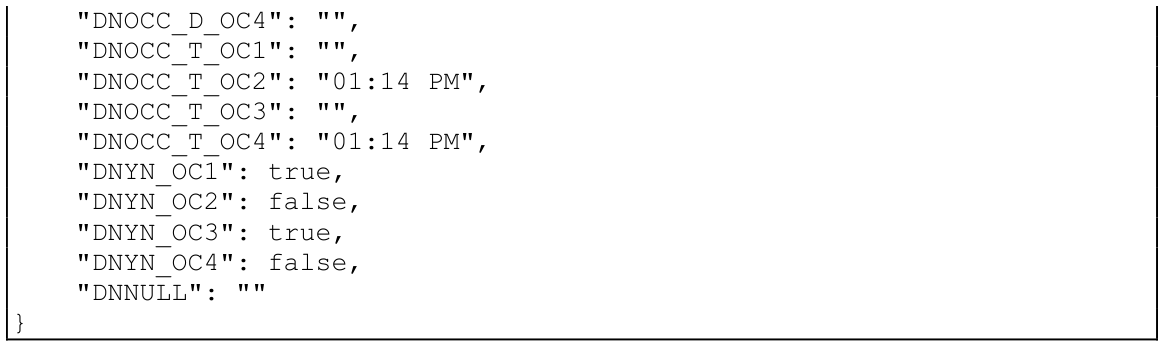
This example shows an empty JSON string being returned when the FORMAT #DNFFMT is in an initialized state.
FORMAT INIT #DNFFMT;LET JSON$=TFF(FMT$,"JO"); PRINT JSON$
{}
JSON Input function
Section titled “JSON Input function”This TFF string function uses a JSON formatted string to update a FORMAT.
TFF (format-name, json-string [,data-names] [,masks], option-string[,ERR=line-ref|,ERC=error-code])- format-name
- is a string specifying the name of a format that has been loaded into memory using the FORMAT INCLUDE directive.
- json-string
- is a string containing JSON formatted data.
- data-names
- is an optional string specifying data elements to be selected from format-name.
- masks
- is an optional string specifying masks for processing date values.
- option-string
- is a string specifying the option codes.
- line-ref
- is the program line number or label to branch to if an error is produced by this function.
- error-code
- is a programmer-defined error code. Valid values are positive or negative whole numbers.
Option codes
Section titled “Option codes”This function uses data extracted from a JSON formatted string to update elements of a format in memory. The option-string begins with “JI” and may be followed by any of the optional codes listed below. See the remarks section for complete descriptions.
- "JI"
- Selects the JSON Input function.
- "C"
- Include century in dates.
- "D"
- Use data element descriptions.
- "L"
- Produce a list of data elements that were updated.
- "M"
- Use supplied date-mask.
- "N"
- Use named occurrences.
- "V"
- The data-names argument uses variable length entries and the update-list will contain variable sized entries.
- "W"
- The data-names argument uses wide length entries.
Remarks
Section titled “Remarks”This function uses the JSON entries in json-string to select data elements in format-name. Non-matching entry names are ignored. The output of this function is a string of JSON string(s) for each error that prevented a successful update. If an invalid JSON string is detected, the function will return the following JSON error string:
{ “error”: 20 }
Processing of the entries in json-string will stop when an invalid JSON string is detected.
If an error is detected updating a data element in format-name, the function will return a JSON error string containing the data element name, occurrence value if the data element is defined for multiple occurrences and the Basic error code:
{ “<data-name>[(nnn)]”: <error> }
Processing of the entries in json-string will not stop when an error is detected while assigning values to format-name, therefore multiple assignment errors can be return by the function.
The optional data-names argument is used to select data elements to be updated. Data names matching JSON entry names but missing from data-names will be skipped.
When the “V” option is omitted, the data-names argument is processed as fixed length 20- character entries. When the “V” option is included, the data-names argument is processed as variable length entries connected by one or more spaces. Each data element name in the argument can include an occurrence value enclosed in parenthesis. The “V” option must be used when the combination of name and occurrence value exceeds 20 characters.
When the ”W” option is specified, the data-names argument is processed as fixed length 25 character entries to allow for large data names and occurrence values.
The “C” option signals that values for date elements contain the century. This applies to date types 2, 5, 6, 7 and 8. The default is a two digit year.
The “D” option requests that data descriptions contained in format-name be used to match JSON entry names. A language selection must have been present in the #IDSV system format when the FORMAT INCLUDE for format-name was executed. This option is ignored if data descriptions are not available. When the data-names argument is included, a data name selected by matching a description must also exist in data-names.
The “L” option produces a list of data names and occurrence values if applicable that were successfully updated. The list will contain 20-character entries or variable length entries if the “V” option was specified. The list will contain 25-character entries if the “W” option was specified. The list follows the list of errors in the output string.
The “M” option signals that the masks argument has been specified and that date elements will be processed using the one of the supplied masks based on date type … date-only, SQL-date or time-only. An override mask can be used to supply a mask for a specific data element. The format of the different masks in the masks argument is:
“DM=<date-only-mask>” “SM=<sql-date-mask>” “TM=<time-only-mask>” “OM=<override-mask>[<data-element-name>]”
Multiple masks in the masks argument must be separated by a “|”. The date-only, SQL-date or time-only masks can only be specified once in the masks argument. If supplied more than once, an ERR=17 will be returned. Multiple override masks can be specified in the masks argument. If the override mask specifies a data element with occurrences, all occurrence values will be processed using the override mask. If the override mask is not properly formatted, an ERR=17 will be returned. If the override mask specifies a data element that is specified more than once or not a date type, an ERR=17 will be returned. If the override mask specifies a data element that does not exist in the format, an ERR=163 will be returned.
The masking of a date element will be processed in the following order:
- Override mask.
- Date-only, SQL-date or time-only based on date type.
- The data element’s valid values display mask.
- Date-only date elements will default to “MM/DD/YY”, time-only date elements will default to “HH:MI:SS” and SQL date elements will default to “MM/DD/YY HH:MI:SS”. If the “C” option is enabled, 4-digit years will be used for processing date types 2, 5, 6, 7 and 8.
The “N” option signals that the JSON entry names contain Named Occurrences, DNNAME_OCnnn, where nnn is the occurrence index. The maximum size of a Named Occurrence is 26 characters.
There are additional considerations when updating data elements that specify multiple occurrences. If a JSON entry name includes _OCnnn, that value will be used to select the occurrence to update. Otherwise, the first occurrence is assumed. In the data-names argument, an element name can include an occurrence value. The JSON entry name will only be selected if the occurrence value for the data element is valid.
This option is generally available starting with release level 8.9.0.
Examples
Section titled “Examples”In the example below the formatted string in JSON$ is used to update the FORMAT #DNFFMT and uses the “L” option to return an update-list. Underscores in the JSON entry names are automatically converted to dashes.
LET JSON$=" {    "DNSTR": "String value",    "DNNUM": 1234.99,    "DNDATE1": "02/13/24",    "DNDATE2": "02/12/25",    "DNTIME1": "13:14:15",    "DNTIME2": "23:59:59",    "DNOCC_S": ["Occurrence-1", "", "Occurrence-3", ""],    "DNOCC_N": [0.00, 2000.99, 0.00, 4000.99],    "DNOCC_D": ["02/14/24 13:14:18", "", "02/16/24 13:14:18", ""],    "DNOCC_T": ["", "13:14:34", "", "13:14:53"],    "DNYN": ["Y", "N", "Y", "N"]";LET ULST$=TFF(FMT$,JSON$,"JIL"); PRINT ULST$
{    "update-list": [                    "DNSTR                    ",                    "DNNUM                    ",                    "DNDATE1                  ",                    "DNDATE2                  ",                    "DNTIME1                  ",                    "DNTIME2                  ",                    "DNOCC-S(1)               ",                    "DNOCC-S(2)               ",                    "DNOCC-S(3)               ",                    "DNOCC-S(4)               ",                    "DNOCC-N(1)               ",                    "DNOCC-N(2)               ",                    "DNOCC-N(3)               ",                    "DNOCC-N(4)               ",                    "DNOCC-D(1)               ",                    "DNOCC-D(2)               ",                    "DNOCC-D(3)               ",                    "DNOCC-D(4)               ",                    "DNOCC-T(1)               ",                    "DNOCC-T(2)               ",                    "DNOCC-T(3)               ",                    "DNOCC-T(4)               ",                    "DNYN(1)                  ",                    "DNYN(2)                  ",                    "DNYN(3)                  ",                    "DNYN(4)                  "                   ]}
In the example below the “D” option code indicates Data Descriptions are used in the json-string in place of Element Names. Underscores are automatically converted to spaces.
LET JSON$=" { "String_Desc": "String value", "Number_Desc": 1234.99, "Date1_Desc": "02/13/24", "Date2_Desc": "02/12/25", "Time1_Desc": "13:14:15", "Time2_Desc": "23:59:59", "Strings_Desc": ["Occurrence-1", "", "Occurrence-3", ""], "Numbers_Desc": [0.00, 2000.99, 0.00, 4000.99], "Dates_Desc": ["02/14/24 13:14:18", "", "02/16/24 13:14:18", ""], "Times_Desc": ["", "13:14:34", "", "13:14:53"], "Yes/No_Desc": ["Y", "N", "Y", "N"]}";LET ELST$=TFF(FMT$,JSON$,"JID")In the example below the “M” option indicates that a date-mask has been supplied for the processing of date elements.
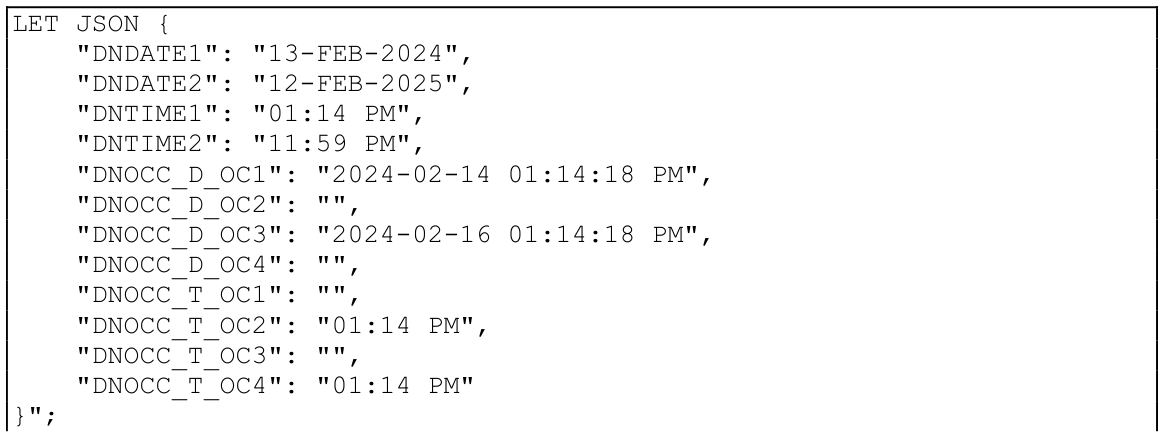

In the example below the “N” option code indicates that the JSON entry names contain Named Occurrences.
LET JSON$="{ "DNSTR": "String value", "DNNUM": 1234.99, "DNDATE1": "02/13/24", "DNDATE2": "02/12/25", "DNTIME1": "13:14:15", "DNTIME2": "23:59:59", "DNOCC_S_OC1": "Occurrence-1", "DNOCC_S_OC2": "", "DNOCC_S_OC3": "Occurrence-3", "DNOCC_S_OC4": "", "DNOCC_N_OC1": 0.00, "DNOCC_N_OC2": 2000.99, "DNOCC_N_OC3": 0.00, "DNOCC_N_OC4": 4000.99, "DNOCC_D_OC1": "02/14/24 13:14:18", "DNOCC_D_OC2": "", "DNOCC_D_OC3": "02/16/24 13:14:18", "DNOCC_D_OC4": "", "DNOCC_T_OC1": "", "DNOCC_T_OC2": "13:14:34", "DNOCC_T_OC3": "", "DNOCC_T_OC4": "13:14:53", "DNYN_OC1": "Y", "DNYN_OC2": "N", "DNYN_OC3": "Y", "DNYN_OC4": "N", "DNNULL": ""}";LET ELST$=TFF(FMT$,JSON$,"JIN")In the example below the “L” and “V” option codes will generate an update-list of variable sized entries after updating the format.
LET JSON$="{    "DNOCC_S": ["Occurrence-1", "", "Occurrence-3", ""],    "DNYN": [true, false, true, false]}";LET ULST$=TFF(FMT$,JSON$,"JILV"); PRINT ULST$
{    "update-list": [                    "DNOCC-S(1)",                    "DNOCC-S(2)",                    "DNOCC-S(3)",                    "DNOCC-S(4)",                    "DNYN(1)",                    "DNYN(2)",                    "DNYN(3)",                    "DNYN(4)"                   ]}
This example uses a variable length data-names list with “(ALL)” for occurrences, signaled by the “V” option and the “M” option to indicate that masks has been supplied for the processing of date elements to generate a JSON string. Using “(ALL)” in the data-names list will genereate named occurrences. During input, the same options are used along with the “L” and “V” option codes which will generate an update-list of variable sized entries after updating the format.
LET DMSK$="DM=YYYY-MM-DD";LET SMSK$="SM=YYYY-MM-DD HH:MI:SS";LET MSKS$=DMSK$+"|"+SMSK$;LET JSON$=TFF(FMT$,DNEV$,MSKS$,"JOMVY"); PRINT JSON${    "DNSTR": "String value",    "DNNUM": 1234.99,    "DNDATE1": "2024-02-13",    "DNDATE2": "2025-02-12",    "DNTIME1": "13:14:15",    "DNTIME2": "23:59:59",    "DNOCC_S_OC1": "Occurrence-1",    "DNOCC_S_OC3": "Occurrence-3",    "DNOCC_N_OC1": 0.00,    "DNOCC_N_OC2": 2000.99,    "DNOCC_N_OC3": 0.00,    "DNOCC_N_OC4": 4000.99,    "DNOCC_D_OC1": "2024-02-14 13:14:18",    "DNOCC_D_OC3": "2024-02-16 13:14:18",    "DNOCC_T_OC2": "13:14:34",    "DNOCC_T_OC4": "13:14:53",    "DNYN_OC1": "Y",    "DNYN_OC2": "N",    "DNYN_OC3": "Y",    "DNYN_OC4": "N"};LET ULST$=TFF(FMT$,JSON$,DNEV$,MSKS$"JILMV"); PRINT ULST$
{    "update-list": [                    "DNSTR",                    "DNNUM",                    "DNDATE1",                    "DNDATE2",                    "DNTIME1",                    "DNTIME2",                    "DNOCC-S(1)",                    "DNOCC-S(3)",                    "DNOCC-N(1)",                    "DNOCC-N(2)",                    "DNOCC-N(3)",                    "DNOCC-N(4)",                    "DNOCC-D(1)",                    "DNOCC-D(3)",                    "DNOCC-T(2)",                    "DNOCC-T(4)",                    "DNYN(1)",                    "DNYN(2)",                    "DNYN(3)",                    "DNYN(4)"                   ]}
This example shows an empty update-list being returned when an empty JSON string is passed in for input.
LET JSON$="{}";LET ULST$=TFF(FMT$,JSON$,"JIL"); PRINT ULST$
{ "update-list": [] }
This example shows JSON error strings being returned when attempting to assign an invalid value to each occurrence of the DNYN element.
LET JSON$="{    "DNYN_OC1": "",    "DNYN_OC2": "",    "DNYN_OC3": "",    "DNYN_OC4": ""}";LET ELST$=TFF(FMT$,JSON$,"JIN"); PRINT ELST$
{ "DNYN(4)": 167 }{ "DNYN(3)": 167 }{ "DNYN(2)": 167 }{ "DNYN(1)": 167 }
From the Thoroughbred Basic Language Reference, Volume III: R–Z, version 8.9.1. Open this page in the PDF