

*FPSD - Display File Parameters
Purpose
This utility displays the following file information for all types of files (where applicable):
- File Name
- Key Size
- File Type
- Record Size
- Disk
- Number of Records
- Starting Sector
- Available Records
- Ending Sector
- Records in Use
- Total Number
- Available Bytes
- Defined Size
- Object Library Available Space View
- Program ID
- Multi-Key File Key Definition
- Actual Size
The program ID is obtained from the first line of the program if it is a REM statement.
Procedure
To run this utility from Thoroughbred Basic Console Mode, type:
RUN “*FPSD” and press Enter.
To select this utility from the Thoroughbred Basic Utilities Menu, type one of the following:
F and press Enter.
*F and press Enter.
*FPSD and press Enter.
Menu option # and press Enter.
The following prompt is displayed:
ENTER FILE NAME (CR TO END):
Type the name of a file whose information you wish to view and press Enter. If the file cannot be opened, the user is asked to supply another file name or press Enter to exit the utility. After a valid filename is entered a screen similar to the following is displayed:
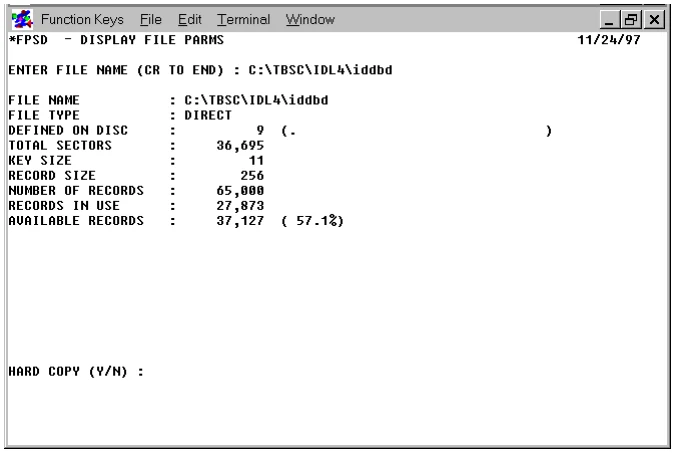
HARD COPY (Y/N)
Type N to return to the “ENTER FILE NAME” prompt without printing. Type Y and press Enter to have the file information sent to a printer. The system prompts:
SELECT PRINTER: xx xx: (where: xx is a configured printer.)
Make a printer selection from the list of available printers displayed in the prompt. Printers displayed in background mode are currently being used and, therefore, are unavailable. If the printer requested cannot be opened, the user is prompted to make another selection. If only one printer is configured this question is not asked.
Error Messages
- ERROR xx HAS OCCURRED. 'CR' TO RETRY, CTL2 FOR NEXT, CTL4 TO END
- An unexpected error has occurred, probably I/O related. Press Enter to retry, F2 to enter a new file name, or F4 to exit the utility.
- ERROR 0 HAS OCCURRED, PRINTER PROBABLY OFF-LINE
- The requested printer is off-line (i.e., not turned on, out of paper, out of toner, etc.). Correct the problem and try again, select another printer, or press F4 to exit.
- PRINTER IS IN USE
- The requested printer is being used by another task; select another.
- PRINTER NOT READY
- The requested printer is off-line (i.e., not turned on, out of paper, out of toner, etc.). Correct the problem and try again, select another printer, or press F4 to exit.
- UNABLE TO OPEN FILE: xxxxxxxx
- The file named does not exist. Type another file name or verify that the permissions are set to allow you to open the file or enter another file name.
- ENCRYPTED PROGRAM
- The program is encrypted.
From the Thoroughbred Basic Utilities, version 8.9.1. Open this page in the PDF