

Introduction
TS ODBC DataServer is an integral part of the Thoroughbred Software network solution. With this product, applications that implement Microsoft’s ODBC (Open Database Connectivity) standard can access live Thoroughbred data files. It will grant read-only or read/write access depending on product, allowing you to report on the data without making any changes to any existing application source code.
The primary requirement is that any Thoroughbred data to be exposed to an ODBC-enabled application must be described in the Thoroughbred Dictionary. Refer to the Thoroughbred Dictionary-IV Reference Manual for more information.
Operating System Support: UNIX, Linux, and Windows
For specific information, please contact your Thoroughbred Sales Representative.
Components
Section titled “Components”Below are listed the components of TS ODBC DataServer:
- Thoroughbred ODBC driver - On the Single-Tier system this component incorporates both the client and server functions. (Single- and Multiple-Tier).
- Thoroughbred Server - This component accesses Thoroughbred data files (Multiple-Tier only).
- Dictionary-IV based TS ODBC DataServer Expose Utility - This component defines the content of the data sources (Single- and Multiple-Tier).
The TS ODBC DataServer is shipped in one of two models: Single-Tier or Multiple-Tier. The Multiple-Tier ships in one of two ways: one for Windows Client systems and one to allow a Windows Server to function as a client. The latter, called TS ODBC Gateway for Windows Server, is designed to allow access to Thoroughbred data via ODBC on servers operating as either Terminal or Web servers.
TS ODBC DataServer (Single-Tier)
Section titled “TS ODBC DataServer (Single-Tier)”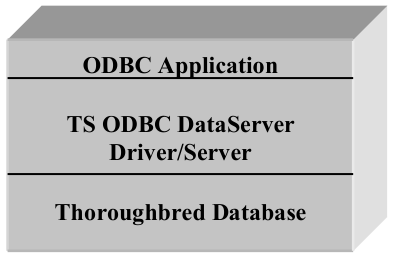
Client
In the TS ODBC DataServer (Single-Tier), the Client, Server, and Expose Utility all reside on the same platform. An example would be a Windows PC.
TS ODBC DataServer (Multiple-Tier)
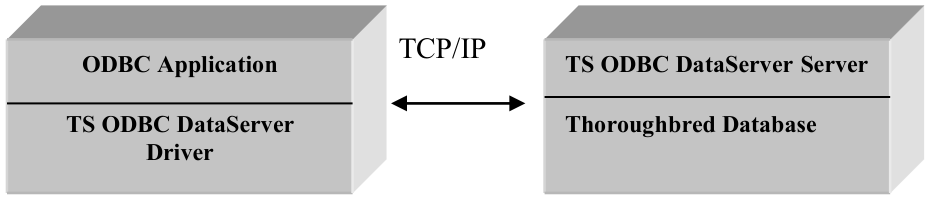
Section titled “TS ODBC DataServer (Multiple-Tier)”In the standard version of the Multiple-Tier TS ODBC DataServer, the TS ODBC driver resides on the Client platform. It is connected by a LAN to the Server platform. The Thoroughbred Server resides on the server platform. The function of the client is to define the name of the data source used by the ODBC application and the name of the server where the Thoroughbred data is stored. The Expose Utility is executed from the Server system to generate the list of Links that will be available to the ODBC application.
- Client
- Server (Windows/UNIX)
In the TS ODBC Gateway for Windows Server version of the Multiple-Tier product, the Client process resides on the Windows Server, which will also host the Terminal Server or Web Server process. The workstations accessing this server with either the Terminal Server client or a web browser do not need the ODBC client software installed. The Windows Server will interface with the TS ODBC DataServer server process to access the Thoroughbred data.
- Client
- Windows Server Server (UNIX)

OR
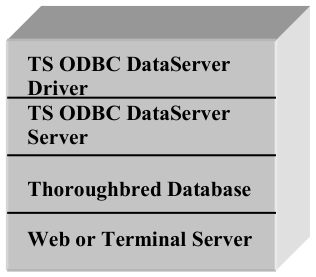
Windows Server
Process Overview
Section titled “Process Overview”The process to get your Thoroughbred data to appear in an ODBC-enabled application starts with a successful installation of the TS ODBC DataServer components. Once completed, the TS ODBC DataServer Expose Utility is executed to create the Data Source entries from Thoroughbred data definitions. For Single-Tier installations the expose process is executed on the workstation system. For Multiple-Tier installations it is executed on the server system.
Following the expose process, the Thoroughbred Administrator is executed to add the Data Source from each workstation that will interface with ODBC-enabled applications. This process is run for both the Single- and Multiple-Tier installations. Once the Data Source is created, the Thoroughbred data will be available for use in any ODBC-enabled application.
Quick Start Steps
Section titled “Quick Start Steps”Single-Tier installation outline
Section titled “Single-Tier installation outline”To install the Single-Tier version, use the following procedure:
- Install the Client Software. Please refer to the Installation and Activation Guide.
- Expose the Thoroughbred data. Please refer to How to Expose Thoroughbred Data.
- Add the data source to the client platform. Please refer to Configuring a Data Source section in TS ODBC DataServer Utilities.
Multiple-Tier installation outline
Section titled “Multiple-Tier installation outline”To install the Multiple-Tier version, which includes the TS ODBC Gateway for Windows, use the following procedure:
- Install the Multiple-Tier Server. Please refer to the Installation and Activation Guide.
- Install the Client on the workstation. Please refer to the Installation and Activation Guide.
- Expose the Thoroughbred data. Please refer to How to Set Up Thoroughbred Data.
- Add the data source to the client platform. Please refer to Configuring a Data Source in TS ODBC DataServer Utilities.
Name Resolution
Section titled “Name Resolution”Before proceeding with the installation, verify that name resolution is implemented. The TS ODBC Data Server requires name resolution to allow forward and reverse resolution of server and client names. The details of implementation are beyond the scope of this manual. Please contact your Network Administrators or Thoroughbred Consulting Services for assistance in this area.
From the TS ODBC DataServer Reference, version 8.9.1. Open this page in the PDF