

OPENworkshop Classes and Methods
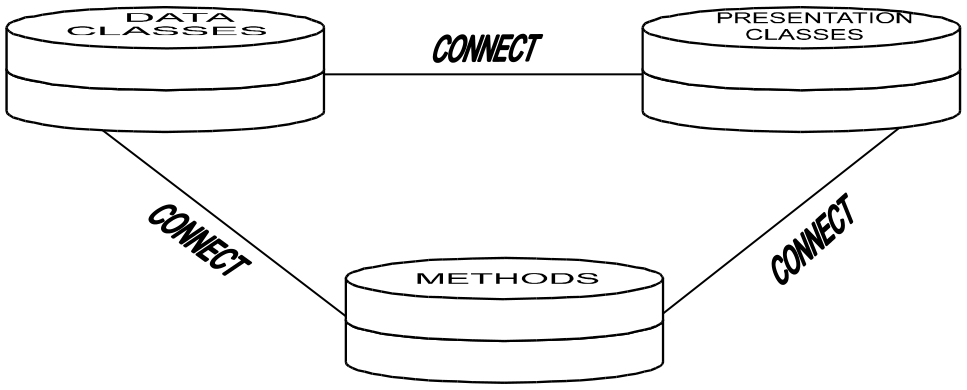
An OPENworkshop application is built using Data Classes, Presentation Classes, and Methods.
CONNECT directives are used to invoke instances of a Class.
Data Classes
Section titled “Data Classes”Data Classes hold the application data. From the point of view of the application developer the most important Classes of Object are:
- Data Element Name
- Defines an item of information, together with its attributes. A Data-name definition also specifies Methods to be used whenever the data item is created, displayed, or amended.
Format Collects together a set of Data-names that will be stored together in a
single table in the OPENworkshop table or file system.
Link Specifies the physical files or tables that will be used to store a Format
and associated key indexes. It also specifies default Presentation Classes
(View and Screen) to use to display the data and allow it to be edited.
Specifies the Trigger Method to be used when any data in the Link is
updated to ensure that Referential Integrity is maintained throughout the
system. Specifies if AES256 bit strong encryption should be enabled for
Auto-Expanding Direct files.
Library Collects together all the Classes relevant to an application or subsystem.
Presentation Classes
Section titled “Presentation Classes”Presentation Classes display or print information for the application user to read or edit. They also allow the user to select subsequent actions.
View Displays data items, in spreadsheet form, as a table of rows and
columns. Each column represents a different Data-name. Each row
represents a record. Where there is more information than can fit in a
window, vertical and horizontal scrolling is provided.
Views display information from a single Link, and from multiple joined Links combining data items. Views can also display calculated values.
Views allow the displayed data to be modified, and rows to be added to or deleted from the file or table being displayed. They also allow users to “drill down” or explore related information.
Screen Displays data items as a “form”. Allows the data to be modified and
records to be added to or deleted from the file or table being displayed.
Message Displays a message and allows limited user input in response.
Report and Query Provides output to a printer or terminal as formatted reports containing
application data and, if required, calculated values.
Menu Presents a set of options for the user to select. Menus can be presented
as a simple list or as a matrix of options.
- Help
- Displays context-sensitive Help.
Methods
Section titled “Methods”Methods contain the program code that performs the logic of the application. In an OPENworkshop application all program code is organized into Methods, each being associated with specific user actions or system functions.
View Method
Called whenever a View is preparing a row to display. Ensures that all data items required for display are available, and calculates any values required by the View.
Pre-Processing Method
Called whenever a View or Screen is preparing to allow a user to edit a data item.
Post-Processing Method
Called whenever a View or Screen has completed editing a data item. May be used to provide complex data validation or to modify related data items in the current row, for example.
Insert Method
Called whenever a View is required to add a new row. Can be used to set initialized values or to verify that the addition of a new row should be allowed.
Link Trigger Method
The Link Trigger Method is defined in a Dictionary-IV Link definition as the Link I/O Trigger. Called whenever a record in a file is to be updated. The Trigger Method is responsible for ensuring that the Data-names are being updated according to application rules and that any associated data will also be updated appropriately. Trigger Methods are the means by which OPENworkshop applications ensure that Referential Integrity is preserved throughout the application.
File Suffix Method
Builds up a file suffix. Is used to manage files in directories.
After Read Method
Called whenever a record has been read by a Screen. Prepares the record for display or editing.
Application Method
Implement the Application logic. Users can initiate a Method by selecting the appropriate option from a menu. Methods can also call other Methods. Such Methods may be designed to perform any purpose the application designer needs.
Startup Method
Called when the application begins. The OPENworkshop Start Method is defined at the operator code level.
View Color Method
The SetColor Method can be used to dynamically control view colors at runtime. For example, it is possible to have all negative numbers in a column displayed using white text on a red background. Background and foreground colors can be set for a cell, a column, a range of columns, a row or a range of rows.
If you are running with VIP enabled, please refer to the VIP for Dictionary-IV manual, Views, Dynamic View Colors.
The user defined View Color Method name is passed to the View class when performing a CONNECT VIEW. The View class will execute the View Color Method when moving off a column or moving off a row. The View Color Method then constructs the appropriate color parameters to be applied to the view by the View class. The View Color Method must pass the color parameters to the View Color API for parsing. The View Color API will interpret the supplied color parameters and generate compact syntax that is in turn processed by the View class.
The following diagram illustrates the process flow when using a View Color Method:
Host application code invokes the View
class supplying the user defined View
Color Method name
The View class calls the supplied View
Color Method
View Color Method exits returning generated view
- The View Color Method calls the View
- color syntax to the View
- Color API passing the view color
- class for processing
parameter
| View Color API exits | |
|---|---|
| The View Color API generates the | returning generated view |
| appropriate view color syntax for the | color syntax for the View |
| View class | class |
- View Class SetColor Method Name Syntax
-
SETCOLOR METHOD=method-name
SETCOLOR METHOD Required syntax.
method-name The name of the method to be executed. Pass the View class the View Color Method name in VIEW$[29]. For more information about VIEW$[29] see the OPENworkshop Manual.
- View Color Method CALL/ENTER List
-
METHOD V$[ALL],VCOLR$[ALL],LNK$[ALL]V$[x,y] View Class Array Supplied by the View Class
[0,0] (1,1) Length of column attribute entry. (2,1) Number of view used column. (3,1) Number of view deleted columns. (4,1) Number of view heading rows. (5,n) New column id and column number string. (6,1) New column number. (7,1) Next new column id. (8,1) Next new column number. (9,n) n column id & n column number. [0,1] (1,1) Column window address (column). (2,1) Column window address (row). (3,1) Column width. (4,1) Column dataname number. $00$ implies new column. (5,1) New column id. (6,n) New column data (build by view method). V$[0,n](6) will be displayed by the view CLASS when the next row is printed. V$[0,n] Same as V$[0,1]
VCOLR$[ALL] View Color Array[0] API returns “.” when no errors else returns one of the following error codes:
| “100” | Not enabled |
|---|---|
| “101” | Supplied parameters invalid |
| “102” | Supplied function requires supplied color parameters |
| “103” | Supplied row and column parameters invalid |
| “104” | Supplied row range invalid |
| “105” | Supplied column range invalid |
| “106” | Supplied cell range invalid |
| “107” | Supplied foreground color invalid |
| “108” | Supplied background color invalid |
The content of [0] is used by the view class to determine how it should process colors. Upon returning from the view color method:
If VCOLR$[0]=“.” AND VCOLR$[3]<>“” the view class will assume a valid color command string was built by the API and will apply it.
If the above conditions fail the view class will build a command string for this row to apply the default view colors.
[1] Column, row information supplied by the View class
| (1,3) | Current column number, 1 based. |
|---|---|
| (4,3) | Current row number, 1 based. |
| (7,3) | First data row number, 0 based. |
| (10,3) | Last data row number, 0 based. |
[2] Color parameters built by the View Color Method, passed to the color API.
| (1,1) | Mode: “S” Set color parameters supplied in VCOLR$[2] “R” Reset entire view back to default colors |
|---|---|
| (2,3) | Starting column number, 1 based. “999” to change all columns in the starting row (5,3 ). “998” for the current column in the view. When VCOLR$[2](1,1)=”S” color parameters in bytes 5 through 61 must be supplied. Multiple color parameters are supported. When supplying multiple color parameters, each set must be padded to 30 bytes. |
| (5,3) | Starting row number, 0 based and include heading rows, must be >=VCOLR$[1](7,3) and <=VCOLR$[1](10,3). “999” to change all rows for the column specified in (2,3). “998” to change the current row. |
| (8,3) | Ending column to define a range. “999” to change all columns in the ending row. “ “ no ending column. |
| (11,3) | Ending row to define a range must, be >=VCOLR$[1](7,3) and <=VCOLR$[1](10,3). “999” to change all rows in the ending col. “ “ no ending row. Note: When both ending column and ending row are “ “ the starting column and row values are applied to the ending column and row values. |
| (14,9) | Foreground color, Basic color keyword padded 9 bytes |
| (23,9) | Background color, Basic color keyword padded 9 bytes |
| (32,30) | Next set of color parameters |
Color values can be supplied using one of two notations:
- BASIC color keywords, keywords are not case sensitive.
- RGB hex notation is supported to provide greater color granularity.
The format is:
#rrggbb
where:
# is required syntax
rr is a red value
gg is a green value
bb is a blue value
For example: #ff00ff
When neither a foreground nor a background color is supplied the view default colors are applied.
VCOLR$[3] SetColor command string built by the API and returned to the View Color Method. This string must be returned to the View class.
LNK$[ALL] - See link array in the OPENworkshop manual.
Example Call View Class
METHOD MSGX$[ALL]Call View Class with a View Color Method name.
....PROCEDURE
      DIM VT$[29];      VT$[1]="OEVCUST",      VT$[29]="SETCOLOR METHOD=OEVCOLOR";      CALL "OO3A",VT$[ALL];      GOTO CUEXIT
Example View Color Method (OEVCOLOR):
METHOD V$[ALL], VCOLR$[ALL],LNK$[ALL]This method (OEVCOLOR) is called by the View Class.
….
PROCEDUREFORMAT INCLUDE #OEFCUST,OPT="NONE";
! By default if VCOLR$[3] does not return to the view class a color command.!    string, the current row will be initialized to default view colors. It!    is not necessary to reset row colors back to defaults.

! When CUST-CODE is 100101 display entire row using white on magenta:
      IF #OEFCUST.CUST-CODE = "100101" ! If row is customer code 100101         VCOLR$[2]=:+                  !    Set color parms:             "999"+                    !         all cols in this row +             VCOLR$[1](4,3)+           !         this row number +             "   "+                    !         no ending col (range) +             "   "+                    !         no ending row (range) +             PAD("WHITE",9)+           !         foreground color +             PAD("MAGENTA",9)          !         background color      FI;                              ! enidf
! The next examples perform a test on a column basis, regardless of the! current column. This code is an example of how to determine which column! in a view contains what data element name. In most real-life cases, this! is not necessary, the format entry number in the view array is sufficient.! This is simply an example if this type of logic should be required.

! When CUST-SALES > 15,000 display that column in this row using!   black on yellow
      IF #OEFCUST.CUST-SALES > 15000   ! If cust sales > 15000         FX$="#OEFCUST";               !    Set format name         FOR V=1 TO NEA("V$",2);       !    Loop through data elements            EN=DEC(V$[0,V](4,1)),      !      Get format entry nbr            DN$=ATR(FX$,EN,21);        !      Get its data name            IF CVT(DN$,128)="CUST-SALES"!     If its the right one               VCOLR$[2]=:+            !          Set color parms:                   STR(V-1:"000")+     !               this col +                   VCOLR$[1](4,3)+     !               this row +                   "   "+              !               no ending col (range) +                   "   "+              !               no ending row (range) +                   PAD("BLACK",9)+     !               foreground color +                   PAD("YELLOW",9),    !               background color               V=NEA("V$",2)+1         !         Force end of loop            FI;                        !      endif         NEXT V                        !    Next data element in format      FI;                              ! endif
! When SR-CODE=HP print both the SR-CODE and sales rep name (<Ax>) using! light green on blue. This uses a column range to set the color of two! consecutive columns.      IF #OEFCUST.SR-CODE="HP"         ! If sales rep is H         FX$="#OEFCUST";               !    Set format name         FOR V=1 TO NEA("V$",2);       !    Loop through data elements            EN=DEC(V$[0,V](4,1)),      !      Get format entry nbr            DN$=ATR(FX$,EN,21);        !      Get its data name            IF CVT(DN$,128)="SR-CODE"  !      If its the right one               V0$=V$[0,0],            !         Get col attr string               EL=ASC(V0$(1,1)),       !         Get len of col attr entry               NC$=V0$(EL),            !         Get 'new col A<x>' string               NC=POS("A"=NC$,2);      !         Scan for new col "A"               IF NC                   !         If found rep name                  CN=ASC(NC$(NC+1,1))  !            Get rep name col nbr               FI;                     !         endif               VCOLR$[2]=:+            !         Set color parms:                   STR(V-1:"000")+     !              this col +                   VCOLR$[1](4,3)+     !              this row +                   STR(CN-1:"000")+    !              ending col (name) +                   VCOLR$[1](4,3)+     !              this row +                   PAD("LGREEN",9)+    !              foreground color +                   PAD("BLUE",9),      !              background color               V=NEA("V$",2)+1         !         Force end of loop            FI;                        !      endif         NEXT V                        !   Next column      FI;                              ! endif
* Call API to construct the set color command string required by view class
      IF LEN(VCOLR$[2])>1              ! If have something         VCOLR$[2]="S"+VCOLR$[2];      !    Set API function: set colors         CALL "OO3AV01",VCOLR$[ALL],   !    Call API, color array,                          V$[ALL]      !              view array      FI;                              ! endif
* Will exit back to view processing with VCOLR$[3] built for the view class.
      GOTO CUEXIT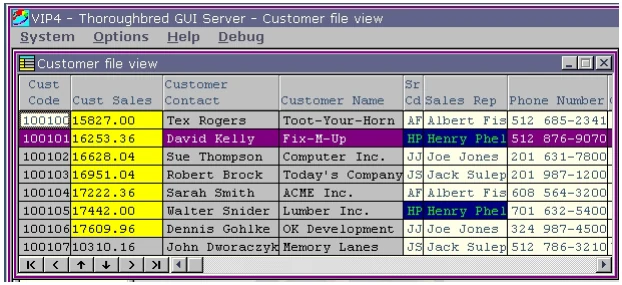
From the OPENworkshop Reference, version 8.9.1. Open this page in the PDF